 ChiaNing
2c632d6dd6
* refactor(2d): share font family and descriptor helpers

Extract the existing TTF and CHAR font family selection and font description
construction into shared helpers. Preserve raw family values, the Arial
fallback, and the existing size and style formatting.

* fix(2d): serialize custom font families at CSS boundaries

Quote and escape raw custom font names before Canvas and DOM consumption,
while preserving system family expressions. Keep Web-loaded aliases raw
and share the serialized expression across registration and loading.

Carry CssFontFamily through Label consumers and cover serialization,
TTF/CHAR selection, EditBox styles, and Web FontFaceSet loading in tests.

* fix(2d): preserve font names during scaling and refresh load metrics

Build CHAR draw descriptors from the scaled size and serialized family,
so unit-like substrings in font names are not rewritten by scaling.

Set the font before baseline measurement and read live Canvas metrics
during Web font polling instead of reusing cached fallback widths.
Add regression tests for the actual CHAR draw path and load completion.

* refactor(native): extract canvas font parsing

Move the existing platform-specific parsing into an internal helper and
return the family, size, and style flags to CanvasRenderingContext2D.
Preserve the existing matching rules, conversions, fallbacks, and update order.

Validated 12,650 comparisons with the original setFont implementation
across five platform macro variants.

* fix(native): restore serialized font aliases within legacy policy

Decode a single quoted CSS family into the descriptor used before TS
serialization. Adopt the result only when the existing platform parser
recognizes the complete registered alias; retain legacy fallbacks otherwise.

Cover existing aliases, escaped encodings, platform name restrictions,
style and size policies, and malformed inputs without expanding font support.

* fix(native): preserve size when a quoted font name falls back

Keep a valid requested px size when a well-formed quoted font family is
rejected on Apple or QNX, while retaining the existing fallback font and
style flags. Leave malformed prefixes, lists, and unsafe sizes unchanged.

Preserve the existing size conversion on other native platforms.

* fix(2d): resolve font family types in bundled declarations

* test(2d): cover explicit native font alias compatibility

* fix(2d): resolve font CI lint diagnostics

Allow implicit move of the native font parsing result and wrap EditBox placeholder CSS without changing its output.

Validation: targeted clang-tidy check, ESLint with zero warnings, 13 native parser tests, and 2062 font policy comparisons.


COCOS 4
COCOS 4 is an open-source, high-performance, cross-platform game and interactive content development engine. Built on a mature C++ architecture, it provides powerful rendering capabilities and flexible script bindings, supporting a "write once, run anywhere" philosophy.
Previously, Cocos Creator referred to the combined engine and editor, spanning versions 1.x, 2.x, and 3.x. To embrace a purely open-source model and fully integrate AI, we are separating the engine from the editor. This is a significant and necessary evolution. Moving forward:
COCOS will refer solely to the engine, with the major version upgrading to COCOS 4. The cross-platform framework and the core components of the editor will be converted to CLI tools and integrated into the engine's core functionality. This represents a major new addition to this open-source release.
Features
- Modern Graphics: The GFX implementation is designed to adapt to the modern graphics APIs, it uses Vulkan on Windows and Android, Metal on Mac OS and iOS, and WebGL on Web platforms.
- High Performance: The runtime engine is built with half C++ and half TypeScript, low-level infrastructure, native platform adaptation, renderer, and scene management are all written in C++ to ensure high runtime performance. We continue to move heavy lifting work to native as much as possible.
- Customizable Render Pipeline: The render pipeline is designed to be fully customizable, it has supported the builtin forward and deferred render pipeline across all platforms. Developers can customize their render pipeline following the same approach.
- Extensible Surface Shader: The material system is built on Coco's effect format which uses GLSL 300, the shader programs will be converted to a suitable runtime format automatically. The surface shader permits to fully customize the surface material while ensuring a universal lighting model.
- Physically Based Rendering (PBR): The standard effect adopts physically based rendering, along with the physically based camera and the lighting based on physical metrics, developers can easily achieve realistic and seamless rendering results across different environments.
- Easy TypeScript API: The user-level API set is provided in TypeScript, along with the powerful VSCode editor, development with Cocos Creator is incredibly efficient.
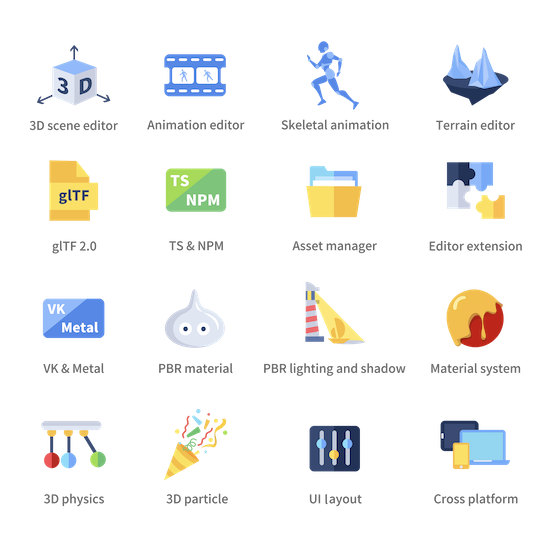
Besides all these highlights, COCOS 4 also provides a built-in animation system, physics system, particle system, terrain editing support, complex UI system, instant preview, etc.
Development and Contribution Notice
Cocos Creator engine is open source and welcomes community participation, for open source engine development with Cocos Creator editor, you should fork this repository and setup custom engine in the editor.
Prerequisite
- Install node.js v9.11.2 +
- Install gulp-cli v2.3.0 +
Clone
Clone this repository into your local environment.
Install
In the cloned engine folder, run the following command to set the development environment:
# download & build engine dependencies
npm install
This is all you have to do to set up the engine development environment.
Build
- If running inside Cocos Creator, the engine will automatically compile and build after the editor window is opened. For more instructions on modifying the engine in Cocos Creator, please refer to Engine Customization Workflow.
- Outside the editor, you need to run the following command to build:
npm run build
Please refer to native readme if you want to develop native applications.
Contribution
You can contribute to the Cocos Creator open-source engine in many ways, they are very much appreciated:
- Report bugs or feature requests by creating an issue.
- Participate in discussions in the issues.
- Create a pull request if you have fixed or improved anything, or implemented any features.
- Improve the documentation with pull requests to the usage documentation repository.
- Help other developers in our Forum.
Contribution notice
If you are trying to make a pull request, some requirements must be met so that your pull request can be accepted:
- Follow our Cpp Coding Style Guide and TypeScript Coding Style Reference.
- Try to integrate ESLint and CPP auto fix tools in your coding environment.
- Link related issues or discussions in your pull request and clearly state the purpose of your pull request.
- Pass all automatic continuous integration tests.
- Request file owners or engine developers to review your pull request.
- Get one valid approval from the engine architects.
Example Project
- Mind Your Step 3D: Beginner's step-by-step tutorial project repo.
- Test Cases: Unit test scenes for every engine module.
- Example Cases: Simple yet expressive demo scenes for baseline testing and topic-specific case study.
- Awesome Cocos: You can find out other useful tools and show cases here.
Links
- Official site
- Download
- Documentation
- API References
- Projects and road map
- Forum
- Discord community: Search for Cocos in the Discover panel of Discord.