mirror of
https://github.com/mob-sakai/UIEffect.git
synced 2026-11-19 17:22:37 +08:00
 酒井峰志
UIEffect
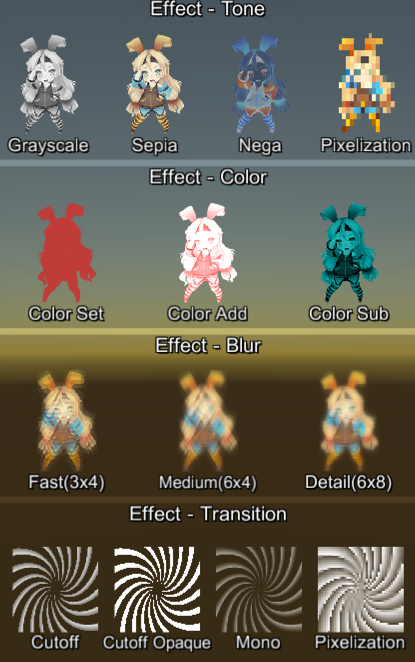
Easy to use effects for uGUI. Supports following effects.
- Grayscale tone
- Sepia tone
- Nega tone
- Pixelation
- Cutoff (alpha-based)
- Mono (alpha-based)
- Color setting
- Color additive
- Color subtract
- Blur fast(3x4)
- Blur medium(6x4)
- Blur detail(6x8)
And, more features!
- Animation

- Use for transition

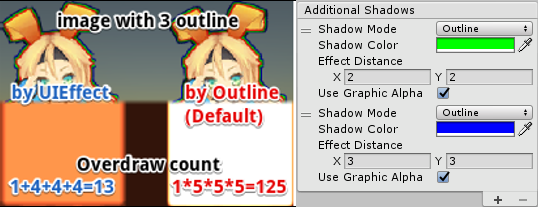
- Multiple shadow effect to reduce rendering vertices
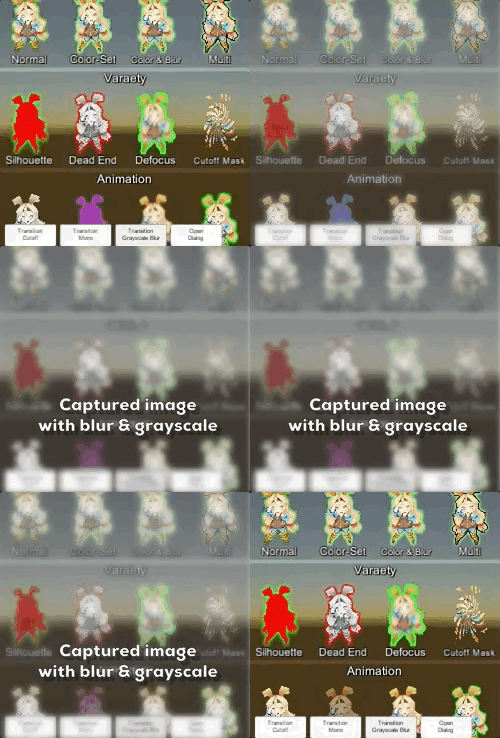
- Capture image with effect, like post effect
Requirement
- Unity 5.3+ (included Unity 2017.x)
- No other SDK are required
Usage
- Download UIEffect.unitypackage and install to your project.
- Import the package into your Unity project. Select
Import Package > Custom Packagefrom theAssetsmenu. - Add
UIEffectcomponent to UI element (Image, RawImage, Text, etc...) fromAdd Componentin inspector. - Choose effect type and adjust values in inspector.

- Enjoy!
UIEffect for CapturedImage
UIEffectCapturedImage is like post effects, but it only provides effects on the rendered result (= captured image) of a frame.
This effect is non-realtime, light-weight, less-camera, blit only once, but effective.
- Camera for processing effect is unnecessary.
- Process effect only once after
UIEffectCapturedImage.Capture. - Using reduction buffer, keep used memory size small and keep rendering load are small.
- When GameObjects with motion are on the screen, a result texture may be stirred.
- You can overlay and display like as: [Screen] | [UIEffectCapturedImage] | [Dialog A] | [UIEffectCapturedImage] | [Dialog B]. See also demo.
Note: Unity 5.6+
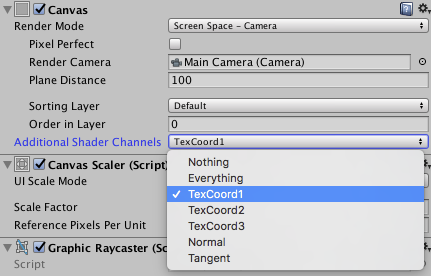
In Unity 5.6+, Canvas supports Additional Shader Channels.
Please enable TexCoord1 to use UIEffect.

Demo
- Effect sample
- Transition
- Dialog window with blur background
- Included in unitypackage
Release Notes
ver.1.3.0
- Feature: Capture image with effect, like post effect.
- Demo: Add transition blur button & dialog with captured image effect.

ver.1.2.0
- Fixed : Pixelaration shifts to the lower right.
- Fixed : Cutoff alpha is incorrect.
- Feature: Supports multiple shadow effect for reduce rendering vertices.
- Feature: New blur effect mode :
Medium. - Feature: Fix button to enable TexCoord1 of Canvas.additionalShaderChannels to use UIEffect.
- Changed : UIEffect.color is obsolete, use UIEffect.effectColor instead.
- Changed: Blur range is [0-2].
- Refactoring: Shader refactoring.
- Demo: Add transition button & multiple shadows.
ver.1.1.0
- Feature: Add Pixelaration effect.
- Feature: Add Cutoff/Mono effect for patterned alpha images. It can be used for masks and transitions!
ver.1.0.0
- Feature: Shader supports pre-processer macros (for example UNITY_VERTEX_OUTPUT_STEREO) for Unity 5.3.x, 5.4.x and 5.5.x.
- Feature: Supports changing value from animation.
- Feature: Supports Tone effect.
- grayscale
- sepia
- nega
- Feature: Supports Color effect.
- set
- add
- sub
- Feature: Supports Blur effect.
- fast
- detail
- Fix: Color effect will not be properly when it was rotated.
- Performance: Shader supports multi-compile for performance.
- Performance: Cache same effect materials to reduce draw calls.
- Improve: Supports mobile devices.
- Improve: Simplify component & inspector.
License
- MIT
- © UTJ/UCL
Author
See Also
- GitHub Page : https://github.com/mob-sakai/UIEffect
- Issue tracker : https://github.com/mob-sakai/UIEffect/issues