mirror of
https://github.com/mob-sakai/UIEffect.git
synced 2026-11-20 01:42:37 +08:00
Compare commits
7 Commits
| Author | SHA1 | Date | |
|---|---|---|---|
 mob-sakai |
086ad3fd35 | ||
|
mob-sakai
|
f196dc3bb5 | ||
|
mob-sakai
|
8685c63286 | ||
|
mob-sakai
|
f60ba8f0fa | ||
|
mob-sakai
|
178db32947 | ||
|
mob-sakai
|
eb9e6c712a | ||
|
mob-sakai
|
f99962a538 |
@@ -42,3 +42,5 @@ _Android/
|
||||
_iOS/
|
||||
_WebGL/
|
||||
_Standalone/
|
||||
Assets/TextMesh Pro.meta
|
||||
Assets/TextMesh Pro
|
||||
|
||||
@@ -1 +0,0 @@
|
||||
./../../../../CHANGELOG.md
|
||||
@@ -0,0 +1,445 @@
|
||||
# Changelog
|
||||
|
||||
## [v3.0.3](https://github.com/mob-sakai/UIEffect/tree/v3.0.3) (2019-01-21)
|
||||
|
||||
[Full Changelog](https://github.com/mob-sakai/UIEffect/compare/v3.0.2...v3.0.3)
|
||||
|
||||
**Fixed bugs:**
|
||||
|
||||
- UIHsvModifier works only on gamma-space [\#145](https://github.com/mob-sakai/UIEffect/issues/145)
|
||||
|
||||
## [v3.0.2](https://github.com/mob-sakai/UIEffect/tree/v3.0.2) (2019-01-15)
|
||||
|
||||
[Full Changelog](https://github.com/mob-sakai/UIEffect/compare/v3.0.1...v3.0.2)
|
||||
|
||||
**Fixed bugs:**
|
||||
|
||||
- UIEffect & UIHsvModifier & UITransitionEffect Strange action [\#144](https://github.com/mob-sakai/UIEffect/issues/144)
|
||||
|
||||
## [v3.0.1](https://github.com/mob-sakai/UIEffect/tree/v3.0.1) (2018-11-07)
|
||||
|
||||
[Full Changelog](https://github.com/mob-sakai/UIEffect/compare/v3.0.0...v3.0.1)
|
||||
|
||||
**Fixed bugs:**
|
||||
|
||||
- Compile error in 2018.3 [\#139](https://github.com/mob-sakai/UIEffect/issues/139)
|
||||
|
||||
## [v3.0.0](https://github.com/mob-sakai/UIEffect/tree/v3.0.0) (2018-10-09)
|
||||
|
||||
[Full Changelog](https://github.com/mob-sakai/UIEffect/compare/v2.8.3...v3.0.0)
|
||||
|
||||
### New architecture: easier, faster and more beautiful.
|
||||
* Simple & easy-to-use
|
||||
* 20% faster
|
||||
* High precision parameter
|
||||
|
||||
### Immediate capturing (UIEffectCapturedImage option)
|
||||
* Capture the previous frame immediately without any camera.
|
||||
* You no longer have to wait one frame to capture!
|
||||
* *NOTE: LWRP, WebGL and Unity 5.x for iOS/Mac are not supported.*
|
||||
|
||||
### Advanced blur (UIEffect option)
|
||||
* Remove common artifacts in the blur effect for uGUI.
|
||||

|
||||
* It is effective for small padding size atlases, including dynamic fonts!
|
||||
|
||||
**Breaking changes:**
|
||||
|
||||
- UIEffectCapturedImage: Remove 'TargetTexture' feature [\#136](https://github.com/mob-sakai/UIEffect/issues/136)
|
||||
- Remove 'additional shadow' in UIShadow component [\#110](https://github.com/mob-sakai/UIEffect/issues/110)
|
||||
- Remove 'custom effect' feature in UIEffect component [\#98](https://github.com/mob-sakai/UIEffect/issues/98)
|
||||
- Remove 'shadow effect' feature in UIEffect component [\#97](https://github.com/mob-sakai/UIEffect/issues/97)
|
||||
- Remove 'hue effect' in UIEffect component [\#91](https://github.com/mob-sakai/UIEffect/issues/91)
|
||||
- Remove 'cutoff' and 'mono' effect in UIEffect component [\#78](https://github.com/mob-sakai/UIEffect/issues/78)
|
||||
- New architecture: Shared texture for effect parameter [\#63](https://github.com/mob-sakai/UIEffect/issues/63)
|
||||
- Change: Change `ToneMode` to `EffectMode` [\#61](https://github.com/mob-sakai/UIEffect/issues/61)
|
||||
- Separate shadow effect to other component [\#52](https://github.com/mob-sakai/UIEffect/issues/52)
|
||||
- Use the graphic color as effect color, to reduce parameters [\#50](https://github.com/mob-sakai/UIEffect/issues/50)
|
||||
|
||||
**Implemented enhancements:**
|
||||
|
||||
- UITransitionEffect: "Pass ray on hidden" option [\#135](https://github.com/mob-sakai/UIEffect/issues/135)
|
||||
- Add component menu in editor [\#133](https://github.com/mob-sakai/UIEffect/issues/133)
|
||||
- UITransitionEffect: Add Show/Hide method [\#132](https://github.com/mob-sakai/UIEffect/issues/132)
|
||||
- UIEffectCapturedImage: Immediate capturing [\#130](https://github.com/mob-sakai/UIEffect/issues/130)
|
||||
- Improve blurring for atlas [\#95](https://github.com/mob-sakai/UIEffect/issues/95)
|
||||
- Use Canvas.willRenderCanvases event instead of Update method [\#87](https://github.com/mob-sakai/UIEffect/issues/87)
|
||||
|
||||
**Closed issues:**
|
||||
|
||||
- Add tooltip [\#92](https://github.com/mob-sakai/UIEffect/issues/92)
|
||||
- UIShiny: change parameter name `highlight` to `gloss` [\#93](https://github.com/mob-sakai/UIEffect/issues/93)
|
||||
|
||||
## [v2.8.3](https://github.com/mob-sakai/UIEffect/tree/v2.8.3) (2018-09-29)
|
||||
|
||||
[Full Changelog](https://github.com/mob-sakai/UIEffect/compare/v2.8.2...v2.8.3)
|
||||
|
||||
**Fixed bugs:**
|
||||
|
||||
- UIEffectCapturedImage: Black screen with Unity 2018.1+ editor on Windows [\#131](https://github.com/mob-sakai/UIEffect/issues/131)
|
||||
|
||||
## [v2.8.2](https://github.com/mob-sakai/UIEffect/tree/v2.8.2) (2018-09-26)
|
||||
|
||||
[Full Changelog](https://github.com/mob-sakai/UIEffect/compare/v2.8.1...v2.8.2)
|
||||
|
||||
**Fixed bugs:**
|
||||
|
||||
- UICapturedEffectImage does not work with 'ScreenSpace - Overlay' in edit mode [\#128](https://github.com/mob-sakai/UIEffect/issues/128)
|
||||
- The UIEffectCapturedImage is upside down with 'ScreenSpace - Overlay' mode [\#127](https://github.com/mob-sakai/UIEffect/issues/127)
|
||||
- When "UI-Effect.mat" is created automatically, Unity hangs up. [\#126](https://github.com/mob-sakai/UIEffect/issues/126)
|
||||
- UICapturedEffectImage does not work with Lightweight Render Pipeline LWRP [\#125](https://github.com/mob-sakai/UIEffect/issues/125)
|
||||
|
||||
## [v2.8.1](https://github.com/mob-sakai/UIEffect/tree/v2.8.1) (2018-08-17)
|
||||
|
||||
[Full Changelog](https://github.com/mob-sakai/UIEffect/compare/v2.8.0...v2.8.1)
|
||||
|
||||
**Fixed bugs:**
|
||||
|
||||
- \(Demo\) "Transition capture & dissolve" is incorrect [\#119](https://github.com/mob-sakai/UIEffect/issues/119)
|
||||
|
||||
## [v2.8.0](https://github.com/mob-sakai/UIEffect/tree/v2.8.0) (2018-08-14)
|
||||
|
||||
[Full Changelog](https://github.com/mob-sakai/UIEffect/compare/v2.7.1...v2.8.0)
|
||||
|
||||
* Create a screen transition!
|
||||

|
||||
|
||||
* Some updates make UIEffectCapturedImage easier to use!
|
||||
|
||||
|
||||
**Implemented enhancements:**
|
||||
|
||||
- UIEffectCapturedImage: Supports 'ScreenSpace - Overlay' [\#115](https://github.com/mob-sakai/UIEffect/issues/115)
|
||||
- UIEffectCapturedImage: Keep aspect ratio [\#114](https://github.com/mob-sakai/UIEffect/issues/114)
|
||||
- UIEffectCapturedImage: 'Capture on enable' option [\#113](https://github.com/mob-sakai/UIEffect/issues/113)
|
||||
- UITransitionEffect: Change transition texture [\#111](https://github.com/mob-sakai/UIEffect/issues/111)
|
||||
|
||||
**Closed issues:**
|
||||
|
||||
- UIEffectCapturedImage: change parameter name `keepCanvasSize` to `fitToScreen` [\#116](https://github.com/mob-sakai/UIEffect/issues/116)
|
||||
|
||||
## [v2.7.1](https://github.com/mob-sakai/UIEffect/tree/v2.7.1) (2018-08-06)
|
||||
|
||||
[Full Changelog](https://github.com/mob-sakai/UIEffect/compare/v2.7.0...v2.7.1)
|
||||
|
||||
**Fixed bugs:**
|
||||
|
||||
- In v2.7.0, UIEffectCapturedImage is flipped vertically on Windows [\#112](https://github.com/mob-sakai/UIEffect/issues/112)
|
||||
|
||||
## [v2.7.0](https://github.com/mob-sakai/UIEffect/tree/v2.7.0) (2018-07-26)
|
||||
|
||||
[Full Changelog](https://github.com/mob-sakai/UIEffect/compare/v2.6.2...v2.7.0)
|
||||
|
||||
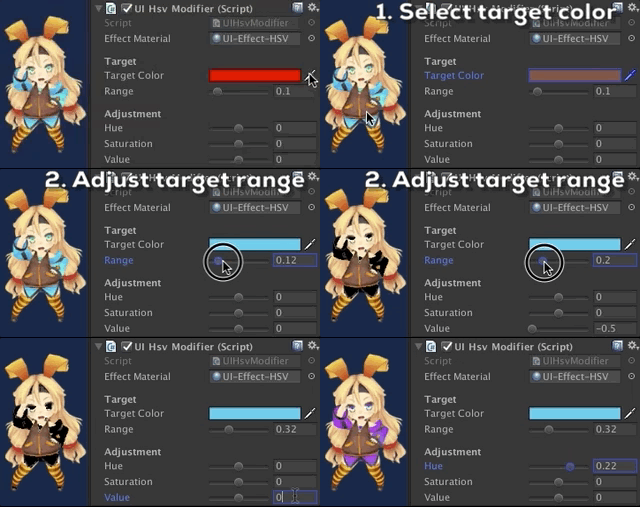
UIHsvModifier: Modify hue, saturation, and value as you like!
|
||||
|
||||
|
||||
* Note: `Hue` mode in UIEffect component will be obsolete in the near future. Please use UIHsvModifier component instead.
|
||||
* Note: `Cutoff` and `Mono` mode in UIEffect component will be obsolete in the near future. Please use UITransitionEffect component instead.
|
||||
|
||||
**Implemented enhancements:**
|
||||
|
||||
- UIEffectCapturedImage: Support target RenderTexture to use external component [\#108](https://github.com/mob-sakai/UIEffect/issues/108)
|
||||
- Transition effect as other component [\#105](https://github.com/mob-sakai/UIEffect/issues/105)
|
||||
- Use multi-pass blurring to capture screenshot [\#96](https://github.com/mob-sakai/UIEffect/issues/96)
|
||||
- Feature: HSV modifier [\#44](https://github.com/mob-sakai/UIEffect/issues/44)
|
||||
|
||||
**Fixed bugs:**
|
||||
|
||||
- UIEffectCapturedImage: ColorMode is not working [\#109](https://github.com/mob-sakai/UIEffect/issues/109)
|
||||
- UIDissolve is not maskable [\#101](https://github.com/mob-sakai/UIEffect/issues/101)
|
||||
|
||||
## [v2.6.2](https://github.com/mob-sakai/UIEffect/tree/v2.6.2) (2018-07-18)
|
||||
|
||||
[Full Changelog](https://github.com/mob-sakai/UIEffect/compare/v2.6.1...v2.6.2)
|
||||
|
||||
**Fixed bugs:**
|
||||
|
||||
- Shader has compile errors in D3D9 or D3D11\_9X\(WSA\) [\#99](https://github.com/mob-sakai/UIEffect/issues/99)
|
||||
|
||||
## [v2.6.1](https://github.com/mob-sakai/UIEffect/tree/v2.6.1) (2018-06-14)
|
||||
|
||||
[Full Changelog](https://github.com/mob-sakai/UIEffect/compare/v2.6.0...v2.6.1)
|
||||
|
||||
**Fixed bugs:**
|
||||
|
||||
- Errors occurred on build \(v2.6.0\) [\#90](https://github.com/mob-sakai/UIEffect/issues/90)
|
||||
|
||||
## [v2.6.0](https://github.com/mob-sakai/UIEffect/tree/v2.6.0) (2018-06-14)
|
||||
|
||||
[Full Changelog](https://github.com/mob-sakai/UIEffect/compare/v2.5.2...v2.6.0)
|
||||
|
||||
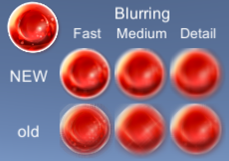
Blurring effect has been improved about 6 times faster!
|
||||
|
||||
|
||||
You can change noise texture for dissolve effect from inspector or script!
|
||||

|
||||
|
||||
|
||||
|
||||
|
||||
**Implemented enhancements:**
|
||||
|
||||
- Improve blurring performance [\#88](https://github.com/mob-sakai/UIEffect/issues/88)
|
||||
- Separate the effect with a character [\#86](https://github.com/mob-sakai/UIEffect/issues/86)
|
||||
- Change dissolve texture [\#75](https://github.com/mob-sakai/UIEffect/issues/75)
|
||||
|
||||
**Closed issues:**
|
||||
|
||||
- Change BlurMode correctly [\#84](https://github.com/mob-sakai/UIEffect/issues/84)
|
||||
- Refactoring to prepare v3.0.0 [\#83](https://github.com/mob-sakai/UIEffect/issues/83)
|
||||
- Change ColorMode correctly [\#51](https://github.com/mob-sakai/UIEffect/issues/51)
|
||||
|
||||
## [v2.5.2](https://github.com/mob-sakai/UIEffect/tree/v2.5.2) (2018-06-07)
|
||||
|
||||
[Full Changelog](https://github.com/mob-sakai/UIEffect/compare/v2.5.1...v2.5.2)
|
||||
|
||||
**Fixed bugs:**
|
||||
|
||||
- When `UIEFFECT\_SEPARATE` symbol is defined, UIDissolve does not work well [\#85](https://github.com/mob-sakai/UIEffect/issues/85)
|
||||
|
||||
## [v2.5.1](https://github.com/mob-sakai/UIEffect/tree/v2.5.1) (2018-05-31)
|
||||
|
||||
[Full Changelog](https://github.com/mob-sakai/UIEffect/compare/v2.5.0...v2.5.1)
|
||||
|
||||
**Fixed bugs:**
|
||||
|
||||
- Fix demo [\#82](https://github.com/mob-sakai/UIEffect/issues/82)
|
||||
|
||||
## [v2.5.0](https://github.com/mob-sakai/UIEffect/tree/v2.5.0) (2018-05-31)
|
||||
|
||||
[Full Changelog](https://github.com/mob-sakai/UIEffect/compare/v2.4.1...v2.5.0)
|
||||
|
||||
Shiny effect has been update!
|
||||
|
||||

|
||||
|
||||
* NOTE: `UIEffect.shadow***` will be obsolete in the near future. Please use `UIShadow` component instead.
|
||||
* NOTE: `UIEffect.custom***` will be obsolete in the near future. Please use `UICustomEffect` component (experimental) instead.
|
||||
|
||||
**Implemented enhancements:**
|
||||
|
||||
- UIDissolve: Play effect from script/inspector [\#81](https://github.com/mob-sakai/UIEffect/issues/81)
|
||||
- UIShiny: Play effect from script/inspector [\#80](https://github.com/mob-sakai/UIEffect/issues/80)
|
||||
- During play mode, you can change the effect type, color type, and blur type \(in Editor\) [\#73](https://github.com/mob-sakai/UIEffect/issues/73)
|
||||
- Add shadow effect as other component [\#72](https://github.com/mob-sakai/UIEffect/issues/72)
|
||||
- UIShiny : Visual update [\#68](https://github.com/mob-sakai/UIEffect/issues/68)
|
||||
- Add Custom effect as other component [\#60](https://github.com/mob-sakai/UIEffect/issues/60)
|
||||
|
||||
**Fixed bugs:**
|
||||
|
||||
- UIDissolve: When width=1 and location=0, image is lacked [\#79](https://github.com/mob-sakai/UIEffect/issues/79)
|
||||
|
||||
**Closed issues:**
|
||||
|
||||
- UIEffect inherit UIEffectBase [\#74](https://github.com/mob-sakai/UIEffect/issues/74)
|
||||
- Change directory structure [\#56](https://github.com/mob-sakai/UIEffect/issues/56)
|
||||
|
||||
## [v2.4.1](https://github.com/mob-sakai/UIEffect/tree/v2.4.1) (2018-05-29)
|
||||
|
||||
[Full Changelog](https://github.com/mob-sakai/UIEffect/compare/v2.4.0...v2.4.1)
|
||||
|
||||
**Fixed bugs:**
|
||||
|
||||
- UIEffectCapturedImage: The result image is flipped vertically [\#69](https://github.com/mob-sakai/UIEffect/issues/69)
|
||||
|
||||
## [v2.4.0](https://github.com/mob-sakai/UIEffect/tree/v2.4.0) (2018-05-21)
|
||||
|
||||
[Full Changelog](https://github.com/mob-sakai/UIEffect/compare/v2.3.2...v2.4.0)
|
||||
|
||||
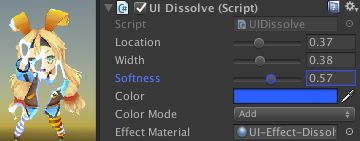
UIDissolve has been updated!
|
||||
|
||||

|
||||
|
||||
|
||||
**Implemented enhancements:**
|
||||
|
||||
- UIDissolve: Add color mode option. [\#64](https://github.com/mob-sakai/UIEffect/issues/64)
|
||||
|
||||
## [v2.3.2](https://github.com/mob-sakai/UIEffect/tree/v2.3.2) (2018-05-21)
|
||||
|
||||
[Full Changelog](https://github.com/mob-sakai/UIEffect/compare/v2.3.1...v2.3.2)
|
||||
|
||||
**Closed issues:**
|
||||
|
||||
- Fixed: UIEffectCapturedImage: When iteration count is even. the result image is flipped vertically \(other method\) [\#65](https://github.com/mob-sakai/UIEffect/issues/65)
|
||||
|
||||
## [v2.3.1](https://github.com/mob-sakai/UIEffect/tree/v2.3.1) (2018-05-10)
|
||||
|
||||
[Full Changelog](https://github.com/mob-sakai/UIEffect/compare/v2.3.0...v2.3.1)
|
||||
|
||||
**Fixed bugs:**
|
||||
|
||||
- UIEffectCapturedImage: When iteration count is even. the result image is flipped vertically \(on Windows\) [\#62](https://github.com/mob-sakai/UIEffect/issues/62)
|
||||
|
||||
## [v2.3.0](https://github.com/mob-sakai/UIEffect/tree/v2.3.0) (2018-05-08)
|
||||
|
||||
[Full Changelog](https://github.com/mob-sakai/UIEffect/compare/v2.2.0...v2.3.0)
|
||||
|
||||
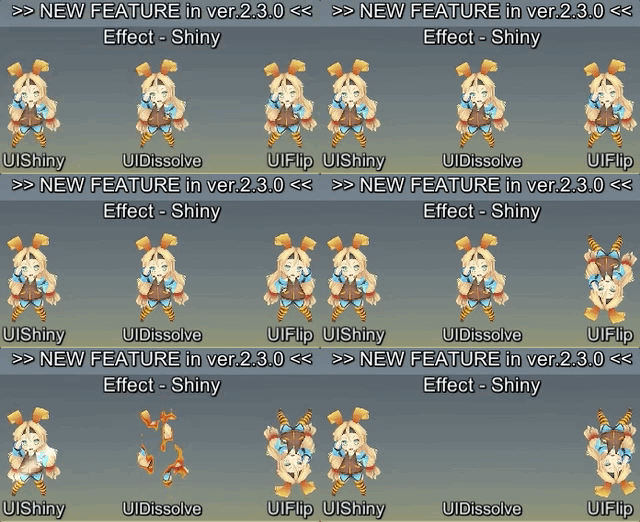
New components has been available!
|
||||
|
||||
* **UIShiny** : Shiny effect WITHOUT Mask component. This will suppress extra draw calls and improve performance.
|
||||
* **UIDissolve** : Dissolve effect WITHOUT material instancing. This will suppress extra draw calls and improve performance.
|
||||
* **UIFlip** : Flip graphic horizontal/vertical.
|
||||
|
||||
|
||||
|
||||
|
||||
**Implemented enhancements:**
|
||||
|
||||
- Feature: Flip horizontal/vertical [\#47](https://github.com/mob-sakai/UIEffect/issues/47)
|
||||
- Feature: Dissolve [\#45](https://github.com/mob-sakai/UIEffect/issues/45)
|
||||
- Feature: Shining effect [\#9](https://github.com/mob-sakai/UIEffect/issues/9)
|
||||
|
||||
## [v2.2.0](https://github.com/mob-sakai/UIEffect/tree/v2.2.0) (2018-04-12)
|
||||
|
||||
[Full Changelog](https://github.com/mob-sakai/UIEffect/compare/v2.1.0...v2.2.0)
|
||||
|
||||
**Implemented enhancements:**
|
||||
|
||||
- Feature: Customize shader/material. You can create a custom ui shader and control it with UIEffct. [\#46](https://github.com/mob-sakai/UIEffect/issues/46)
|
||||
- Feature: UIEffectCapturedImage supports keep canvas size. [\#54](https://github.com/mob-sakai/UIEffect/issues/54)
|
||||
- Feature: UIEffectCapturedImage supports `Quality Type` to easy setup. [\#53](https://github.com/mob-sakai/UIEffect/issues/53)
|
||||
|
||||
**Fixed bugs:**
|
||||
|
||||
- Bug: Color effect on shadow is incorrect. [\#55](https://github.com/mob-sakai/UIEffect/issues/55)
|
||||
|
||||
**Closed issues:**
|
||||
|
||||
- Change: Reduce the pixelation effect when tone level = 1. [\#57](https://github.com/mob-sakai/UIEffect/issues/57)
|
||||
|
||||
## [v2.1.0](https://github.com/mob-sakai/UIEffect/tree/v2.1.0) (2018-04-04)
|
||||
|
||||
[Full Changelog](https://github.com/mob-sakai/UIEffect/compare/v2.0.0...v2.1.0)
|
||||
|
||||
**Implemented enhancements:**
|
||||
|
||||
- Feature: UIEffectCapturedImage support iterative operation [\#48](https://github.com/mob-sakai/UIEffect/issues/48)
|
||||
|
||||
## [v2.0.0](https://github.com/mob-sakai/UIEffect/tree/v2.0.0) (2018-01-25)
|
||||
|
||||
[Full Changelog](https://github.com/mob-sakai/UIEffect/compare/v1.6.1...v2.0.0)
|
||||
|
||||
**Breaking changes:**
|
||||
|
||||
- Important: Unity 5.3.x & 5.4.x are no longer supported. [\#40](https://github.com/mob-sakai/UIEffect/issues/40)
|
||||
|
||||
**Implemented enhancements:**
|
||||
|
||||
- Improve: Reduce the materials. Too many effect materials are exist. [\#15](https://github.com/mob-sakai/UIEffect/issues/15)
|
||||
|
||||
**Closed issues:**
|
||||
|
||||
- Change: Change namespace to Coffee.UIExtensions [\#6](https://github.com/mob-sakai/UIEffect/issues/6)
|
||||
|
||||
## [v1.6.1](https://github.com/mob-sakai/UIEffect/tree/v1.6.1) (2018-01-25)
|
||||
|
||||
[Full Changelog](https://github.com/mob-sakai/UIEffect/compare/v1.6.0...v1.6.1)
|
||||
|
||||
**Fixed bugs:**
|
||||
|
||||
- Bug: Cannot access protected member `UnityEngine.UI.BaseMeshEffect.graphic` [\#41](https://github.com/mob-sakai/UIEffect/issues/41)
|
||||
|
||||
## [v1.6.0](https://github.com/mob-sakai/UIEffect/tree/v1.6.0) (2018-01-18)
|
||||
|
||||
[Full Changelog](https://github.com/mob-sakai/UIEffect/compare/v1.5.1...v1.6.0)
|
||||
|
||||
**Fixed bugs:**
|
||||
|
||||
- Bug: Pixelization is incorrect. [\#34](https://github.com/mob-sakai/UIEffect/issues/34)
|
||||
|
||||
**Closed issues:**
|
||||
|
||||
- Change: UIEffect inherit BaseMeshEffect. [\#35](https://github.com/mob-sakai/UIEffect/issues/35)
|
||||
- Change: Blur level range to \[0-1\] [\#32](https://github.com/mob-sakai/UIEffect/issues/32)
|
||||
- Change: ShadowMode -\> ShadowStyle [\#18](https://github.com/mob-sakai/UIEffect/issues/18)
|
||||
|
||||
## [v1.5.1](https://github.com/mob-sakai/UIEffect/tree/v1.5.1) (2018-01-18)
|
||||
|
||||
[Full Changelog](https://github.com/mob-sakai/UIEffect/compare/v1.5.0...v1.5.1)
|
||||
|
||||
**Fixed bugs:**
|
||||
|
||||
- Bug: An error occurs when no effect is specified for UICapturedImage. [\#36](https://github.com/mob-sakai/UIEffect/issues/36)
|
||||
|
||||
## [v1.5.0](https://github.com/mob-sakai/UIEffect/tree/v1.5.0) (2018-01-16)
|
||||
|
||||
[Full Changelog](https://github.com/mob-sakai/UIEffect/compare/v1.4.4...v1.5.0)
|
||||
|
||||
**Implemented enhancements:**
|
||||
|
||||
- Feature: ShadowMode 'Shadow 3' [\#11](https://github.com/mob-sakai/UIEffect/issues/11)
|
||||
- Feature: Hue [\#8](https://github.com/mob-sakai/UIEffect/issues/8)
|
||||
- Feature: Gradient [\#7](https://github.com/mob-sakai/UIEffect/issues/7)
|
||||
|
||||
## [v1.4.4](https://github.com/mob-sakai/UIEffect/tree/v1.4.4) (2018-01-16)
|
||||
|
||||
[Full Changelog](https://github.com/mob-sakai/UIEffect/compare/v1.4.3...v1.4.4)
|
||||
|
||||
**Fixed bugs:**
|
||||
|
||||
- Bug: Error has occur on edit prefab. [\#27](https://github.com/mob-sakai/UIEffect/issues/27)
|
||||
|
||||
## [v1.4.3](https://github.com/mob-sakai/UIEffect/tree/v1.4.3) (2018-01-15)
|
||||
|
||||
[Full Changelog](https://github.com/mob-sakai/UIEffect/compare/v1.4.2...v1.4.3)
|
||||
|
||||
**Fixed bugs:**
|
||||
|
||||
- Bug: Color effect is incorrect. [\#19](https://github.com/mob-sakai/UIEffect/issues/19)
|
||||
|
||||
## [v1.4.2](https://github.com/mob-sakai/UIEffect/tree/v1.4.2) (2018-01-14)
|
||||
|
||||
[Full Changelog](https://github.com/mob-sakai/UIEffect/compare/v1.4.1...v1.4.2)
|
||||
|
||||
**Implemented enhancements:**
|
||||
|
||||
- Feature: ColorMode `Override` [\#12](https://github.com/mob-sakai/UIEffect/issues/12)
|
||||
|
||||
**Fixed bugs:**
|
||||
|
||||
- Bug: Error has occur OnAfterDeserialize in editor. [\#16](https://github.com/mob-sakai/UIEffect/issues/16)
|
||||
|
||||
## [v1.4.1](https://github.com/mob-sakai/UIEffect/tree/v1.4.1) (2018-01-10)
|
||||
|
||||
[Full Changelog](https://github.com/mob-sakai/UIEffect/compare/v1.4.0...v1.4.1)
|
||||
|
||||
## [v1.4.0](https://github.com/mob-sakai/UIEffect/tree/v1.4.0) (2018-01-07)
|
||||
|
||||
[Full Changelog](https://github.com/mob-sakai/UIEffect/compare/v1.3.0...v1.4.0)
|
||||
|
||||
**Implemented enhancements:**
|
||||
|
||||
- Feature: Exclude unused shader variants from build. [\#5](https://github.com/mob-sakai/UIEffect/issues/5)
|
||||
|
||||
## [v1.3.0](https://github.com/mob-sakai/UIEffect/tree/v1.3.0) (2018-01-06)
|
||||
|
||||
[Full Changelog](https://github.com/mob-sakai/UIEffect/compare/v1.2.0...v1.3.0)
|
||||
|
||||
## [v1.2.0](https://github.com/mob-sakai/UIEffect/tree/v1.2.0) (2018-01-05)
|
||||
|
||||
[Full Changelog](https://github.com/mob-sakai/UIEffect/compare/v1.1.0...v1.2.0)
|
||||
|
||||
**Implemented enhancements:**
|
||||
|
||||
- Feature: Fast multiple shadow effect. [\#2](https://github.com/mob-sakai/UIEffect/issues/2)
|
||||
|
||||
**Fixed bugs:**
|
||||
|
||||
- Pixelaration shifts to the lower right. [\#4](https://github.com/mob-sakai/UIEffect/issues/4)
|
||||
|
||||
## [v1.1.0](https://github.com/mob-sakai/UIEffect/tree/v1.1.0) (2017-08-17)
|
||||
|
||||
[Full Changelog](https://github.com/mob-sakai/UIEffect/compare/v1.0.0...v1.1.0)
|
||||
|
||||
**Implemented enhancements:**
|
||||
|
||||
- Feature: Pixelization effect [\#1](https://github.com/mob-sakai/UIEffect/issues/1)
|
||||
|
||||
## [v1.0.0](https://github.com/mob-sakai/UIEffect/tree/v1.0.0) (2017-03-01)
|
||||
|
||||
[Full Changelog](https://github.com/mob-sakai/UIEffect/compare/a9c4ec4e72a055ca5e5c24f6a75c6720f0f6fd7f...v1.0.0)
|
||||
|
||||
|
||||
|
||||
\* *This Changelog was automatically generated by [github_changelog_generator](https://github.com/github-changelog-generator/github-changelog-generator)*
|
||||
@@ -1 +0,0 @@
|
||||
./../../../../LICENSE.txt
|
||||
@@ -1 +0,0 @@
|
||||
./../../../../README.md
|
||||
@@ -0,0 +1,222 @@
|
||||
UIEffect
|
||||
===
|
||||
|
||||
UIEffect provide visual effect components for uGUI element in Unity.
|
||||
|
||||
[](https://github.com/mob-sakai/UIEffect/releases)
|
||||
[](https://github.com/mob-sakai/UIEffect/releases)
|
||||

|
||||
[](https://github.com/mob-sakai/UIEffect/blob/master/LICENSE.txt)
|
||||
[](http://makeapullrequest.com)
|
||||
[](https://twitter.com/intent/follow?screen_name=mob_sakai)
|
||||
|
||||
<< [Description](#Description) | [WebGL Demo](#demo) | [Download](https://github.com/mob-sakai/UIEffect/releases) | [Usage](#usage) | [Example of using](#example-of-using) | [Development Note](#development-note) >>
|
||||
|
||||
### What's new? [See changelog ](https://github.com/mob-sakai/UIEffect/blob/develop/CHANGELOG.md)
|
||||
### Do you want to receive notifications for new releases? [Watch this repo ](https://github.com/mob-sakai/UIEffect/subscription)
|
||||
### Support me on Patreon! [](https://www.patreon.com/join/2343451?)
|
||||
|
||||
|
||||
|
||||
<br><br><br><br>
|
||||
## Description
|
||||
|
||||
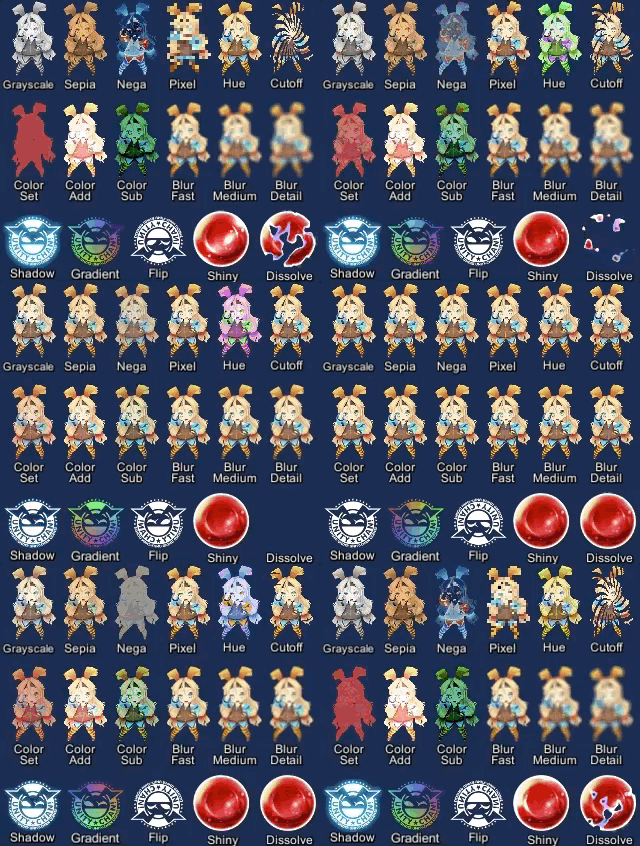
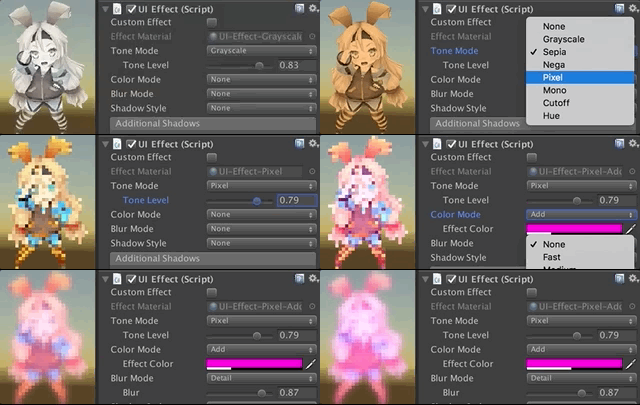
Let's decorate your UI with effects!
|
||||
You can control parameters as you like from the script as well as inspector.
|
||||
AnimationClip is supported as a matter of course!
|
||||
|
||||
|
||||
|
||||
|
||||
<br><br>
|
||||
#### Available effects
|
||||
|
||||
| Component | Features | Screenshot |
|
||||
|-|-|-|
|
||||
|**UIEffect**|Combine some visual effects.<br><br>**Effect Mode:** Grayscale, Sepia, Nega, Pixelation<br>**Color Mode:** Multiply, Fill, Additive, Subtract<br>**Blur Mode:** Fast, Medium, Detail<br>**Advanced Blur:** Enable more beautiful blurring.|<img src="https://user-images.githubusercontent.com/12690315/46639603-258df180-cba2-11e8-8f50-9e93bdc4c96e.png" width="600px">|
|
||||
|**UICaptured EffectImage**|Capture a screenshot of a specific frame with effect, and display it.<br>This effect is non-realtime, light-weight, less-camera, but be effective enough.<br><br>**Effect Mode:** Grayscale, Sepia, Nega, Pixelation<br>**Color Mode:** Multiply, Fill, Additive, Subtract<br>**Blur Mode:** Fast, Medium, Detail<br>**Quality Mode:** Fast, Medium, Detail, Custom<br>**Capture On Enable:** When the component is enable, capture screen automatically.<br>**Blur iterations:** Number of blur iterations.<br>**Reduction/Downsampling Rate:** None, x1, x2, x4, x8<br>**Fit size to screen:** Fit RectTransform to the screen on captured.<br>**Immediate Capturing:**<br><br>*NOTE: This component can be used with UIEffect, UITransition etc.*<br>*NOTE: Immediate capturing does not support LWRP, WebGL and Unity 5.x for iOS/Mac.*|<img src="https://user-images.githubusercontent.com/12690315/44078752-4c2e4114-9fe2-11e8-97f0-54d3a36a562e.gif" width="600px">|
|
||||
|**UIShiny**|Apply shining effect to a graphic.<br>The effect does not require Mask component or normal map.<br><br>**Parameters:** Effect factor, Width, Rotation, Softness, Brightness, Gloss<br>**Effect Player:** To play shining, enable `Play` in inspector or call `Play()` from script.|<img src="https://user-images.githubusercontent.com/12690315/46639689-b1078280-cba2-11e8-8716-cbc634af7293.gif" width="600px">|
|
||||
|**UIDissolve**|Apply dissolve effect to a graphic.<br><br>**Color Mode for edge:** Multiply, Fill, Additive, Subtract<br>**Parameters:** Effect factor, Width, Rotation, Softness, Edge color<br>**Options:** Effect area, Keep effect aspect ratio<br>**Effect Player:** To play dissolving, call `Play()` from script.|<img src="https://user-images.githubusercontent.com/12690315/46639690-b1078280-cba2-11e8-8aa9-1d2650fe9a62.gif" width="600px">|
|
||||
|**UIHsvModifier**|Modify HSV for graphic.<br><br>**Target:** Color, Range<br>**Adjustment:** Hue, Saturation, Value|<img src="https://user-images.githubusercontent.com/12690315/43200006-d6e2bf54-904e-11e8-9f22-0c0f9ce5912f.gif" width="600px">|
|
||||
|**UITransition Effect**|Apply transition effect with a single channel texture.<br><br>**Effect Mode:** Cutoff, Fade, Dissolve<br>**Options:** Effect area, Keep effect aspect ratio, transition texture<br>**Pass Ray On Hidden:** Disable the graphic's raycastTarget on hidden.<br>**Effect Player:** To show/hide transition, call `Show()/Hide()` from script.|<img src="https://user-images.githubusercontent.com/12690315/46639688-b1078280-cba2-11e8-8bbb-16b8498bca5f.gif" width="600px">|
|
||||
|
||||
<br><br>
|
||||
##### The following effects can be used with the above components.
|
||||
|
||||
| Component | Features | Screenshot |
|
||||
|-|-|-|
|
||||
|**UIShadow**|Add shadow/outline to a graphic.<br>The performance is better than the default Shadow/Outline component.<br><br>**ShadowStyle:** Shadow, Shadow3, Outline, Outline8|<img src="https://user-images.githubusercontent.com/12690315/46639604-258df180-cba2-11e8-98a9-aa31f04c695d.png" width="600px">|
|
||||
|**UIGradient**|Change vertex color as gradient with angle and offset.<br><br>**Direction:** Horizontal, Vertical, Angle, Diagonal<br>**Options:** Offset, Color space|<img src="https://user-images.githubusercontent.com/12690315/40716995-ca87665e-6445-11e8-8233-ec2e21fefd6b.png" width="600px">|
|
||||
|**UIFlip**|Flip a graphic.<br><br>**Direction:** Horizontal, Vertical, Both|<img src="https://user-images.githubusercontent.com/12690315/40716996-cab1fd7e-6445-11e8-9753-962d23991d86.png" width="600px">|
|
||||
|
||||
|
||||
|
||||
|
||||
<br><br><br><br>
|
||||
## Demo
|
||||
|
||||
[WebGL Demo](http://mob-sakai.github.io/UIEffect)
|
||||
|
||||
* Effect sample
|
||||
* Transition
|
||||
* Dialog window with blured background
|
||||
* Included in unitypackage
|
||||
|
||||
|
||||
|
||||
|
||||
<br><br><br><br>
|
||||
## Usage
|
||||
|
||||
1. Download UIEffect.unitypackage from [Releases](https://github.com/mob-sakai/UIEffect/releases).
|
||||
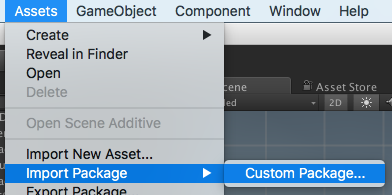
2. Import the package into your Unity project. Select `Import Package > Custom Package` from the `Assets` menu.
|
||||
|
||||
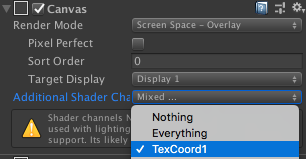
3. In Unity5.6+, enable `TexCoord1` channel of canvas. See also [Development Note](##note-unity-56).
|
||||
|
||||
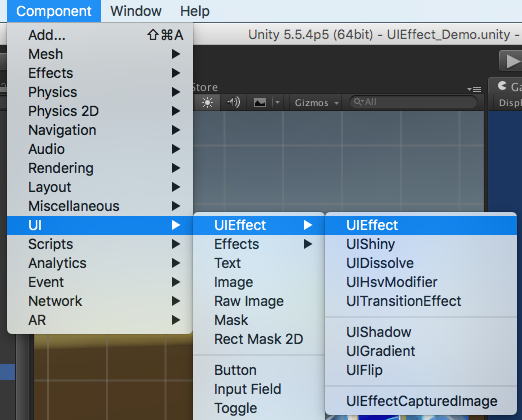
4. Add any effect component to UI element (Image, RawImage, Text, etc...) from `Add Component` in inspector or `Component > UI > UIEffect > ...` menu.
|
||||
|
||||
6. Adjust the parameters of the effect as you like, in inspector.
|
||||

|
||||
7. Enjoy!
|
||||
|
||||
|
||||
##### Requirement
|
||||
|
||||
* Unity 5.5+ *(included Unity 2018.x)*
|
||||
* No other SDK are required
|
||||
|
||||
|
||||
|
||||
|
||||
<br><br><br><br>
|
||||
## Example of using
|
||||
|
||||
| Case | Description | Screenshot |
|
||||
|-|-|-|
|
||||
|Lock/unlock contents|Use UIEffect to apply grayscale.<br>Indicate to user that the content is unavailable.|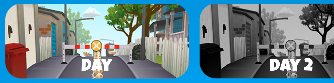|
|
||||
|Silhouette|Use UIEffect for filling color.|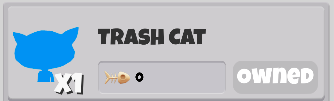|
|
||||
|Soft shadow/<br>Outer glow|Use UIEffect and UIShadow to blur the shadow.<br>To blur only shadow, set `Blur Factor` in UIEffect to 0.||
|
||||
|Colored shadow|Use UIEffect and UIShadow to fill shadow with color.<br>To fill only shadow, set `Color Factor` in UIEffect to 0.||
|
||||
|Blurred dynamic font|Use UIEffect to blur text.<br>To blur dynamic font cleanly, enable `Advanced Blur` option.||
|
||||
|Text with outline & shadow|Use two UIShadows to add outline and shadow.<br>There is less overdraw than default Outline/Shadow `(Default: 1 x 5 x 2 = 10 overdraws, UIShadow: 1 + 4 + 1 = 6 overdraws)`.||
|
||||
|Shining button|Use UIShiny for shining button.<br>Shine the button and indicate to user that you can press the button.<br>Enable `Play` and `Loop` option to shine it without any AnimationClip.||
|
||||
|Blurring the background of a menu|Use UIEffectCapturedImage to blur the background of a menu.<br>UIEffectCapturedImage applies an effect to the screen of the previous frame, without adding a camera or layer.<br>It's not a real-time post effect, so it's good performance and works well on mobile.|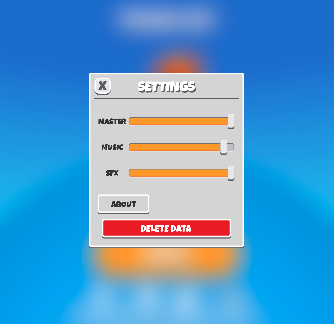|
|
||||
|Screen transition|Use UITransitionEffect to add screen transition.<br>You can change transition texture (single channel texture).<br>Enable `Pass Ray On Hidden` option and use `Show()/Hide()` method to play transition without AnimationClip.|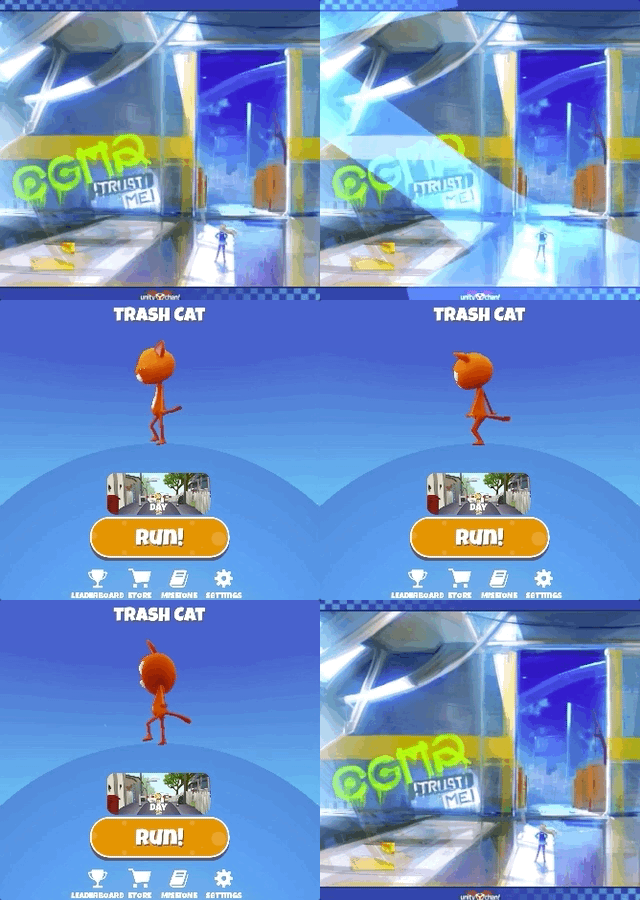|
|
||||
|
||||
|
||||
|
||||
|
||||
<br><br><br><br>
|
||||
## Development Note
|
||||
|
||||
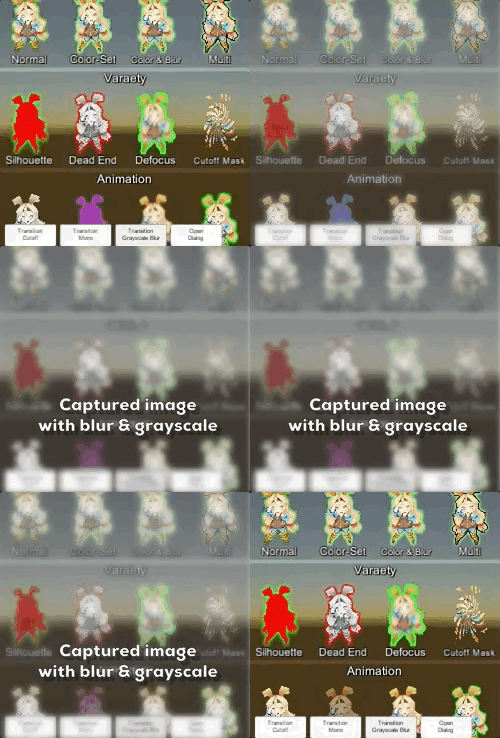
#### How does UIEffectCapturedImage work?
|
||||
|
||||
|
||||
|
||||
`UIEffectCapturedImage` is similar to post effect, but uses `CommandBuffer` to give effect only on the rendering result (= captured image) of a specific frame.
|
||||
This effect is non-realtime, light-weight, less-camera, blit only once, but be effective enough.
|
||||
|
||||
* Camera for processing effect is unnecessary.
|
||||
* Process effect only once after `UIEffectCapturedImage.Capture`.
|
||||
* Using reduction buffer, keep using memory size small and keep the rendering load are small.
|
||||
* When GameObjects with motion are on the screen, a result texture may be stirred.
|
||||
* You can overlay and display like as:
|
||||
`[Screen] | [UIEffectCapturedImage] | [Dialog A] | [UIEffectCapturedImage] | [Dialog B]`.
|
||||
See also [Demo](#demo).
|
||||
|
||||
|
||||
#### Why is UIEffect lightweight?
|
||||
|
||||
* UIEffect pre-generates material from a combination of effects. This has the following benefits.
|
||||
* Draw call batching If possible, draw calls will decrease.
|
||||
* Since only the required material and shader variants are included in the build, the build size will be smaller.
|
||||
|
||||
|
||||
#### How to control effect parameters for uGUI element WITHOUT MaterialPropertyBlock?
|
||||
|
||||
* In general, you can use [MaterialPropertyBlock](https://docs.unity3d.com/ScriptReference/MaterialPropertyBlock.html) for renderers to control minor changes in the material without different batches.
|
||||
* However, changing the [MaterialPropertyBlock](https://docs.unity3d.com/ScriptReference/MaterialPropertyBlock.html) of the uGUI element from the script will cause different batches and draw calls to increase.
|
||||
* So UIEffect encodes multiple effect parameters to UV1 channel with [IMeshModifier](https://docs.unity3d.com/ScriptReference/UI.IMeshModifier.html).
|
||||
* Pack four 6-bit [0-1] (64 steps) parameters into one float value.
|
||||
* The parameters are lower precision, but sufficient.
|
||||
|
||||
| uv1 | 6-bit [0-1] | 6-bit [0-1] | 6-bit [0-1] | 6-bit [0-1] |
|
||||
|-|-|-|-|-|
|
||||
| x(32bit float) | Tone level | *Empty* | Blur level | *Empty* |
|
||||
| y(32bit float) | Red channel | Green channel | Blue channel | Alpha channel |
|
||||
|
||||
* In v3.0.0+, UIEffect uploads the parameter value to a shared texture and the shader refers to it.
|
||||
This approach has the following advantages:
|
||||
* More parameters for the effect are available.
|
||||
* The parameter accuracy is improved from 6 bits to 8 bits.
|
||||
* ModifyMesh is not called when parameter value is changed.
|
||||
|
||||
|
||||
#### Note: Unity 5.6+
|
||||
|
||||
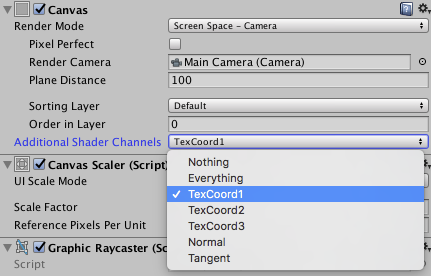
In Unity 5.6+, Canvas supports **Additional Shader Channels**.
|
||||
Please enable `TexCoord1` to use UIEffect.
|
||||
|
||||

|
||||
|
||||
|
||||
#### Note: if you include prefabs / scenes containing UIEffect in AssetBundle.
|
||||
|
||||
Use script define symbol `UIEFFECT_SEPARATE`.
|
||||
Unused shader variants and materials will be excluded from AssetBundles.
|
||||
|
||||
||Combined mode (default)|Separated mode|
|
||||
|-|-|-|
|
||||
|Script define symbol| - |`UIEFFECT_SEPARATE`|
|
||||
|Included in build|Only used variants|Only used variants|
|
||||
|Included in AssetBundle|All variants (Heavy!)|Only used variants|
|
||||
|Look in editor|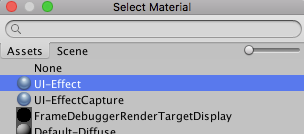|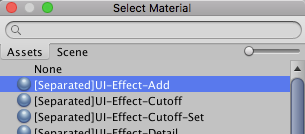|
|
||||
|
||||
|
||||
#### How to improve performance?
|
||||
|
||||
* Use `ShaderVariantCollection` to preload shader.
|
||||
https://docs.unity3d.com/Manual/OptimizingShaderLoadTime.html
|
||||
* Set camera's clear flag to "Solid Color".
|
||||
* Enable multi thread rendering.
|
||||
|
||||
|
||||
#### The issue of default Outline component
|
||||
|
||||
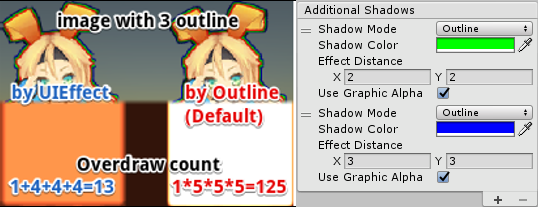
Graphic with multiple outline components will generate a lot of overdraw.
|
||||
|
||||
|
||||
|
||||
This is an overdraw view of image with three outline components.
|
||||
Because there are many overdraws, it is very bright!
|
||||
For each Outline component, increase the mesh by 5 times. (In the case of the Shadow component, it doubles the mesh.)
|
||||
In the image above, `1 x 5 x 5 x 5 = 125` overdraws are generated.
|
||||
|
||||
UIShadow's 'Addition Shadow' feature solves this issue by adding only the necessary mesh, `1 + 4 + 4 + 4 = 13` overdraws are generated.
|
||||
|
||||
|
||||
|
||||
|
||||
<br><br><br><br>
|
||||
## License
|
||||
|
||||
* MIT
|
||||
* © UTJ/UCL
|
||||
|
||||
|
||||
|
||||
## Author
|
||||
|
||||
[mob-sakai](https://github.com/mob-sakai)
|
||||
[](https://twitter.com/intent/follow?screen_name=mob_sakai)
|
||||
[](https://www.patreon.com/join/2343451?)
|
||||
|
||||
|
||||
|
||||
## See Also
|
||||
|
||||
* GitHub page : https://github.com/mob-sakai/UIEffect
|
||||
* Releases : https://github.com/mob-sakai/UIEffect/releases
|
||||
* Issue tracker : https://github.com/mob-sakai/UIEffect/issues
|
||||
* Current project : https://github.com/mob-sakai/UIEffect/projects/1
|
||||
* Change log : https://github.com/mob-sakai/UIEffect/blob/master/CHANGELOG.md
|
||||
@@ -167,7 +167,8 @@ namespace Coffee.UIExtensions
|
||||
|
||||
if (!_texture)
|
||||
{
|
||||
_texture = new Texture2D(_channels / 4, _instanceLimit, TextureFormat.RGBA32, false, false);
|
||||
bool isLinear = QualitySettings.activeColorSpace == ColorSpace.Linear;
|
||||
_texture = new Texture2D(_channels / 4, _instanceLimit, TextureFormat.RGBA32, false, isLinear);
|
||||
_texture.filterMode = FilterMode.Point;
|
||||
_texture.wrapMode = TextureWrapMode.Clamp;
|
||||
|
||||
|
||||
@@ -0,0 +1,18 @@
|
||||
{
|
||||
"name": "com.coffee.uieffect",
|
||||
"displayName": "UIEffect",
|
||||
"description": " UIEffect is an effect component for uGUI element in Unity.\nLet's decorate your UI with effects!",
|
||||
"version": "3.0.3",
|
||||
"unity": "5.5",
|
||||
"license": "MIT",
|
||||
"repository": {
|
||||
"type": "git",
|
||||
"url": "git+https://github.com/mob-sakai/UIEffect.git"
|
||||
},
|
||||
"src": "Assets/Coffee/UIExtensions/UIEffect",
|
||||
"author": "mob-sakai <sakai861104@gmail.com> (https://github.com/mob-sakai)",
|
||||
"editorOnly": false,
|
||||
"upmSupport": false,
|
||||
"dependencies": {
|
||||
}
|
||||
}
|
||||
@@ -0,0 +1,8 @@
|
||||
fileFormatVersion: 2
|
||||
guid: 546af75b6221c4768be79d67c9cea1fb
|
||||
timeCreated: 1547605752
|
||||
licenseType: Pro
|
||||
TextScriptImporter:
|
||||
userData:
|
||||
assetBundleName:
|
||||
assetBundleVariant:
|
||||
-437
@@ -1,437 +0,0 @@
|
||||
# Changelog
|
||||
|
||||
## [v3.0.2](https://github.com/mob-sakai/UIEffect/tree/v3.0.2) (2019-01-15)
|
||||
|
||||
[Full Changelog](https://github.com/mob-sakai/UIEffect/compare/v3.0.1...v3.0.2)
|
||||
|
||||
**Fixed bugs:**
|
||||
|
||||
- UIEffect & UIHsvModifier & UITransitionEffect Strange action [\#144](https://github.com/mob-sakai/UIEffect/issues/144)
|
||||
|
||||
## [v3.0.1](https://github.com/mob-sakai/UIEffect/tree/v3.0.1) (2018-11-07)
|
||||
|
||||
[Full Changelog](https://github.com/mob-sakai/UIEffect/compare/v3.0.0...v3.0.1)
|
||||
|
||||
**Fixed bugs:**
|
||||
|
||||
- Compile error in 2018.3 [\#139](https://github.com/mob-sakai/UIEffect/issues/139)
|
||||
|
||||
## [v3.0.0](https://github.com/mob-sakai/UIEffect/tree/v3.0.0) (2018-10-09)
|
||||
|
||||
[Full Changelog](https://github.com/mob-sakai/UIEffect/compare/v2.8.3...v3.0.0)
|
||||
|
||||
### New architecture: easier, faster and more beautiful.
|
||||
* Simple & easy-to-use
|
||||
* 20% faster
|
||||
* High precision parameter
|
||||
|
||||
### Immediate capturing (UIEffectCapturedImage option)
|
||||
* Capture the previous frame immediately without any camera.
|
||||
* You no longer have to wait one frame to capture!
|
||||
* *NOTE: LWRP, WebGL and Unity 5.x for iOS/Mac are not supported.*
|
||||
|
||||
### Advanced blur (UIEffect option)
|
||||
* Remove common artifacts in the blur effect for uGUI.
|
||||

|
||||
* It is effective for small padding size atlases, including dynamic fonts!
|
||||
|
||||
**Breaking changes:**
|
||||
|
||||
- UIEffectCapturedImage: Remove 'TargetTexture' feature [\#136](https://github.com/mob-sakai/UIEffect/issues/136)
|
||||
- Remove 'additional shadow' in UIShadow component [\#110](https://github.com/mob-sakai/UIEffect/issues/110)
|
||||
- Remove 'custom effect' feature in UIEffect component [\#98](https://github.com/mob-sakai/UIEffect/issues/98)
|
||||
- Remove 'shadow effect' feature in UIEffect component [\#97](https://github.com/mob-sakai/UIEffect/issues/97)
|
||||
- Remove 'hue effect' in UIEffect component [\#91](https://github.com/mob-sakai/UIEffect/issues/91)
|
||||
- Remove 'cutoff' and 'mono' effect in UIEffect component [\#78](https://github.com/mob-sakai/UIEffect/issues/78)
|
||||
- New architecture: Shared texture for effect parameter [\#63](https://github.com/mob-sakai/UIEffect/issues/63)
|
||||
- Change: Change `ToneMode` to `EffectMode` [\#61](https://github.com/mob-sakai/UIEffect/issues/61)
|
||||
- Separate shadow effect to other component [\#52](https://github.com/mob-sakai/UIEffect/issues/52)
|
||||
- Use the graphic color as effect color, to reduce parameters [\#50](https://github.com/mob-sakai/UIEffect/issues/50)
|
||||
|
||||
**Implemented enhancements:**
|
||||
|
||||
- UITransitionEffect: "Pass ray on hidden" option [\#135](https://github.com/mob-sakai/UIEffect/issues/135)
|
||||
- Add component menu in editor [\#133](https://github.com/mob-sakai/UIEffect/issues/133)
|
||||
- UITransitionEffect: Add Show/Hide method [\#132](https://github.com/mob-sakai/UIEffect/issues/132)
|
||||
- UIEffectCapturedImage: Immediate capturing [\#130](https://github.com/mob-sakai/UIEffect/issues/130)
|
||||
- Improve blurring for atlas [\#95](https://github.com/mob-sakai/UIEffect/issues/95)
|
||||
- Use Canvas.willRenderCanvases event instead of Update method [\#87](https://github.com/mob-sakai/UIEffect/issues/87)
|
||||
|
||||
**Closed issues:**
|
||||
|
||||
- Add tooltip [\#92](https://github.com/mob-sakai/UIEffect/issues/92)
|
||||
- UIShiny: change parameter name `highlight` to `gloss` [\#93](https://github.com/mob-sakai/UIEffect/issues/93)
|
||||
|
||||
## [v2.8.3](https://github.com/mob-sakai/UIEffect/tree/v2.8.3) (2018-09-29)
|
||||
|
||||
[Full Changelog](https://github.com/mob-sakai/UIEffect/compare/v2.8.2...v2.8.3)
|
||||
|
||||
**Fixed bugs:**
|
||||
|
||||
- UIEffectCapturedImage: Black screen with Unity 2018.1+ editor on Windows [\#131](https://github.com/mob-sakai/UIEffect/issues/131)
|
||||
|
||||
## [v2.8.2](https://github.com/mob-sakai/UIEffect/tree/v2.8.2) (2018-09-26)
|
||||
|
||||
[Full Changelog](https://github.com/mob-sakai/UIEffect/compare/v2.8.1...v2.8.2)
|
||||
|
||||
**Fixed bugs:**
|
||||
|
||||
- UICapturedEffectImage does not work with 'ScreenSpace - Overlay' in edit mode [\#128](https://github.com/mob-sakai/UIEffect/issues/128)
|
||||
- The UIEffectCapturedImage is upside down with 'ScreenSpace - Overlay' mode [\#127](https://github.com/mob-sakai/UIEffect/issues/127)
|
||||
- When "UI-Effect.mat" is created automatically, Unity hangs up. [\#126](https://github.com/mob-sakai/UIEffect/issues/126)
|
||||
- UICapturedEffectImage does not work with Lightweight Render Pipeline LWRP [\#125](https://github.com/mob-sakai/UIEffect/issues/125)
|
||||
|
||||
## [v2.8.1](https://github.com/mob-sakai/UIEffect/tree/v2.8.1) (2018-08-17)
|
||||
|
||||
[Full Changelog](https://github.com/mob-sakai/UIEffect/compare/v2.8.0...v2.8.1)
|
||||
|
||||
**Fixed bugs:**
|
||||
|
||||
- \(Demo\) "Transition capture & dissolve" is incorrect [\#119](https://github.com/mob-sakai/UIEffect/issues/119)
|
||||
|
||||
## [v2.8.0](https://github.com/mob-sakai/UIEffect/tree/v2.8.0) (2018-08-14)
|
||||
|
||||
[Full Changelog](https://github.com/mob-sakai/UIEffect/compare/v2.7.1...v2.8.0)
|
||||
|
||||
* Create a screen transition!
|
||||

|
||||
|
||||
* Some updates make UIEffectCapturedImage easier to use!
|
||||
|
||||
|
||||
**Implemented enhancements:**
|
||||
|
||||
- UIEffectCapturedImage: Supports 'ScreenSpace - Overlay' [\#115](https://github.com/mob-sakai/UIEffect/issues/115)
|
||||
- UIEffectCapturedImage: Keep aspect ratio [\#114](https://github.com/mob-sakai/UIEffect/issues/114)
|
||||
- UIEffectCapturedImage: 'Capture on enable' option [\#113](https://github.com/mob-sakai/UIEffect/issues/113)
|
||||
- UITransitionEffect: Change transition texture [\#111](https://github.com/mob-sakai/UIEffect/issues/111)
|
||||
|
||||
**Closed issues:**
|
||||
|
||||
- UIEffectCapturedImage: change parameter name `keepCanvasSize` to `fitToScreen` [\#116](https://github.com/mob-sakai/UIEffect/issues/116)
|
||||
|
||||
## [v2.7.1](https://github.com/mob-sakai/UIEffect/tree/v2.7.1) (2018-08-06)
|
||||
|
||||
[Full Changelog](https://github.com/mob-sakai/UIEffect/compare/v2.7.0...v2.7.1)
|
||||
|
||||
**Fixed bugs:**
|
||||
|
||||
- In v2.7.0, UIEffectCapturedImage is flipped vertically on Windows [\#112](https://github.com/mob-sakai/UIEffect/issues/112)
|
||||
|
||||
## [v2.7.0](https://github.com/mob-sakai/UIEffect/tree/v2.7.0) (2018-07-26)
|
||||
|
||||
[Full Changelog](https://github.com/mob-sakai/UIEffect/compare/v2.6.2...v2.7.0)
|
||||
|
||||
UIHsvModifier: Modify hue, saturation, and value as you like!
|
||||

|
||||
|
||||
* Note: `Hue` mode in UIEffect component will be obsolete in the near future. Please use UIHsvModifier component instead.
|
||||
* Note: `Cutoff` and `Mono` mode in UIEffect component will be obsolete in the near future. Please use UITransitionEffect component instead.
|
||||
|
||||
**Implemented enhancements:**
|
||||
|
||||
- UIEffectCapturedImage: Support target RenderTexture to use external component [\#108](https://github.com/mob-sakai/UIEffect/issues/108)
|
||||
- Transition effect as other component [\#105](https://github.com/mob-sakai/UIEffect/issues/105)
|
||||
- Use multi-pass blurring to capture screenshot [\#96](https://github.com/mob-sakai/UIEffect/issues/96)
|
||||
- Feature: HSV modifier [\#44](https://github.com/mob-sakai/UIEffect/issues/44)
|
||||
|
||||
**Fixed bugs:**
|
||||
|
||||
- UIEffectCapturedImage: ColorMode is not working [\#109](https://github.com/mob-sakai/UIEffect/issues/109)
|
||||
- UIDissolve is not maskable [\#101](https://github.com/mob-sakai/UIEffect/issues/101)
|
||||
|
||||
## [v2.6.2](https://github.com/mob-sakai/UIEffect/tree/v2.6.2) (2018-07-18)
|
||||
|
||||
[Full Changelog](https://github.com/mob-sakai/UIEffect/compare/v2.6.1...v2.6.2)
|
||||
|
||||
**Fixed bugs:**
|
||||
|
||||
- Shader has compile errors in D3D9 or D3D11\_9X\(WSA\) [\#99](https://github.com/mob-sakai/UIEffect/issues/99)
|
||||
|
||||
## [v2.6.1](https://github.com/mob-sakai/UIEffect/tree/v2.6.1) (2018-06-14)
|
||||
|
||||
[Full Changelog](https://github.com/mob-sakai/UIEffect/compare/v2.6.0...v2.6.1)
|
||||
|
||||
**Fixed bugs:**
|
||||
|
||||
- Errors occurred on build \(v2.6.0\) [\#90](https://github.com/mob-sakai/UIEffect/issues/90)
|
||||
|
||||
## [v2.6.0](https://github.com/mob-sakai/UIEffect/tree/v2.6.0) (2018-06-14)
|
||||
|
||||
[Full Changelog](https://github.com/mob-sakai/UIEffect/compare/v2.5.2...v2.6.0)
|
||||
|
||||
Blurring effect has been improved about 6 times faster!
|
||||

|
||||
|
||||
You can change noise texture for dissolve effect from inspector or script!
|
||||

|
||||
|
||||
|
||||
|
||||
|
||||
**Implemented enhancements:**
|
||||
|
||||
- Improve blurring performance [\#88](https://github.com/mob-sakai/UIEffect/issues/88)
|
||||
- Separate the effect with a character [\#86](https://github.com/mob-sakai/UIEffect/issues/86)
|
||||
- Change dissolve texture [\#75](https://github.com/mob-sakai/UIEffect/issues/75)
|
||||
|
||||
**Closed issues:**
|
||||
|
||||
- Change BlurMode correctly [\#84](https://github.com/mob-sakai/UIEffect/issues/84)
|
||||
- Refactoring to prepare v3.0.0 [\#83](https://github.com/mob-sakai/UIEffect/issues/83)
|
||||
- Change ColorMode correctly [\#51](https://github.com/mob-sakai/UIEffect/issues/51)
|
||||
|
||||
## [v2.5.2](https://github.com/mob-sakai/UIEffect/tree/v2.5.2) (2018-06-07)
|
||||
|
||||
[Full Changelog](https://github.com/mob-sakai/UIEffect/compare/v2.5.1...v2.5.2)
|
||||
|
||||
**Fixed bugs:**
|
||||
|
||||
- When `UIEFFECT\_SEPARATE` symbol is defined, UIDissolve does not work well [\#85](https://github.com/mob-sakai/UIEffect/issues/85)
|
||||
|
||||
## [v2.5.1](https://github.com/mob-sakai/UIEffect/tree/v2.5.1) (2018-05-31)
|
||||
|
||||
[Full Changelog](https://github.com/mob-sakai/UIEffect/compare/v2.5.0...v2.5.1)
|
||||
|
||||
**Fixed bugs:**
|
||||
|
||||
- Fix demo [\#82](https://github.com/mob-sakai/UIEffect/issues/82)
|
||||
|
||||
## [v2.5.0](https://github.com/mob-sakai/UIEffect/tree/v2.5.0) (2018-05-31)
|
||||
|
||||
[Full Changelog](https://github.com/mob-sakai/UIEffect/compare/v2.4.1...v2.5.0)
|
||||
|
||||
Shiny effect has been update!
|
||||
|
||||

|
||||
|
||||
* NOTE: `UIEffect.shadow***` will be obsolete in the near future. Please use `UIShadow` component instead.
|
||||
* NOTE: `UIEffect.custom***` will be obsolete in the near future. Please use `UICustomEffect` component (experimental) instead.
|
||||
|
||||
**Implemented enhancements:**
|
||||
|
||||
- UIDissolve: Play effect from script/inspector [\#81](https://github.com/mob-sakai/UIEffect/issues/81)
|
||||
- UIShiny: Play effect from script/inspector [\#80](https://github.com/mob-sakai/UIEffect/issues/80)
|
||||
- During play mode, you can change the effect type, color type, and blur type \(in Editor\) [\#73](https://github.com/mob-sakai/UIEffect/issues/73)
|
||||
- Add shadow effect as other component [\#72](https://github.com/mob-sakai/UIEffect/issues/72)
|
||||
- UIShiny : Visual update [\#68](https://github.com/mob-sakai/UIEffect/issues/68)
|
||||
- Add Custom effect as other component [\#60](https://github.com/mob-sakai/UIEffect/issues/60)
|
||||
|
||||
**Fixed bugs:**
|
||||
|
||||
- UIDissolve: When width=1 and location=0, image is lacked [\#79](https://github.com/mob-sakai/UIEffect/issues/79)
|
||||
|
||||
**Closed issues:**
|
||||
|
||||
- UIEffect inherit UIEffectBase [\#74](https://github.com/mob-sakai/UIEffect/issues/74)
|
||||
- Change directory structure [\#56](https://github.com/mob-sakai/UIEffect/issues/56)
|
||||
|
||||
## [v2.4.1](https://github.com/mob-sakai/UIEffect/tree/v2.4.1) (2018-05-29)
|
||||
|
||||
[Full Changelog](https://github.com/mob-sakai/UIEffect/compare/v2.4.0...v2.4.1)
|
||||
|
||||
**Fixed bugs:**
|
||||
|
||||
- UIEffectCapturedImage: The result image is flipped vertically [\#69](https://github.com/mob-sakai/UIEffect/issues/69)
|
||||
|
||||
## [v2.4.0](https://github.com/mob-sakai/UIEffect/tree/v2.4.0) (2018-05-21)
|
||||
|
||||
[Full Changelog](https://github.com/mob-sakai/UIEffect/compare/v2.3.2...v2.4.0)
|
||||
|
||||
UIDissolve has been updated!
|
||||
|
||||

|
||||

|
||||
|
||||
**Implemented enhancements:**
|
||||
|
||||
- UIDissolve: Add color mode option. [\#64](https://github.com/mob-sakai/UIEffect/issues/64)
|
||||
|
||||
## [v2.3.2](https://github.com/mob-sakai/UIEffect/tree/v2.3.2) (2018-05-21)
|
||||
|
||||
[Full Changelog](https://github.com/mob-sakai/UIEffect/compare/v2.3.1...v2.3.2)
|
||||
|
||||
**Closed issues:**
|
||||
|
||||
- Fixed: UIEffectCapturedImage: When iteration count is even. the result image is flipped vertically \(other method\) [\#65](https://github.com/mob-sakai/UIEffect/issues/65)
|
||||
|
||||
## [v2.3.1](https://github.com/mob-sakai/UIEffect/tree/v2.3.1) (2018-05-10)
|
||||
|
||||
[Full Changelog](https://github.com/mob-sakai/UIEffect/compare/v2.3.0...v2.3.1)
|
||||
|
||||
**Fixed bugs:**
|
||||
|
||||
- UIEffectCapturedImage: When iteration count is even. the result image is flipped vertically \(on Windows\) [\#62](https://github.com/mob-sakai/UIEffect/issues/62)
|
||||
|
||||
## [v2.3.0](https://github.com/mob-sakai/UIEffect/tree/v2.3.0) (2018-05-08)
|
||||
|
||||
[Full Changelog](https://github.com/mob-sakai/UIEffect/compare/v2.2.0...v2.3.0)
|
||||
|
||||
New components has been available!
|
||||
|
||||
* **UIShiny** : Shiny effect WITHOUT Mask component. This will suppress extra draw calls and improve performance.
|
||||
* **UIDissolve** : Dissolve effect WITHOUT material instancing. This will suppress extra draw calls and improve performance.
|
||||
* **UIFlip** : Flip graphic horizontal/vertical.
|
||||
|
||||

|
||||
|
||||
|
||||
**Implemented enhancements:**
|
||||
|
||||
- Feature: Flip horizontal/vertical [\#47](https://github.com/mob-sakai/UIEffect/issues/47)
|
||||
- Feature: Dissolve [\#45](https://github.com/mob-sakai/UIEffect/issues/45)
|
||||
- Feature: Shining effect [\#9](https://github.com/mob-sakai/UIEffect/issues/9)
|
||||
|
||||
## [v2.2.0](https://github.com/mob-sakai/UIEffect/tree/v2.2.0) (2018-04-12)
|
||||
|
||||
[Full Changelog](https://github.com/mob-sakai/UIEffect/compare/v2.1.0...v2.2.0)
|
||||
|
||||
**Implemented enhancements:**
|
||||
|
||||
- Feature: Customize shader/material. You can create a custom ui shader and control it with UIEffct. [\#46](https://github.com/mob-sakai/UIEffect/issues/46)
|
||||
- Feature: UIEffectCapturedImage supports keep canvas size. [\#54](https://github.com/mob-sakai/UIEffect/issues/54)
|
||||
- Feature: UIEffectCapturedImage supports `Quality Type` to easy setup. [\#53](https://github.com/mob-sakai/UIEffect/issues/53)
|
||||
|
||||
**Fixed bugs:**
|
||||
|
||||
- Bug: Color effect on shadow is incorrect. [\#55](https://github.com/mob-sakai/UIEffect/issues/55)
|
||||
|
||||
**Closed issues:**
|
||||
|
||||
- Change: Reduce the pixelation effect when tone level = 1. [\#57](https://github.com/mob-sakai/UIEffect/issues/57)
|
||||
|
||||
## [v2.1.0](https://github.com/mob-sakai/UIEffect/tree/v2.1.0) (2018-04-04)
|
||||
|
||||
[Full Changelog](https://github.com/mob-sakai/UIEffect/compare/v2.0.0...v2.1.0)
|
||||
|
||||
**Implemented enhancements:**
|
||||
|
||||
- Feature: UIEffectCapturedImage support iterative operation [\#48](https://github.com/mob-sakai/UIEffect/issues/48)
|
||||
|
||||
## [v2.0.0](https://github.com/mob-sakai/UIEffect/tree/v2.0.0) (2018-01-25)
|
||||
|
||||
[Full Changelog](https://github.com/mob-sakai/UIEffect/compare/v1.6.1...v2.0.0)
|
||||
|
||||
**Breaking changes:**
|
||||
|
||||
- Important: Unity 5.3.x & 5.4.x are no longer supported. [\#40](https://github.com/mob-sakai/UIEffect/issues/40)
|
||||
|
||||
**Implemented enhancements:**
|
||||
|
||||
- Improve: Reduce the materials. Too many effect materials are exist. [\#15](https://github.com/mob-sakai/UIEffect/issues/15)
|
||||
|
||||
**Closed issues:**
|
||||
|
||||
- Change: Change namespace to Coffee.UIExtensions [\#6](https://github.com/mob-sakai/UIEffect/issues/6)
|
||||
|
||||
## [v1.6.1](https://github.com/mob-sakai/UIEffect/tree/v1.6.1) (2018-01-25)
|
||||
|
||||
[Full Changelog](https://github.com/mob-sakai/UIEffect/compare/v1.6.0...v1.6.1)
|
||||
|
||||
**Fixed bugs:**
|
||||
|
||||
- Bug: Cannot access protected member `UnityEngine.UI.BaseMeshEffect.graphic` [\#41](https://github.com/mob-sakai/UIEffect/issues/41)
|
||||
|
||||
## [v1.6.0](https://github.com/mob-sakai/UIEffect/tree/v1.6.0) (2018-01-18)
|
||||
|
||||
[Full Changelog](https://github.com/mob-sakai/UIEffect/compare/v1.5.1...v1.6.0)
|
||||
|
||||
**Fixed bugs:**
|
||||
|
||||
- Bug: Pixelization is incorrect. [\#34](https://github.com/mob-sakai/UIEffect/issues/34)
|
||||
|
||||
**Closed issues:**
|
||||
|
||||
- Change: UIEffect inherit BaseMeshEffect. [\#35](https://github.com/mob-sakai/UIEffect/issues/35)
|
||||
- Change: Blur level range to \[0-1\] [\#32](https://github.com/mob-sakai/UIEffect/issues/32)
|
||||
- Change: ShadowMode -\> ShadowStyle [\#18](https://github.com/mob-sakai/UIEffect/issues/18)
|
||||
|
||||
## [v1.5.1](https://github.com/mob-sakai/UIEffect/tree/v1.5.1) (2018-01-18)
|
||||
|
||||
[Full Changelog](https://github.com/mob-sakai/UIEffect/compare/v1.5.0...v1.5.1)
|
||||
|
||||
**Fixed bugs:**
|
||||
|
||||
- Bug: An error occurs when no effect is specified for UICapturedImage. [\#36](https://github.com/mob-sakai/UIEffect/issues/36)
|
||||
|
||||
## [v1.5.0](https://github.com/mob-sakai/UIEffect/tree/v1.5.0) (2018-01-16)
|
||||
|
||||
[Full Changelog](https://github.com/mob-sakai/UIEffect/compare/v1.4.4...v1.5.0)
|
||||
|
||||
**Implemented enhancements:**
|
||||
|
||||
- Feature: ShadowMode 'Shadow 3' [\#11](https://github.com/mob-sakai/UIEffect/issues/11)
|
||||
- Feature: Hue [\#8](https://github.com/mob-sakai/UIEffect/issues/8)
|
||||
- Feature: Gradient [\#7](https://github.com/mob-sakai/UIEffect/issues/7)
|
||||
|
||||
## [v1.4.4](https://github.com/mob-sakai/UIEffect/tree/v1.4.4) (2018-01-16)
|
||||
|
||||
[Full Changelog](https://github.com/mob-sakai/UIEffect/compare/v1.4.3...v1.4.4)
|
||||
|
||||
**Fixed bugs:**
|
||||
|
||||
- Bug: Error has occur on edit prefab. [\#27](https://github.com/mob-sakai/UIEffect/issues/27)
|
||||
|
||||
## [v1.4.3](https://github.com/mob-sakai/UIEffect/tree/v1.4.3) (2018-01-15)
|
||||
|
||||
[Full Changelog](https://github.com/mob-sakai/UIEffect/compare/v1.4.2...v1.4.3)
|
||||
|
||||
**Fixed bugs:**
|
||||
|
||||
- Bug: Color effect is incorrect. [\#19](https://github.com/mob-sakai/UIEffect/issues/19)
|
||||
|
||||
## [v1.4.2](https://github.com/mob-sakai/UIEffect/tree/v1.4.2) (2018-01-14)
|
||||
|
||||
[Full Changelog](https://github.com/mob-sakai/UIEffect/compare/v1.4.1...v1.4.2)
|
||||
|
||||
**Implemented enhancements:**
|
||||
|
||||
- Feature: ColorMode `Override` [\#12](https://github.com/mob-sakai/UIEffect/issues/12)
|
||||
|
||||
**Fixed bugs:**
|
||||
|
||||
- Bug: Error has occur OnAfterDeserialize in editor. [\#16](https://github.com/mob-sakai/UIEffect/issues/16)
|
||||
|
||||
## [v1.4.1](https://github.com/mob-sakai/UIEffect/tree/v1.4.1) (2018-01-10)
|
||||
|
||||
[Full Changelog](https://github.com/mob-sakai/UIEffect/compare/v1.4.0...v1.4.1)
|
||||
|
||||
## [v1.4.0](https://github.com/mob-sakai/UIEffect/tree/v1.4.0) (2018-01-07)
|
||||
|
||||
[Full Changelog](https://github.com/mob-sakai/UIEffect/compare/v1.3.0...v1.4.0)
|
||||
|
||||
**Implemented enhancements:**
|
||||
|
||||
- Feature: Exclude unused shader variants from build. [\#5](https://github.com/mob-sakai/UIEffect/issues/5)
|
||||
|
||||
## [v1.3.0](https://github.com/mob-sakai/UIEffect/tree/v1.3.0) (2018-01-06)
|
||||
|
||||
[Full Changelog](https://github.com/mob-sakai/UIEffect/compare/v1.2.0...v1.3.0)
|
||||
|
||||
## [v1.2.0](https://github.com/mob-sakai/UIEffect/tree/v1.2.0) (2018-01-05)
|
||||
|
||||
[Full Changelog](https://github.com/mob-sakai/UIEffect/compare/v1.1.0...v1.2.0)
|
||||
|
||||
**Implemented enhancements:**
|
||||
|
||||
- Feature: Fast multiple shadow effect. [\#2](https://github.com/mob-sakai/UIEffect/issues/2)
|
||||
|
||||
**Fixed bugs:**
|
||||
|
||||
- Pixelaration shifts to the lower right. [\#4](https://github.com/mob-sakai/UIEffect/issues/4)
|
||||
|
||||
## [v1.1.0](https://github.com/mob-sakai/UIEffect/tree/v1.1.0) (2017-08-17)
|
||||
|
||||
[Full Changelog](https://github.com/mob-sakai/UIEffect/compare/v1.0.0...v1.1.0)
|
||||
|
||||
**Implemented enhancements:**
|
||||
|
||||
- Feature: Pixelization effect [\#1](https://github.com/mob-sakai/UIEffect/issues/1)
|
||||
|
||||
## [v1.0.0](https://github.com/mob-sakai/UIEffect/tree/v1.0.0) (2017-03-01)
|
||||
|
||||
[Full Changelog](https://github.com/mob-sakai/UIEffect/compare/a9c4ec4e72a055ca5e5c24f6a75c6720f0f6fd7f...v1.0.0)
|
||||
|
||||
|
||||
|
||||
\* *This Changelog was automatically generated by [github_changelog_generator](https://github.com/skywinder/Github-Changelog-Generator)*
|
||||
Symlink
+1
@@ -0,0 +1 @@
|
||||
Assets/Coffee/UIExtensions/UIEffect/CHANGELOG.md
|
||||
Symlink
+1
@@ -0,0 +1 @@
|
||||
Assets/Coffee/UIExtensions/UIEffect/LICENSE.md
|
||||
@@ -1,222 +0,0 @@
|
||||
UIEffect
|
||||
===
|
||||
|
||||
UIEffect provide visual effect components for uGUI element in Unity.
|
||||
|
||||
[](https://github.com/mob-sakai/UIEffect/releases)
|
||||
[](https://github.com/mob-sakai/UIEffect/releases)
|
||||

|
||||
[](https://github.com/mob-sakai/UIEffect/blob/master/LICENSE.txt)
|
||||
[](http://makeapullrequest.com)
|
||||
[](https://twitter.com/intent/follow?screen_name=mob_sakai)
|
||||
|
||||
<< [Description](#Description) | [WebGL Demo](#demo) | [Download](https://github.com/mob-sakai/UIEffect/releases) | [Usage](#usage) | [Example of using](#example-of-using) | [Development Note](#development-note) >>
|
||||
|
||||
### What's new? [See changelog ](https://github.com/mob-sakai/UIEffect/blob/develop/CHANGELOG.md)
|
||||
### Do you want to receive notifications for new releases? [Watch this repo ](https://github.com/mob-sakai/UIEffect/subscription)
|
||||
### Support me on Patreon! [](https://www.patreon.com/join/2343451?)
|
||||
|
||||
|
||||
|
||||
<br><br><br><br>
|
||||
## Description
|
||||
|
||||
Let's decorate your UI with effects!
|
||||
You can control parameters as you like from the script as well as inspector.
|
||||
AnimationClip is supported as a matter of course!
|
||||
|
||||

|
||||

|
||||
|
||||
<br><br>
|
||||
#### Available effects
|
||||
|
||||
| Component | Features | Screenshot |
|
||||
|-|-|-|
|
||||
|**UIEffect**|Combine some visual effects.<br><br>**Effect Mode:** Grayscale, Sepia, Nega, Pixelation<br>**Color Mode:** Multiply, Fill, Additive, Subtract<br>**Blur Mode:** Fast, Medium, Detail<br>**Advanced Blur:** Enable more beautiful blurring.|<img src="https://user-images.githubusercontent.com/12690315/46639603-258df180-cba2-11e8-8f50-9e93bdc4c96e.png" width="600px">|
|
||||
|**UICaptured EffectImage**|Capture a screenshot of a specific frame with effect, and display it.<br>This effect is non-realtime, light-weight, less-camera, but be effective enough.<br><br>**Effect Mode:** Grayscale, Sepia, Nega, Pixelation<br>**Color Mode:** Multiply, Fill, Additive, Subtract<br>**Blur Mode:** Fast, Medium, Detail<br>**Quality Mode:** Fast, Medium, Detail, Custom<br>**Capture On Enable:** When the component is enable, capture screen automatically.<br>**Blur iterations:** Number of blur iterations.<br>**Reduction/Downsampling Rate:** None, x1, x2, x4, x8<br>**Fit size to screen:** Fit RectTransform to the screen on captured.<br>**Immediate Capturing:**<br><br>*NOTE: This component can be used with UIEffect, UITransition etc.*<br>*NOTE: Immediate capturing does not support LWRP, WebGL and Unity 5.x for iOS/Mac.*|<img src="https://user-images.githubusercontent.com/12690315/44078752-4c2e4114-9fe2-11e8-97f0-54d3a36a562e.gif" width="600px">|
|
||||
|**UIShiny**|Apply shining effect to a graphic.<br>The effect does not require Mask component or normal map.<br><br>**Parameters:** Effect factor, Width, Rotation, Softness, Brightness, Gloss<br>**Effect Player:** To play shining, enable `Play` in inspector or call `Play()` from script.|<img src="https://user-images.githubusercontent.com/12690315/46639689-b1078280-cba2-11e8-8716-cbc634af7293.gif" width="600px">|
|
||||
|**UIDissolve**|Apply dissolve effect to a graphic.<br><br>**Color Mode for edge:** Multiply, Fill, Additive, Subtract<br>**Parameters:** Effect factor, Width, Rotation, Softness, Edge color<br>**Options:** Effect area, Keep effect aspect ratio<br>**Effect Player:** To play dissolving, call `Play()` from script.|<img src="https://user-images.githubusercontent.com/12690315/46639690-b1078280-cba2-11e8-8aa9-1d2650fe9a62.gif" width="600px">|
|
||||
|**UIHsvModifier**|Modify HSV for graphic.<br><br>**Target:** Color, Range<br>**Adjustment:** Hue, Saturation, Value|<img src="https://user-images.githubusercontent.com/12690315/43200006-d6e2bf54-904e-11e8-9f22-0c0f9ce5912f.gif" width="600px">|
|
||||
|**UITransition Effect**|Apply transition effect with a single channel texture.<br><br>**Effect Mode:** Cutoff, Fade, Dissolve<br>**Options:** Effect area, Keep effect aspect ratio, transition texture<br>**Pass Ray On Hidden:** Disable the graphic's raycastTarget on hidden.<br>**Effect Player:** To show/hide transition, call `Show()/Hide()` from script.|<img src="https://user-images.githubusercontent.com/12690315/46639688-b1078280-cba2-11e8-8bbb-16b8498bca5f.gif" width="600px">|
|
||||
|
||||
<br><br>
|
||||
##### The following effects can be used with the above components.
|
||||
|
||||
| Component | Features | Screenshot |
|
||||
|-|-|-|
|
||||
|**UIShadow**|Add shadow/outline to a graphic.<br>The performance is better than the default Shadow/Outline component.<br><br>**ShadowStyle:** Shadow, Shadow3, Outline, Outline8|<img src="https://user-images.githubusercontent.com/12690315/46639604-258df180-cba2-11e8-98a9-aa31f04c695d.png" width="600px">|
|
||||
|**UIGradient**|Change vertex color as gradient with angle and offset.<br><br>**Direction:** Horizontal, Vertical, Angle, Diagonal<br>**Options:** Offset, Color space|<img src="https://user-images.githubusercontent.com/12690315/40716995-ca87665e-6445-11e8-8233-ec2e21fefd6b.png" width="600px">|
|
||||
|**UIFlip**|Flip a graphic.<br><br>**Direction:** Horizontal, Vertical, Both|<img src="https://user-images.githubusercontent.com/12690315/40716996-cab1fd7e-6445-11e8-9753-962d23991d86.png" width="600px">|
|
||||
|
||||
|
||||
|
||||
|
||||
<br><br><br><br>
|
||||
## Demo
|
||||
|
||||
[WebGL Demo](http://mob-sakai.github.io/UIEffect)
|
||||
|
||||
* Effect sample
|
||||
* Transition
|
||||
* Dialog window with blured background
|
||||
* Included in unitypackage
|
||||
|
||||
|
||||
|
||||
|
||||
<br><br><br><br>
|
||||
## Usage
|
||||
|
||||
1. Download UIEffect.unitypackage from [Releases](https://github.com/mob-sakai/UIEffect/releases).
|
||||
2. Import the package into your Unity project. Select `Import Package > Custom Package` from the `Assets` menu.
|
||||

|
||||
3. In Unity5.6+, enable `TexCoord1` channel of canvas. See also [Development Note](##note-unity-56).
|
||||

|
||||
4. Add any effect component to UI element (Image, RawImage, Text, etc...) from `Add Component` in inspector or `Component > UI > UIEffect > ...` menu.
|
||||

|
||||
6. Adjust the parameters of the effect as you like, in inspector.
|
||||

|
||||
7. Enjoy!
|
||||
|
||||
|
||||
##### Requirement
|
||||
|
||||
* Unity 5.5+ *(included Unity 2018.x)*
|
||||
* No other SDK are required
|
||||
|
||||
|
||||
|
||||
|
||||
<br><br><br><br>
|
||||
## Example of using
|
||||
|
||||
| Case | Description | Screenshot |
|
||||
|-|-|-|
|
||||
|Lock/unlock contents|Use UIEffect to apply grayscale.<br>Indicate to user that the content is unavailable.||
|
||||
|Silhouette|Use UIEffect for filling color.||
|
||||
|Soft shadow/<br>Outer glow|Use UIEffect and UIShadow to blur the shadow.<br>To blur only shadow, set `Blur Factor` in UIEffect to 0.||
|
||||
|Colored shadow|Use UIEffect and UIShadow to fill shadow with color.<br>To fill only shadow, set `Color Factor` in UIEffect to 0.||
|
||||
|Blurred dynamic font|Use UIEffect to blur text.<br>To blur dynamic font cleanly, enable `Advanced Blur` option.||
|
||||
|Text with outline & shadow|Use two UIShadows to add outline and shadow.<br>There is less overdraw than default Outline/Shadow `(Default: 1 x 5 x 2 = 10 overdraws, UIShadow: 1 + 4 + 1 = 6 overdraws)`.||
|
||||
|Shining button|Use UIShiny for shining button.<br>Shine the button and indicate to user that you can press the button.<br>Enable `Play` and `Loop` option to shine it without any AnimationClip.||
|
||||
|Blurring the background of a menu|Use UIEffectCapturedImage to blur the background of a menu.<br>UIEffectCapturedImage applies an effect to the screen of the previous frame, without adding a camera or layer.<br>It's not a real-time post effect, so it's good performance and works well on mobile.||
|
||||
|Screen transition|Use UITransitionEffect to add screen transition.<br>You can change transition texture (single channel texture).<br>Enable `Pass Ray On Hidden` option and use `Show()/Hide()` method to play transition without AnimationClip.||
|
||||
|
||||
|
||||
|
||||
|
||||
<br><br><br><br>
|
||||
## Development Note
|
||||
|
||||
#### How does UIEffectCapturedImage work?
|
||||
|
||||

|
||||
|
||||
`UIEffectCapturedImage` is similar to post effect, but uses `CommandBuffer` to give effect only on the rendering result (= captured image) of a specific frame.
|
||||
This effect is non-realtime, light-weight, less-camera, blit only once, but be effective enough.
|
||||
|
||||
* Camera for processing effect is unnecessary.
|
||||
* Process effect only once after `UIEffectCapturedImage.Capture`.
|
||||
* Using reduction buffer, keep using memory size small and keep the rendering load are small.
|
||||
* When GameObjects with motion are on the screen, a result texture may be stirred.
|
||||
* You can overlay and display like as:
|
||||
`[Screen] | [UIEffectCapturedImage] | [Dialog A] | [UIEffectCapturedImage] | [Dialog B]`.
|
||||
See also [Demo](#demo).
|
||||
|
||||
|
||||
#### Why is UIEffect lightweight?
|
||||
|
||||
* UIEffect pre-generates material from a combination of effects. This has the following benefits.
|
||||
* Draw call batching If possible, draw calls will decrease.
|
||||
* Since only the required material and shader variants are included in the build, the build size will be smaller.
|
||||
|
||||
|
||||
#### How to control effect parameters for uGUI element WITHOUT MaterialPropertyBlock?
|
||||
|
||||
* In general, you can use [MaterialPropertyBlock](https://docs.unity3d.com/ScriptReference/MaterialPropertyBlock.html) for renderers to control minor changes in the material without different batches.
|
||||
* However, changing the [MaterialPropertyBlock](https://docs.unity3d.com/ScriptReference/MaterialPropertyBlock.html) of the uGUI element from the script will cause different batches and draw calls to increase.
|
||||
* So UIEffect encodes multiple effect parameters to UV1 channel with [IMeshModifier](https://docs.unity3d.com/ScriptReference/UI.IMeshModifier.html).
|
||||
* Pack four 6-bit [0-1] (64 steps) parameters into one float value.
|
||||
* The parameters are lower precision, but sufficient.
|
||||
|
||||
| uv1 | 6-bit [0-1] | 6-bit [0-1] | 6-bit [0-1] | 6-bit [0-1] |
|
||||
|-|-|-|-|-|
|
||||
| x(32bit float) | Tone level | *Empty* | Blur level | *Empty* |
|
||||
| y(32bit float) | Red channel | Green channel | Blue channel | Alpha channel |
|
||||
|
||||
* In v3.0.0+, UIEffect uploads the parameter value to a shared texture and the shader refers to it.
|
||||
This approach has the following advantages:
|
||||
* More parameters for the effect are available.
|
||||
* The parameter accuracy is improved from 6 bits to 8 bits.
|
||||
* ModifyMesh is not called when parameter value is changed.
|
||||
|
||||
|
||||
#### Note: Unity 5.6+
|
||||
|
||||
In Unity 5.6+, Canvas supports **Additional Shader Channels**.
|
||||
Please enable `TexCoord1` to use UIEffect.
|
||||

|
||||

|
||||
|
||||
|
||||
#### Note: if you include prefabs / scenes containing UIEffect in AssetBundle.
|
||||
|
||||
Use script define symbol `UIEFFECT_SEPARATE`.
|
||||
Unused shader variants and materials will be excluded from AssetBundles.
|
||||
|
||||
||Combined mode (default)|Separated mode|
|
||||
|-|-|-|
|
||||
|Script define symbol| - |`UIEFFECT_SEPARATE`|
|
||||
|Included in build|Only used variants|Only used variants|
|
||||
|Included in AssetBundle|All variants (Heavy!)|Only used variants|
|
||||
|Look in editor|||
|
||||
|
||||
|
||||
#### How to improve performance?
|
||||
|
||||
* Use `ShaderVariantCollection` to preload shader.
|
||||
https://docs.unity3d.com/Manual/OptimizingShaderLoadTime.html
|
||||
* Set camera's clear flag to "Solid Color".
|
||||
* Enable multi thread rendering.
|
||||
|
||||
|
||||
#### The issue of default Outline component
|
||||
|
||||
Graphic with multiple outline components will generate a lot of overdraw.
|
||||
|
||||

|
||||
|
||||
This is an overdraw view of image with three outline components.
|
||||
Because there are many overdraws, it is very bright!
|
||||
For each Outline component, increase the mesh by 5 times. (In the case of the Shadow component, it doubles the mesh.)
|
||||
In the image above, `1 x 5 x 5 x 5 = 125` overdraws are generated.
|
||||
|
||||
UIShadow's 'Addition Shadow' feature solves this issue by adding only the necessary mesh, `1 + 4 + 4 + 4 = 13` overdraws are generated.
|
||||
|
||||
|
||||
|
||||
|
||||
<br><br><br><br>
|
||||
## License
|
||||
|
||||
* MIT
|
||||
* © UTJ/UCL
|
||||
|
||||
|
||||
|
||||
## Author
|
||||
|
||||
[mob-sakai](https://github.com/mob-sakai)
|
||||
[](https://twitter.com/intent/follow?screen_name=mob_sakai)
|
||||
[](https://www.patreon.com/join/2343451?)
|
||||
|
||||
|
||||
|
||||
## See Also
|
||||
|
||||
* GitHub page : https://github.com/mob-sakai/UIEffect
|
||||
* Releases : https://github.com/mob-sakai/UIEffect/releases
|
||||
* Issue tracker : https://github.com/mob-sakai/UIEffect/issues
|
||||
* Current project : https://github.com/mob-sakai/UIEffect/projects/1
|
||||
* Change log : https://github.com/mob-sakai/UIEffect/blob/master/CHANGELOG.md
|
||||
@@ -1,10 +0,0 @@
|
||||
{
|
||||
"name": "UIEffect",
|
||||
"version": "3.0.2",
|
||||
"repository": {
|
||||
"type": "git",
|
||||
"url": "git+https://github.com/mob-sakai/UIEffect.git"
|
||||
},
|
||||
"src": "Assets/Coffee/UIExtensions/UIEffect",
|
||||
"license": "MIT"
|
||||
}
|
||||
Symlink
+1
@@ -0,0 +1 @@
|
||||
Assets/Coffee/UIExtensions/UIEffect/package.json
|
||||
+1
-1
@@ -2,4 +2,4 @@
|
||||
|
||||
# NOTE: Set an environment variable `CHANGELOG_GITHUB_TOKEN` by running the following command at the prompt, or by adding it to your shell profile (e.g., ~/.bash_profile or ~/.zshrc):
|
||||
# export CHANGELOG_GITHUB_TOKEN="«your-40-digit-github-token»"
|
||||
bash <(curl -sL 'https://gist.github.com/mob-sakai/a883999a32dd8b1927639e46b3cd6801/raw/unity_release.sh')
|
||||
bash <(curl -sL 'https://gist.github.com/mob-sakai/e281baa04e1a47148b62387f9c7967df/raw/unity_release.sh')
|
||||
Reference in New Issue
Block a user