mirror of
https://github.com/mob-sakai/UIEffect.git
synced 2026-11-20 01:42:37 +08:00
Compare commits
38 Commits
| Author | SHA1 | Date | |
|---|---|---|---|
 Takashi Sakai |
772297abd0 | ||
|
Takashi Sakai
|
b4cb57e097 | ||
|
Takashi Sakai
|
923f74d047 | ||
|
Takashi Sakai
|
be90296be7 | ||
|
Takashi Sakai
|
e6027fbec2 | ||
|
Takashi Sakai
|
72e2149f70 | ||
|
Takashi Sakai
|
8490d11762 | ||
|
Takashi Sakai
|
ed3fce5fa5 | ||
|
Takashi Sakai
|
4bbe569248 | ||
|
Takashi Sakai
|
9d911eb581 | ||
|
Takashi Sakai
|
bc87c42cdd | ||
|
Takashi Sakai
|
972235ec44 | ||
|
Takashi Sakai
|
e4fa6aff30 | ||
|
Takashi Sakai
|
b80ff1498e | ||
|
Takashi Sakai
|
ea83602102 | ||
|
Takashi Sakai
|
df5f723e11 | ||
|
Takashi Sakai
|
32293858bf | ||
|
Takashi Sakai
|
e7bec9849b | ||
|
Takashi Sakai
|
8ae051b7b2 | ||
|
Takashi Sakai
|
bb300bef59 | ||
|
Takashi Sakai
|
30884fd349 | ||
|
Takashi Sakai
|
f477f1174a | ||
|
Takashi Sakai
|
aaf79b76a9 | ||
|
Takashi Sakai
|
2c8b994aa0 | ||
|
Takashi Sakai
|
49c3855c49 | ||
|
Takashi Sakai
|
537784c0f3 | ||
|
Takashi Sakai
|
bf8b4833fd | ||
|
Takashi Sakai
|
c78bc86cf1 | ||
|
Takashi Sakai
|
0ad6bd7693 | ||
|
Takashi Sakai
|
3fda891b35 | ||
|
Takashi Sakai
|
efefad1a73 | ||
|
Takashi Sakai
|
1e9cea00cb | ||
|
Takashi Sakai
|
f17183d1b0 | ||
|
Takashi Sakai
|
7d699f08db | ||
|
Takashi Sakai
|
db98e1f0ce | ||
|
Takashi Sakai
|
eaa78e2bb4 | ||
|
Takashi Sakai
|
068783767a | ||
|
Takashi Sakai
|
fe18d0f82f |
@@ -0,0 +1,6 @@
|
||||
user=mob-sakai
|
||||
project=UIEffect
|
||||
issues-wo-labels=false
|
||||
pr-wo-labels=false
|
||||
exclude_labels=duplicate,question,invalid,wontfix,Duplicate,Question,Invalid,Wontfix,Meta: Exclude From Changelog,unreleased
|
||||
unreleased=false
|
||||
@@ -30,3 +30,7 @@ sysinfo.txt
|
||||
|
||||
# Builds
|
||||
*.apk
|
||||
|
||||
|
||||
# Packages
|
||||
*.unitypackage
|
||||
@@ -1,78 +0,0 @@
|
||||
using System;
|
||||
using System.Linq;
|
||||
using UnityEditor;
|
||||
using UnityEngine;
|
||||
using UnityEngine.UI;
|
||||
|
||||
namespace Coffee.UIExtensions
|
||||
{
|
||||
using BlurMode = UIEffect.BlurMode;
|
||||
using ColorMode = UIEffect.ColorMode;
|
||||
using ToneMode = UIEffect.ToneMode;
|
||||
|
||||
public static class ExportPackage
|
||||
{
|
||||
const string kPackageName = "UIEffect.unitypackage";
|
||||
static readonly string[] kAssetPathes =
|
||||
{
|
||||
"Assets/UIEffect",
|
||||
};
|
||||
|
||||
[MenuItem("Export Package/" + kPackageName)]
|
||||
[InitializeOnLoadMethod]
|
||||
static void Export()
|
||||
{
|
||||
if (EditorApplication.isPlayingOrWillChangePlaymode)
|
||||
return;
|
||||
|
||||
// Export package
|
||||
AssetDatabase.ExportPackage(kAssetPathes, kPackageName, ExportPackageOptions.Recurse | ExportPackageOptions.Default);
|
||||
UnityEngine.Debug.Log("Export successfully : " + kPackageName);
|
||||
|
||||
// Update readme.
|
||||
System.IO.File.Copy("Assets/UIEffect/Readme.md", "Readme.md", true);
|
||||
}
|
||||
|
||||
[MenuItem("Export Package/Generate Material Variants")]
|
||||
static void GenerateMaterialVariants()
|
||||
{
|
||||
#if UIEFFECT_SEPARATE
|
||||
// On "UIEFFECT_SEPARATE" mode, generate effect materials on demand.
|
||||
return;
|
||||
#endif
|
||||
|
||||
// Export materials.
|
||||
AssetDatabase.StartAssetEditing();
|
||||
{
|
||||
// For UIEffect
|
||||
GenerateMaterialVariants(Shader.Find(UIEffect.shaderName));
|
||||
|
||||
// For UIEffectCapturedImage
|
||||
GenerateMaterialVariants(Shader.Find(UIEffectCapturedImage.shaderName));
|
||||
}
|
||||
AssetDatabase.StopAssetEditing();
|
||||
AssetDatabase.SaveAssets();
|
||||
AssetDatabase.Refresh();
|
||||
}
|
||||
|
||||
/// <summary>
|
||||
/// Generates the material variants.
|
||||
/// </summary>
|
||||
static void GenerateMaterialVariants(Shader shader)
|
||||
{
|
||||
var combinations = (from tone in (ToneMode[])Enum.GetValues(typeof(ToneMode))
|
||||
from color in (ColorMode[])Enum.GetValues(typeof(ColorMode))
|
||||
from blur in (BlurMode[])Enum.GetValues(typeof(BlurMode))
|
||||
select new { tone, color, blur }).ToArray();
|
||||
|
||||
for (int i = 0; i < combinations.Length; i++)
|
||||
{
|
||||
var comb = combinations[i];
|
||||
|
||||
EditorUtility.DisplayProgressBar("Genarate Effect Material", UIEffect.GetVariantName(shader, comb.tone, comb.color, comb.blur), (float)i / combinations.Length);
|
||||
UIEffect.GetOrGenerateMaterialVariant(shader, comb.tone, comb.color, comb.blur);
|
||||
}
|
||||
EditorUtility.ClearProgressBar();
|
||||
}
|
||||
}
|
||||
}
|
||||
Symlink
+1
@@ -0,0 +1 @@
|
||||
../../CHANGELOG.md
|
||||
@@ -1,7 +1,6 @@
|
||||
fileFormatVersion: 2
|
||||
guid: 5b535d57ef51543408dea9bdc2ac90a0
|
||||
folderAsset: yes
|
||||
timeCreated: 1502937466
|
||||
guid: 1fe75f65a37454bf5aa2dab183b4305a
|
||||
timeCreated: 1522651812
|
||||
licenseType: Pro
|
||||
DefaultImporter:
|
||||
userData:
|
||||
File diff suppressed because it is too large
Load Diff
@@ -0,0 +1,21 @@
|
||||
using System.Collections;
|
||||
using System.Collections.Generic;
|
||||
using UnityEngine;
|
||||
using UnityEngine.UI;
|
||||
|
||||
namespace Coffee.UIExtensions
|
||||
{
|
||||
public class Demo_UIEffect : MonoBehaviour
|
||||
{
|
||||
[SerializeField] RectMask2D mask;
|
||||
|
||||
// Use this for initialization
|
||||
void Start()
|
||||
{
|
||||
if (mask)
|
||||
{
|
||||
mask.enabled = true;
|
||||
}
|
||||
}
|
||||
}
|
||||
}
|
||||
@@ -1,6 +1,6 @@
|
||||
fileFormatVersion: 2
|
||||
guid: 89691001b43234d4db48a9fab0f1260a
|
||||
timeCreated: 1502937469
|
||||
guid: e94f1a0bc56a14944aadc5064f5f485a
|
||||
timeCreated: 1525599611
|
||||
licenseType: Pro
|
||||
MonoImporter:
|
||||
serializedVersion: 2
|
||||
+1
-1
@@ -2,7 +2,7 @@
|
||||
|
||||
namespace Coffee.UIExtensions
|
||||
{
|
||||
public class UIEffectDialogDemo : MonoBehaviour
|
||||
public class Demo_UIEffectDialog : MonoBehaviour
|
||||
{
|
||||
public void Open()
|
||||
{
|
||||
@@ -0,0 +1,444 @@
|
||||
%YAML 1.1
|
||||
%TAG !u! tag:unity3d.com,2011:
|
||||
--- !u!74 &-1353081132
|
||||
AnimationClip:
|
||||
m_ObjectHideFlags: 0
|
||||
m_PrefabParentObject: {fileID: 0}
|
||||
m_PrefabInternal: {fileID: 0}
|
||||
m_Name: Animation
|
||||
serializedVersion: 6
|
||||
m_Legacy: 0
|
||||
m_Compressed: 0
|
||||
m_UseHighQualityCurve: 1
|
||||
m_RotationCurves: []
|
||||
m_CompressedRotationCurves: []
|
||||
m_EulerCurves: []
|
||||
m_PositionCurves: []
|
||||
m_ScaleCurves: []
|
||||
m_FloatCurves:
|
||||
- curve:
|
||||
serializedVersion: 2
|
||||
m_Curve:
|
||||
- serializedVersion: 2
|
||||
time: 0
|
||||
value: 0
|
||||
inSlope: 0
|
||||
outSlope: 0
|
||||
tangentMode: 136
|
||||
- serializedVersion: 2
|
||||
time: 1
|
||||
value: 0
|
||||
inSlope: 0
|
||||
outSlope: 0
|
||||
tangentMode: 136
|
||||
- serializedVersion: 2
|
||||
time: 2
|
||||
value: 1
|
||||
inSlope: 0
|
||||
outSlope: 0
|
||||
tangentMode: 136
|
||||
m_PreInfinity: 2
|
||||
m_PostInfinity: 2
|
||||
m_RotationOrder: 4
|
||||
attribute: m_Location
|
||||
path:
|
||||
classID: 114
|
||||
script: {fileID: 11500000, guid: f19b7e2285c104f6ca47d583f3e5444f, type: 3}
|
||||
- curve:
|
||||
serializedVersion: 2
|
||||
m_Curve:
|
||||
- serializedVersion: 2
|
||||
time: 0
|
||||
value: 0
|
||||
inSlope: 0
|
||||
outSlope: 0
|
||||
tangentMode: 136
|
||||
- serializedVersion: 2
|
||||
time: 1
|
||||
value: 0
|
||||
inSlope: 0
|
||||
outSlope: 0
|
||||
tangentMode: 136
|
||||
- serializedVersion: 2
|
||||
time: 2
|
||||
value: 1
|
||||
inSlope: 0
|
||||
outSlope: 0
|
||||
tangentMode: 136
|
||||
m_PreInfinity: 2
|
||||
m_PostInfinity: 2
|
||||
m_RotationOrder: 4
|
||||
attribute: m_Location
|
||||
path:
|
||||
classID: 114
|
||||
script: {fileID: 11500000, guid: ce76b7a490bd74f34a2f2752641aea24, type: 3}
|
||||
- curve:
|
||||
serializedVersion: 2
|
||||
m_Curve:
|
||||
- serializedVersion: 2
|
||||
time: 0
|
||||
value: 0
|
||||
inSlope: Infinity
|
||||
outSlope: Infinity
|
||||
tangentMode: 103
|
||||
- serializedVersion: 2
|
||||
time: 0.5
|
||||
value: 1
|
||||
inSlope: Infinity
|
||||
outSlope: Infinity
|
||||
tangentMode: 103
|
||||
- serializedVersion: 2
|
||||
time: 1
|
||||
value: 0
|
||||
inSlope: Infinity
|
||||
outSlope: Infinity
|
||||
tangentMode: 103
|
||||
- serializedVersion: 2
|
||||
time: 1.5
|
||||
value: 1
|
||||
inSlope: Infinity
|
||||
outSlope: Infinity
|
||||
tangentMode: 103
|
||||
- serializedVersion: 2
|
||||
time: 2
|
||||
value: 0
|
||||
inSlope: Infinity
|
||||
outSlope: Infinity
|
||||
tangentMode: 103
|
||||
m_PreInfinity: 2
|
||||
m_PostInfinity: 2
|
||||
m_RotationOrder: 4
|
||||
attribute: m_Horizontal
|
||||
path:
|
||||
classID: 114
|
||||
script: {fileID: 11500000, guid: 9bb4e59514e90489d985e9a17c838085, type: 3}
|
||||
- curve:
|
||||
serializedVersion: 2
|
||||
m_Curve:
|
||||
- serializedVersion: 2
|
||||
time: 0
|
||||
value: 0
|
||||
inSlope: Infinity
|
||||
outSlope: Infinity
|
||||
tangentMode: 103
|
||||
- serializedVersion: 2
|
||||
time: 0.5
|
||||
value: 0
|
||||
inSlope: Infinity
|
||||
outSlope: Infinity
|
||||
tangentMode: 103
|
||||
- serializedVersion: 2
|
||||
time: 1
|
||||
value: 1
|
||||
inSlope: Infinity
|
||||
outSlope: Infinity
|
||||
tangentMode: 103
|
||||
- serializedVersion: 2
|
||||
time: 1.5
|
||||
value: 1
|
||||
inSlope: Infinity
|
||||
outSlope: Infinity
|
||||
tangentMode: 103
|
||||
- serializedVersion: 2
|
||||
time: 2
|
||||
value: 0
|
||||
inSlope: Infinity
|
||||
outSlope: Infinity
|
||||
tangentMode: 103
|
||||
m_PreInfinity: 2
|
||||
m_PostInfinity: 2
|
||||
m_RotationOrder: 4
|
||||
attribute: m_Veritical
|
||||
path:
|
||||
classID: 114
|
||||
script: {fileID: 11500000, guid: 9bb4e59514e90489d985e9a17c838085, type: 3}
|
||||
m_PPtrCurves: []
|
||||
m_SampleRate: 12
|
||||
m_WrapMode: 0
|
||||
m_Bounds:
|
||||
m_Center: {x: 0, y: 0, z: 0}
|
||||
m_Extent: {x: 0, y: 0, z: 0}
|
||||
m_ClipBindingConstant:
|
||||
genericBindings:
|
||||
- path: 0
|
||||
attribute: 2830261733
|
||||
script: {fileID: 11500000, guid: f19b7e2285c104f6ca47d583f3e5444f, type: 3}
|
||||
classID: 114
|
||||
customType: 0
|
||||
isPPtrCurve: 0
|
||||
- path: 0
|
||||
attribute: 2830261733
|
||||
script: {fileID: 11500000, guid: ce76b7a490bd74f34a2f2752641aea24, type: 3}
|
||||
classID: 114
|
||||
customType: 0
|
||||
isPPtrCurve: 0
|
||||
- path: 0
|
||||
attribute: 3652906371
|
||||
script: {fileID: 11500000, guid: 9bb4e59514e90489d985e9a17c838085, type: 3}
|
||||
classID: 114
|
||||
customType: 0
|
||||
isPPtrCurve: 0
|
||||
- path: 0
|
||||
attribute: 1301824207
|
||||
script: {fileID: 11500000, guid: 9bb4e59514e90489d985e9a17c838085, type: 3}
|
||||
classID: 114
|
||||
customType: 0
|
||||
isPPtrCurve: 0
|
||||
pptrCurveMapping: []
|
||||
m_AnimationClipSettings:
|
||||
serializedVersion: 2
|
||||
m_AdditiveReferencePoseClip: {fileID: 0}
|
||||
m_AdditiveReferencePoseTime: 0
|
||||
m_StartTime: 0
|
||||
m_StopTime: 2
|
||||
m_OrientationOffsetY: 0
|
||||
m_Level: 0
|
||||
m_CycleOffset: 0
|
||||
m_HasAdditiveReferencePose: 0
|
||||
m_LoopTime: 1
|
||||
m_LoopBlend: 0
|
||||
m_LoopBlendOrientation: 0
|
||||
m_LoopBlendPositionY: 0
|
||||
m_LoopBlendPositionXZ: 0
|
||||
m_KeepOriginalOrientation: 0
|
||||
m_KeepOriginalPositionY: 1
|
||||
m_KeepOriginalPositionXZ: 0
|
||||
m_HeightFromFeet: 0
|
||||
m_Mirror: 0
|
||||
m_EditorCurves:
|
||||
- curve:
|
||||
serializedVersion: 2
|
||||
m_Curve:
|
||||
- serializedVersion: 2
|
||||
time: 0
|
||||
value: 0
|
||||
inSlope: 0
|
||||
outSlope: 0
|
||||
tangentMode: 136
|
||||
- serializedVersion: 2
|
||||
time: 1
|
||||
value: 0
|
||||
inSlope: 0
|
||||
outSlope: 0
|
||||
tangentMode: 136
|
||||
- serializedVersion: 2
|
||||
time: 2
|
||||
value: 1
|
||||
inSlope: 0
|
||||
outSlope: 0
|
||||
tangentMode: 136
|
||||
m_PreInfinity: 2
|
||||
m_PostInfinity: 2
|
||||
m_RotationOrder: 4
|
||||
attribute: m_Location
|
||||
path:
|
||||
classID: 114
|
||||
script: {fileID: 11500000, guid: f19b7e2285c104f6ca47d583f3e5444f, type: 3}
|
||||
- curve:
|
||||
serializedVersion: 2
|
||||
m_Curve:
|
||||
- serializedVersion: 2
|
||||
time: 0
|
||||
value: 0
|
||||
inSlope: 0
|
||||
outSlope: 0
|
||||
tangentMode: 136
|
||||
- serializedVersion: 2
|
||||
time: 1
|
||||
value: 0
|
||||
inSlope: 0
|
||||
outSlope: 0
|
||||
tangentMode: 136
|
||||
- serializedVersion: 2
|
||||
time: 2
|
||||
value: 1
|
||||
inSlope: 0
|
||||
outSlope: 0
|
||||
tangentMode: 136
|
||||
m_PreInfinity: 2
|
||||
m_PostInfinity: 2
|
||||
m_RotationOrder: 4
|
||||
attribute: m_Location
|
||||
path:
|
||||
classID: 114
|
||||
script: {fileID: 11500000, guid: ce76b7a490bd74f34a2f2752641aea24, type: 3}
|
||||
- curve:
|
||||
serializedVersion: 2
|
||||
m_Curve:
|
||||
- serializedVersion: 2
|
||||
time: 0
|
||||
value: 0
|
||||
inSlope: Infinity
|
||||
outSlope: Infinity
|
||||
tangentMode: 103
|
||||
- serializedVersion: 2
|
||||
time: 0.5
|
||||
value: 1
|
||||
inSlope: Infinity
|
||||
outSlope: Infinity
|
||||
tangentMode: 103
|
||||
- serializedVersion: 2
|
||||
time: 1
|
||||
value: 0
|
||||
inSlope: Infinity
|
||||
outSlope: Infinity
|
||||
tangentMode: 103
|
||||
- serializedVersion: 2
|
||||
time: 1.5
|
||||
value: 1
|
||||
inSlope: Infinity
|
||||
outSlope: Infinity
|
||||
tangentMode: 103
|
||||
- serializedVersion: 2
|
||||
time: 2
|
||||
value: 0
|
||||
inSlope: Infinity
|
||||
outSlope: Infinity
|
||||
tangentMode: 103
|
||||
m_PreInfinity: 2
|
||||
m_PostInfinity: 2
|
||||
m_RotationOrder: 4
|
||||
attribute: m_Horizontal
|
||||
path:
|
||||
classID: 114
|
||||
script: {fileID: 11500000, guid: 9bb4e59514e90489d985e9a17c838085, type: 3}
|
||||
- curve:
|
||||
serializedVersion: 2
|
||||
m_Curve:
|
||||
- serializedVersion: 2
|
||||
time: 0
|
||||
value: 0
|
||||
inSlope: Infinity
|
||||
outSlope: Infinity
|
||||
tangentMode: 103
|
||||
- serializedVersion: 2
|
||||
time: 0.5
|
||||
value: 0
|
||||
inSlope: Infinity
|
||||
outSlope: Infinity
|
||||
tangentMode: 103
|
||||
- serializedVersion: 2
|
||||
time: 1
|
||||
value: 1
|
||||
inSlope: Infinity
|
||||
outSlope: Infinity
|
||||
tangentMode: 103
|
||||
- serializedVersion: 2
|
||||
time: 1.5
|
||||
value: 1
|
||||
inSlope: Infinity
|
||||
outSlope: Infinity
|
||||
tangentMode: 103
|
||||
- serializedVersion: 2
|
||||
time: 2
|
||||
value: 0
|
||||
inSlope: Infinity
|
||||
outSlope: Infinity
|
||||
tangentMode: 103
|
||||
m_PreInfinity: 2
|
||||
m_PostInfinity: 2
|
||||
m_RotationOrder: 4
|
||||
attribute: m_Veritical
|
||||
path:
|
||||
classID: 114
|
||||
script: {fileID: 11500000, guid: 9bb4e59514e90489d985e9a17c838085, type: 3}
|
||||
m_EulerEditorCurves: []
|
||||
m_HasGenericRootTransform: 0
|
||||
m_HasMotionFloatCurves: 0
|
||||
m_GenerateMotionCurves: 0
|
||||
m_IsEmpty: 0
|
||||
m_Events: []
|
||||
--- !u!91 &9100000
|
||||
AnimatorController:
|
||||
m_ObjectHideFlags: 0
|
||||
m_PrefabParentObject: {fileID: 0}
|
||||
m_PrefabInternal: {fileID: 0}
|
||||
m_Name: Shiny, Dissolve, Flip
|
||||
serializedVersion: 5
|
||||
m_AnimatorParameters:
|
||||
- m_Name: New Bool
|
||||
m_Type: 4
|
||||
m_DefaultFloat: 0
|
||||
m_DefaultInt: 0
|
||||
m_DefaultBool: 0
|
||||
m_Controller: {fileID: 9100000}
|
||||
m_AnimatorLayers:
|
||||
- serializedVersion: 5
|
||||
m_Name: Base Layer
|
||||
m_StateMachine: {fileID: 110755890}
|
||||
m_Mask: {fileID: 0}
|
||||
m_Motions: []
|
||||
m_Behaviours: []
|
||||
m_BlendingMode: 0
|
||||
m_SyncedLayerIndex: -1
|
||||
m_DefaultWeight: 0
|
||||
m_IKPass: 0
|
||||
m_SyncedLayerAffectsTiming: 0
|
||||
m_Controller: {fileID: 9100000}
|
||||
--- !u!1102 &110250372
|
||||
AnimatorState:
|
||||
serializedVersion: 5
|
||||
m_ObjectHideFlags: 1
|
||||
m_PrefabParentObject: {fileID: 0}
|
||||
m_PrefabInternal: {fileID: 0}
|
||||
m_Name: Animation
|
||||
m_Speed: 1
|
||||
m_CycleOffset: 0
|
||||
m_Transitions: []
|
||||
m_StateMachineBehaviours: []
|
||||
m_Position: {x: 50, y: 50, z: 0}
|
||||
m_IKOnFeet: 0
|
||||
m_WriteDefaultValues: 1
|
||||
m_Mirror: 0
|
||||
m_SpeedParameterActive: 0
|
||||
m_MirrorParameterActive: 0
|
||||
m_CycleOffsetParameterActive: 0
|
||||
m_Motion: {fileID: -1353081132}
|
||||
m_Tag:
|
||||
m_SpeedParameter:
|
||||
m_MirrorParameter:
|
||||
m_CycleOffsetParameter:
|
||||
--- !u!1107 &110755890
|
||||
AnimatorStateMachine:
|
||||
serializedVersion: 5
|
||||
m_ObjectHideFlags: 1
|
||||
m_PrefabParentObject: {fileID: 0}
|
||||
m_PrefabInternal: {fileID: 0}
|
||||
m_Name: Base Layer
|
||||
m_ChildStates:
|
||||
- serializedVersion: 1
|
||||
m_State: {fileID: 110250372}
|
||||
m_Position: {x: 240, y: 120, z: 0}
|
||||
m_ChildStateMachines: []
|
||||
m_AnyStateTransitions: []
|
||||
m_EntryTransitions: []
|
||||
m_StateMachineTransitions: {}
|
||||
m_StateMachineBehaviours: []
|
||||
m_AnyStatePosition: {x: 48, y: 72, z: 0}
|
||||
m_EntryPosition: {x: 50, y: 120, z: 0}
|
||||
m_ExitPosition: {x: 800, y: 120, z: 0}
|
||||
m_ParentStateMachinePosition: {x: 800, y: 20, z: 0}
|
||||
m_DefaultState: {fileID: 110250372}
|
||||
--- !u!1102 &558841200
|
||||
AnimatorState:
|
||||
serializedVersion: 5
|
||||
m_ObjectHideFlags: 1
|
||||
m_PrefabParentObject: {fileID: 0}
|
||||
m_PrefabInternal: {fileID: 0}
|
||||
m_Name: Animation
|
||||
m_Speed: 1
|
||||
m_CycleOffset: 0
|
||||
m_Transitions: []
|
||||
m_StateMachineBehaviours: []
|
||||
m_Position: {x: 50, y: 50, z: 0}
|
||||
m_IKOnFeet: 0
|
||||
m_WriteDefaultValues: 1
|
||||
m_Mirror: 0
|
||||
m_SpeedParameterActive: 0
|
||||
m_MirrorParameterActive: 0
|
||||
m_CycleOffsetParameterActive: 0
|
||||
m_Motion: {fileID: 0}
|
||||
m_Tag:
|
||||
m_SpeedParameter:
|
||||
m_MirrorParameter:
|
||||
m_CycleOffsetParameter:
|
||||
@@ -0,0 +1,8 @@
|
||||
fileFormatVersion: 2
|
||||
guid: efc039787ac554a5d9ac2068e70d0c44
|
||||
timeCreated: 1502936794
|
||||
licenseType: Pro
|
||||
NativeFormatImporter:
|
||||
userData:
|
||||
assetBundleName:
|
||||
assetBundleVariant:
|
||||
@@ -1,6 +1,7 @@
|
||||
using UnityEditor;
|
||||
using UnityEditor.UI;
|
||||
using UnityEngine;
|
||||
using DesamplingRate = Coffee.UIExtensions.UIEffectCapturedImage.DesamplingRate;
|
||||
|
||||
namespace Coffee.UIExtensions
|
||||
{
|
||||
@@ -11,6 +12,41 @@ namespace Coffee.UIExtensions
|
||||
[CanEditMultipleObjects]
|
||||
public class UIEffectCapturedImageEditor : RawImageEditor
|
||||
{
|
||||
//################################
|
||||
// Constant or Static Members.
|
||||
//################################
|
||||
|
||||
public enum QualityMode : int
|
||||
{
|
||||
Fast = (DesamplingRate.x2 << 0) + (DesamplingRate.x2 << 4) + (FilterMode.Bilinear << 8) + (1 << 10),
|
||||
Medium = (DesamplingRate.x1 << 0) + (DesamplingRate.x1 << 4) + (FilterMode.Bilinear << 8) + (1 << 10),
|
||||
Detail = (DesamplingRate.None << 0) + (DesamplingRate.x1 << 4) + (FilterMode.Bilinear << 8) + (1 << 10),
|
||||
Custom = -1,
|
||||
}
|
||||
|
||||
|
||||
//################################
|
||||
// Public/Protected Members.
|
||||
//################################
|
||||
/// <summary>
|
||||
/// This function is called when the object becomes enabled and active.
|
||||
/// </summary>
|
||||
protected override void OnEnable()
|
||||
{
|
||||
base.OnEnable();
|
||||
_spTexture = serializedObject.FindProperty("m_Texture");
|
||||
_spColor = serializedObject.FindProperty("m_Color");
|
||||
_spRaycastTarget = serializedObject.FindProperty("m_RaycastTarget");
|
||||
_spDesamplingRate = serializedObject.FindProperty("m_DesamplingRate");
|
||||
_spReductionRate = serializedObject.FindProperty("m_ReductionRate");
|
||||
_spFilterMode = serializedObject.FindProperty("m_FilterMode");
|
||||
_spIterations = serializedObject.FindProperty("m_Iterations");
|
||||
_spKeepSizeToRootCanvas = serializedObject.FindProperty("m_KeepCanvasSize");
|
||||
|
||||
|
||||
_customAdvancedOption = (qualityMode == QualityMode.Custom);
|
||||
}
|
||||
|
||||
/// <summary>
|
||||
/// Implement this function to make a custom inspector.
|
||||
/// </summary>
|
||||
@@ -21,9 +57,9 @@ namespace Coffee.UIExtensions
|
||||
//================
|
||||
// Basic properties.
|
||||
//================
|
||||
EditorGUILayout.PropertyField(serializedObject.FindProperty("m_Texture"));
|
||||
EditorGUILayout.PropertyField(serializedObject.FindProperty("m_Color"));
|
||||
EditorGUILayout.PropertyField(serializedObject.FindProperty("m_RaycastTarget"));
|
||||
EditorGUILayout.PropertyField(_spTexture);
|
||||
EditorGUILayout.PropertyField(_spColor);
|
||||
EditorGUILayout.PropertyField(_spRaycastTarget);
|
||||
|
||||
//================
|
||||
// Capture effect.
|
||||
@@ -38,14 +74,24 @@ namespace Coffee.UIExtensions
|
||||
GUILayout.Space(10);
|
||||
EditorGUILayout.LabelField("Advanced Option", EditorStyles.boldLabel);
|
||||
|
||||
// Desampling rate.
|
||||
DrawDesamplingRate(serializedObject.FindProperty("m_DesamplingRate"));
|
||||
EditorGUI.BeginChangeCheck();
|
||||
QualityMode quality = qualityMode;
|
||||
quality = (QualityMode)EditorGUILayout.EnumPopup("Quality Mode", quality);
|
||||
if(EditorGUI.EndChangeCheck())
|
||||
{
|
||||
_customAdvancedOption = (quality == QualityMode.Custom);
|
||||
qualityMode = quality;
|
||||
}
|
||||
|
||||
// Reduction rate.
|
||||
DrawDesamplingRate(serializedObject.FindProperty("m_ReductionRate"));
|
||||
|
||||
// Filter Mode.
|
||||
EditorGUILayout.PropertyField(serializedObject.FindProperty("m_FilterMode"));
|
||||
// When qualityMode is `Custom`, show advanced option.
|
||||
if (_customAdvancedOption)
|
||||
{
|
||||
DrawDesamplingRate(_spDesamplingRate);// Desampling rate.
|
||||
DrawDesamplingRate(_spReductionRate);// Reduction rate.
|
||||
EditorGUILayout.PropertyField(_spFilterMode);// Filter Mode.
|
||||
EditorGUILayout.PropertyField(_spIterations);// Iterations.
|
||||
}
|
||||
EditorGUILayout.PropertyField(_spKeepSizeToRootCanvas);// Iterations.
|
||||
|
||||
serializedObject.ApplyModifiedProperties();
|
||||
|
||||
@@ -64,6 +110,48 @@ namespace Coffee.UIExtensions
|
||||
}
|
||||
}
|
||||
|
||||
//################################
|
||||
// Private Members.
|
||||
//################################
|
||||
const int Bits4 = (1 << 4) - 1;
|
||||
const int Bits2 = (1 << 2) - 1;
|
||||
bool _customAdvancedOption = false;
|
||||
SerializedProperty _spTexture;
|
||||
SerializedProperty _spColor;
|
||||
SerializedProperty _spRaycastTarget;
|
||||
SerializedProperty _spDesamplingRate;
|
||||
SerializedProperty _spReductionRate;
|
||||
SerializedProperty _spFilterMode;
|
||||
SerializedProperty _spIterations;
|
||||
SerializedProperty _spKeepSizeToRootCanvas;
|
||||
|
||||
QualityMode qualityMode
|
||||
{
|
||||
get
|
||||
{
|
||||
if (_customAdvancedOption)
|
||||
return QualityMode.Custom;
|
||||
|
||||
int qualityValue = (_spDesamplingRate.intValue << 0)
|
||||
+ (_spReductionRate.intValue << 4)
|
||||
+ (_spFilterMode.intValue << 8)
|
||||
+ (_spIterations.intValue << 10);
|
||||
|
||||
return System.Enum.IsDefined(typeof(QualityMode), qualityValue) ? (QualityMode)qualityValue : QualityMode.Custom;
|
||||
}
|
||||
set
|
||||
{
|
||||
if (value != QualityMode.Custom)
|
||||
{
|
||||
int qualityValue = (int)value;
|
||||
_spDesamplingRate.intValue = (qualityValue >> 0) & Bits4;
|
||||
_spReductionRate.intValue = (qualityValue >> 4) & Bits4;
|
||||
_spFilterMode.intValue = (qualityValue >> 8) & Bits2;
|
||||
_spIterations.intValue = (qualityValue >> 10) & Bits4;
|
||||
}
|
||||
}
|
||||
}
|
||||
|
||||
/// <summary>
|
||||
/// Draws the desampling rate.
|
||||
/// </summary>
|
||||
|
||||
@@ -11,12 +11,11 @@ namespace Coffee.UIExtensions
|
||||
[CanEditMultipleObjects]
|
||||
public class UIEffectEditor : Editor
|
||||
{
|
||||
ReorderableList roAdditionalShadows;
|
||||
SerializedProperty spAdditionalShadows;
|
||||
SerializedProperty spBlurMode;
|
||||
|
||||
//################################
|
||||
// Constant or Static Members.
|
||||
//################################
|
||||
/// <summary>
|
||||
/// Implement this function to make a custom inspector.
|
||||
/// Draw effect properties.
|
||||
/// </summary>
|
||||
public static void DrawEffectProperties(string shaderName, SerializedObject serializedObject)
|
||||
{
|
||||
@@ -93,23 +92,46 @@ namespace Coffee.UIExtensions
|
||||
}
|
||||
}
|
||||
|
||||
//################################
|
||||
// Private Members.
|
||||
//################################
|
||||
ReorderableList _roAdditionalShadows;
|
||||
SerializedProperty _spAdditionalShadows;
|
||||
SerializedProperty _spBlurMode;
|
||||
SerializedProperty _spCustomEffect;
|
||||
SerializedProperty _spEffectMaterial;
|
||||
SerializedProperty _spEffectColor;
|
||||
SerializedProperty _spCustomFactorX;
|
||||
SerializedProperty _spCustomFactorY;
|
||||
SerializedProperty _spCustomFactorZ;
|
||||
SerializedProperty _spCustomFactorW;
|
||||
|
||||
void OnEnable()
|
||||
{
|
||||
spAdditionalShadows = serializedObject.FindProperty("m_AdditionalShadows");
|
||||
spBlurMode = serializedObject.FindProperty("m_BlurMode");
|
||||
_spAdditionalShadows = serializedObject.FindProperty("m_AdditionalShadows");
|
||||
_spBlurMode = serializedObject.FindProperty("m_BlurMode");
|
||||
_spEffectColor = serializedObject.FindProperty("m_EffectColor");
|
||||
|
||||
roAdditionalShadows = new ReorderableList(serializedObject, spAdditionalShadows, true, true, true, true);
|
||||
roAdditionalShadows.drawElementCallback = DrawElementCallback;
|
||||
roAdditionalShadows.drawHeaderCallback = (rect) => EditorGUI.LabelField(rect, "Additional Shadows");
|
||||
roAdditionalShadows.onAddCallback = OnAddCallback;
|
||||
roAdditionalShadows.elementHeightCallback = ElementHeightCallback;
|
||||
_spCustomEffect = serializedObject.FindProperty("m_CustomEffect");
|
||||
_spEffectMaterial = serializedObject.FindProperty("m_EffectMaterial");
|
||||
var spFactor = serializedObject.FindProperty("m_CustomFactor");
|
||||
_spCustomFactorX = spFactor.FindPropertyRelative("x");
|
||||
_spCustomFactorY = spFactor.FindPropertyRelative("y");
|
||||
_spCustomFactorZ = spFactor.FindPropertyRelative("z");
|
||||
_spCustomFactorW = spFactor.FindPropertyRelative("w");
|
||||
|
||||
_roAdditionalShadows = new ReorderableList(serializedObject, _spAdditionalShadows, true, true, true, true);
|
||||
_roAdditionalShadows.drawElementCallback = DrawElementCallback;
|
||||
_roAdditionalShadows.drawHeaderCallback = (rect) => EditorGUI.LabelField(rect, "Additional Shadows");
|
||||
_roAdditionalShadows.onAddCallback = OnAddCallback;
|
||||
_roAdditionalShadows.elementHeightCallback = ElementHeightCallback;
|
||||
|
||||
}
|
||||
|
||||
void OnAddCallback(ReorderableList ro)
|
||||
{
|
||||
spAdditionalShadows.InsertArrayElementAtIndex(ro.count);
|
||||
var element = spAdditionalShadows.GetArrayElementAtIndex(ro.count - 1);
|
||||
_spAdditionalShadows.InsertArrayElementAtIndex(ro.count);
|
||||
var element = _spAdditionalShadows.GetArrayElementAtIndex(ro.count - 1);
|
||||
element.FindPropertyRelative("shadowMode").intValue = (int)UIEffect.ShadowStyle.Shadow;
|
||||
element.FindPropertyRelative("shadowColor").colorValue = Color.black;
|
||||
element.FindPropertyRelative("effectDistance").vector2Value = new Vector2(1f, -1f);
|
||||
@@ -119,11 +141,11 @@ namespace Coffee.UIExtensions
|
||||
|
||||
float ElementHeightCallback(int index)
|
||||
{
|
||||
var element = spAdditionalShadows.GetArrayElementAtIndex(index);
|
||||
var element = _spAdditionalShadows.GetArrayElementAtIndex(index);
|
||||
if (element.FindPropertyRelative("shadowMode").intValue == (int)UIEffect.ShadowStyle.None)
|
||||
return 16;
|
||||
|
||||
return (spBlurMode.intValue == (int)UIEffect.BlurMode.None ? 66 : 84) + (EditorGUIUtility.wideMode ? 0 : 18);
|
||||
return (_spBlurMode.intValue == (int)UIEffect.BlurMode.None ? 66 : 84) + (EditorGUIUtility.wideMode ? 0 : 18);
|
||||
}
|
||||
|
||||
/// <summary>
|
||||
@@ -131,7 +153,7 @@ namespace Coffee.UIExtensions
|
||||
/// </summary>
|
||||
void DrawElementCallback(Rect rect, int index, bool isActive, bool isFocused)
|
||||
{
|
||||
var sp = roAdditionalShadows.serializedProperty.GetArrayElementAtIndex(index);
|
||||
var sp = _roAdditionalShadows.serializedProperty.GetArrayElementAtIndex(index);
|
||||
|
||||
Rect r = new Rect(rect);
|
||||
r.height = EditorGUIUtility.singleLineHeight;
|
||||
@@ -147,7 +169,7 @@ namespace Coffee.UIExtensions
|
||||
r.y += EditorGUIUtility.wideMode ? r.height : r.height * 2;
|
||||
EditorGUI.PropertyField(r, sp.FindPropertyRelative("useGraphicAlpha"));
|
||||
|
||||
if (spBlurMode.intValue != (int)UIEffect.BlurMode.None)
|
||||
if (_spBlurMode.intValue != (int)UIEffect.BlurMode.None)
|
||||
{
|
||||
r.y += r.height;
|
||||
EditorGUI.PropertyField(r, sp.FindPropertyRelative("shadowBlur"));
|
||||
@@ -160,7 +182,25 @@ namespace Coffee.UIExtensions
|
||||
public override void OnInspectorGUI()
|
||||
{
|
||||
serializedObject.Update();
|
||||
DrawEffectProperties(UIEffect.shaderName, serializedObject);
|
||||
|
||||
// Custom effect.
|
||||
EditorGUILayout.PropertyField(_spCustomEffect);
|
||||
if(_spCustomEffect.boolValue)
|
||||
{
|
||||
EditorGUILayout.PropertyField(_spEffectMaterial);
|
||||
|
||||
EditorGUI.indentLevel++;
|
||||
EditorGUILayout.Slider(_spCustomFactorX, 0, 1, new GUIContent("Effect Factor X"));
|
||||
EditorGUILayout.Slider(_spCustomFactorY, 0, 1, new GUIContent("Effect Factor Y"));
|
||||
EditorGUILayout.Slider(_spCustomFactorZ, 0, 1, new GUIContent("Effect Factor Z"));
|
||||
EditorGUILayout.Slider(_spCustomFactorW, 0, 1, new GUIContent("Effect Factor W"));
|
||||
EditorGUILayout.PropertyField(_spEffectColor);
|
||||
EditorGUI.indentLevel--;
|
||||
}
|
||||
else
|
||||
{
|
||||
DrawEffectProperties(UIEffect.shaderName, serializedObject);
|
||||
}
|
||||
|
||||
//================
|
||||
// Shadow setting.
|
||||
@@ -176,7 +216,7 @@ namespace Coffee.UIExtensions
|
||||
EditorGUILayout.PropertyField(serializedObject.FindProperty("m_ShadowColor"));
|
||||
EditorGUILayout.PropertyField(serializedObject.FindProperty("m_UseGraphicAlpha"));
|
||||
|
||||
if (spBlurMode.intValue != (int)UIEffect.BlurMode.None)
|
||||
if (_spBlurMode.intValue != (int)UIEffect.BlurMode.None)
|
||||
{
|
||||
EditorGUILayout.PropertyField(serializedObject.FindProperty("m_ShadowBlur"));
|
||||
}
|
||||
@@ -186,7 +226,7 @@ namespace Coffee.UIExtensions
|
||||
//================
|
||||
// Additional shadow setting.
|
||||
//================
|
||||
roAdditionalShadows.DoLayoutList();
|
||||
_roAdditionalShadows.DoLayoutList();
|
||||
|
||||
serializedObject.ApplyModifiedProperties();
|
||||
|
||||
|
||||
@@ -1,7 +0,0 @@
|
||||
Copyright 2017 mob-sakai
|
||||
|
||||
Permission is hereby granted, free of charge, to any person obtaining a copy of this software and associated documentation files (the "Software"), to deal in the Software without restriction, including without limitation the rights to use, copy, modify, merge, publish, distribute, sublicense, and/or sell copies of the Software, and to permit persons to whom the Software is furnished to do so, subject to the following conditions:
|
||||
|
||||
The above copyright notice and this permission notice shall be included in all copies or substantial portions of the Software.
|
||||
|
||||
THE SOFTWARE IS PROVIDED "AS IS", WITHOUT WARRANTY OF ANY KIND, EXPRESS OR IMPLIED, INCLUDING BUT NOT LIMITED TO THE WARRANTIES OF MERCHANTABILITY, FITNESS FOR A PARTICULAR PURPOSE AND NONINFRINGEMENT. IN NO EVENT SHALL THE AUTHORS OR COPYRIGHT HOLDERS BE LIABLE FOR ANY CLAIM, DAMAGES OR OTHER LIABILITY, WHETHER IN AN ACTION OF CONTRACT, TORT OR OTHERWISE, ARISING FROM, OUT OF OR IN CONNECTION WITH THE SOFTWARE OR THE USE OR OTHER DEALINGS IN THE SOFTWARE.
|
||||
Symlink
+1
@@ -0,0 +1 @@
|
||||
./../../LICENSE.txt
|
||||
@@ -0,0 +1,172 @@
|
||||
%YAML 1.1
|
||||
%TAG !u! tag:unity3d.com,2011:
|
||||
--- !u!21 &2100000
|
||||
Material:
|
||||
serializedVersion: 6
|
||||
m_ObjectHideFlags: 0
|
||||
m_PrefabParentObject: {fileID: 0}
|
||||
m_PrefabInternal: {fileID: 0}
|
||||
m_Name: UI-Effect-Shiny
|
||||
m_Shader: {fileID: 4800000, guid: 20ffe76c2439c403aabdd25bd94bf011, type: 3}
|
||||
m_ShaderKeywords: _EMISSION
|
||||
m_LightmapFlags: 1
|
||||
m_CustomRenderQueue: -1
|
||||
stringTagMap: {}
|
||||
m_SavedProperties:
|
||||
serializedVersion: 2
|
||||
m_TexEnvs:
|
||||
- first:
|
||||
name: _BumpMap
|
||||
second:
|
||||
m_Texture: {fileID: 0}
|
||||
m_Scale: {x: 1, y: 1}
|
||||
m_Offset: {x: 0, y: 0}
|
||||
- first:
|
||||
name: _DetailAlbedoMap
|
||||
second:
|
||||
m_Texture: {fileID: 0}
|
||||
m_Scale: {x: 1, y: 1}
|
||||
m_Offset: {x: 0, y: 0}
|
||||
- first:
|
||||
name: _DetailMask
|
||||
second:
|
||||
m_Texture: {fileID: 0}
|
||||
m_Scale: {x: 1, y: 1}
|
||||
m_Offset: {x: 0, y: 0}
|
||||
- first:
|
||||
name: _DetailNormalMap
|
||||
second:
|
||||
m_Texture: {fileID: 0}
|
||||
m_Scale: {x: 1, y: 1}
|
||||
m_Offset: {x: 0, y: 0}
|
||||
- first:
|
||||
name: _EmissionMap
|
||||
second:
|
||||
m_Texture: {fileID: 0}
|
||||
m_Scale: {x: 1, y: 1}
|
||||
m_Offset: {x: 0, y: 0}
|
||||
- first:
|
||||
name: _MainTex
|
||||
second:
|
||||
m_Texture: {fileID: 0}
|
||||
m_Scale: {x: 1, y: 1}
|
||||
m_Offset: {x: 0, y: 0}
|
||||
- first:
|
||||
name: _MetallicGlossMap
|
||||
second:
|
||||
m_Texture: {fileID: 0}
|
||||
m_Scale: {x: 1, y: 1}
|
||||
m_Offset: {x: 0, y: 0}
|
||||
- first:
|
||||
name: _OcclusionMap
|
||||
second:
|
||||
m_Texture: {fileID: 0}
|
||||
m_Scale: {x: 1, y: 1}
|
||||
m_Offset: {x: 0, y: 0}
|
||||
- first:
|
||||
name: _ParallaxMap
|
||||
second:
|
||||
m_Texture: {fileID: 0}
|
||||
m_Scale: {x: 1, y: 1}
|
||||
m_Offset: {x: 0, y: 0}
|
||||
m_Floats:
|
||||
- first:
|
||||
name: _BumpScale
|
||||
second: 1
|
||||
- first:
|
||||
name: _ColorMask
|
||||
second: 15
|
||||
- first:
|
||||
name: _Cutoff
|
||||
second: 0.5
|
||||
- first:
|
||||
name: _DetailNormalMapScale
|
||||
second: 1
|
||||
- first:
|
||||
name: _DstBlend
|
||||
second: 0
|
||||
- first:
|
||||
name: _GlossMapScale
|
||||
second: 1
|
||||
- first:
|
||||
name: _Glossiness
|
||||
second: 0.5
|
||||
- first:
|
||||
name: _GlossyReflections
|
||||
second: 1
|
||||
- first:
|
||||
name: _Metallic
|
||||
second: 0
|
||||
- first:
|
||||
name: _Mode
|
||||
second: 0
|
||||
- first:
|
||||
name: _OcclusionStrength
|
||||
second: 1
|
||||
- first:
|
||||
name: _Parallax
|
||||
second: 0.02
|
||||
- first:
|
||||
name: _ShineLocation
|
||||
second: 0.03
|
||||
- first:
|
||||
name: _ShineWidth
|
||||
second: 0.612
|
||||
- first:
|
||||
name: _SmoothnessTextureChannel
|
||||
second: 0
|
||||
- first:
|
||||
name: _SpecularHighlights
|
||||
second: 1
|
||||
- first:
|
||||
name: _SrcBlend
|
||||
second: 1
|
||||
- first:
|
||||
name: _Stencil
|
||||
second: 0
|
||||
- first:
|
||||
name: _StencilComp
|
||||
second: 8
|
||||
- first:
|
||||
name: _StencilOp
|
||||
second: 0
|
||||
- first:
|
||||
name: _StencilReadMask
|
||||
second: 255
|
||||
- first:
|
||||
name: _StencilWriteMask
|
||||
second: 255
|
||||
- first:
|
||||
name: _UVSec
|
||||
second: 0
|
||||
- first:
|
||||
name: _UseUIAlphaClip
|
||||
second: 0
|
||||
- first:
|
||||
name: _ZWrite
|
||||
second: 1
|
||||
- first:
|
||||
name: _alpha
|
||||
second: 0.4
|
||||
- first:
|
||||
name: _angle
|
||||
second: 180
|
||||
- first:
|
||||
name: _factor
|
||||
second: 16.2
|
||||
- first:
|
||||
name: _width
|
||||
second: 9969.5
|
||||
m_Colors:
|
||||
- first:
|
||||
name: _Color
|
||||
second: {r: 1, g: 1, b: 1, a: 1}
|
||||
- first:
|
||||
name: _EmissionColor
|
||||
second: {r: 0, g: 0, b: 0, a: 1}
|
||||
- first:
|
||||
name: _effectcolor
|
||||
second: {r: 0.14812386, g: 0, b: 0.9338235, a: 0.441}
|
||||
- first:
|
||||
name: _size
|
||||
second: {r: 112, g: 317, b: 100, a: 1000}
|
||||
@@ -0,0 +1,8 @@
|
||||
fileFormatVersion: 2
|
||||
guid: 9dc7e810a87b444ab96919f3215c2fe5
|
||||
timeCreated: 1523859834
|
||||
licenseType: Pro
|
||||
NativeFormatImporter:
|
||||
userData:
|
||||
assetBundleName:
|
||||
assetBundleVariant:
|
||||

Binary file not shown.
|
After Width: | Height: | Size: 20 KiB |

@@ -0,0 +1,100 @@
|
||||
fileFormatVersion: 2
|
||||
guid: 3e04c247fb2604af186173fce0bc62de
|
||||
timeCreated: 1524468976
|
||||
licenseType: Pro
|
||||
TextureImporter:
|
||||
fileIDToRecycleName: {}
|
||||
serializedVersion: 4
|
||||
mipmaps:
|
||||
mipMapMode: 0
|
||||
enableMipMap: 0
|
||||
sRGBTexture: 0
|
||||
linearTexture: 0
|
||||
fadeOut: 0
|
||||
borderMipMap: 0
|
||||
mipMapFadeDistanceStart: 1
|
||||
mipMapFadeDistanceEnd: 3
|
||||
bumpmap:
|
||||
convertToNormalMap: 0
|
||||
externalNormalMap: 0
|
||||
heightScale: 0.25
|
||||
normalMapFilter: 0
|
||||
isReadable: 0
|
||||
grayScaleToAlpha: 0
|
||||
generateCubemap: 6
|
||||
cubemapConvolution: 0
|
||||
seamlessCubemap: 0
|
||||
textureFormat: 1
|
||||
maxTextureSize: 2048
|
||||
textureSettings:
|
||||
filterMode: 1
|
||||
aniso: -1
|
||||
mipBias: -1
|
||||
wrapMode: 1
|
||||
nPOTScale: 1
|
||||
lightmap: 0
|
||||
compressionQuality: 50
|
||||
spriteMode: 0
|
||||
spriteExtrude: 1
|
||||
spriteMeshType: 1
|
||||
alignment: 0
|
||||
spritePivot: {x: 0.5, y: 0.5}
|
||||
spriteBorder: {x: 0, y: 0, z: 0, w: 0}
|
||||
spritePixelsToUnits: 100
|
||||
alphaUsage: 2
|
||||
alphaIsTransparency: 0
|
||||
spriteTessellationDetail: -1
|
||||
textureType: 10
|
||||
textureShape: 1
|
||||
maxTextureSizeSet: 0
|
||||
compressionQualitySet: 0
|
||||
textureFormatSet: 0
|
||||
platformSettings:
|
||||
- buildTarget: DefaultTexturePlatform
|
||||
maxTextureSize: 256
|
||||
textureFormat: -1
|
||||
textureCompression: 1
|
||||
compressionQuality: 50
|
||||
crunchedCompression: 0
|
||||
allowsAlphaSplitting: 0
|
||||
overridden: 0
|
||||
- buildTarget: Standalone
|
||||
maxTextureSize: 256
|
||||
textureFormat: -1
|
||||
textureCompression: 1
|
||||
compressionQuality: 50
|
||||
crunchedCompression: 0
|
||||
allowsAlphaSplitting: 0
|
||||
overridden: 0
|
||||
- buildTarget: iPhone
|
||||
maxTextureSize: 256
|
||||
textureFormat: -1
|
||||
textureCompression: 1
|
||||
compressionQuality: 50
|
||||
crunchedCompression: 0
|
||||
allowsAlphaSplitting: 0
|
||||
overridden: 0
|
||||
- buildTarget: Android
|
||||
maxTextureSize: 256
|
||||
textureFormat: -1
|
||||
textureCompression: 1
|
||||
compressionQuality: 50
|
||||
crunchedCompression: 0
|
||||
allowsAlphaSplitting: 0
|
||||
overridden: 0
|
||||
- buildTarget: WebGL
|
||||
maxTextureSize: 256
|
||||
textureFormat: -1
|
||||
textureCompression: 1
|
||||
compressionQuality: 50
|
||||
crunchedCompression: 0
|
||||
allowsAlphaSplitting: 0
|
||||
overridden: 0
|
||||
spriteSheet:
|
||||
serializedVersion: 2
|
||||
sprites: []
|
||||
outline: []
|
||||
spritePackingTag:
|
||||
userData:
|
||||
assetBundleName:
|
||||
assetBundleVariant:
|
||||
Symlink
+1
@@ -0,0 +1 @@
|
||||
../../README.md
|
||||
@@ -1,327 +0,0 @@
|
||||
UIEffect
|
||||
===
|
||||
|
||||
Easy to use effects for uGUI.
|
||||
|
||||

|
||||
|
||||
[WebGL Demo](#demo) | [Download](https://github.com/mob-sakai/UIEffect/releases) | [Usage](#usage) | [Release Notes](#release-notes)
|
||||
|
||||
|
||||
### Supports following effects!
|
||||
|
||||
* Grayscale
|
||||
* Sepia tone
|
||||
* Nega tone
|
||||
* Pixelation
|
||||
* Hue shift
|
||||
* Cutoff (alpha-based)
|
||||
* Mono (alpha-based)
|
||||
* Color override
|
||||
* Color additive
|
||||
* Color subtract
|
||||
* Blur fast(3x4)
|
||||
* Blur medium(6x4)
|
||||
* Blur detail(6x8)
|
||||
* Shadow with effect
|
||||
* Shadow
|
||||
* Shadow3
|
||||
* Outline
|
||||
* Outline8
|
||||
* Gradient vertex color
|
||||
* Horizontal
|
||||
* Vertical
|
||||
* Angle
|
||||
* Diagonal
|
||||
|
||||
|
||||
#### And, more features!
|
||||
|
||||
* Control effect parameter with Animation
|
||||

|
||||
* Use for screen transition
|
||||

|
||||
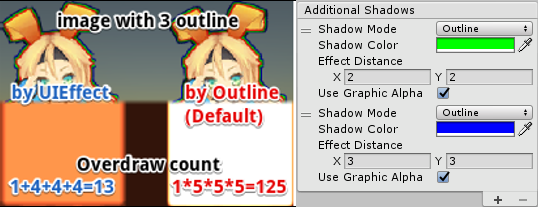
* Multiple shadow effect to reduce rendering vertices
|
||||
|
||||
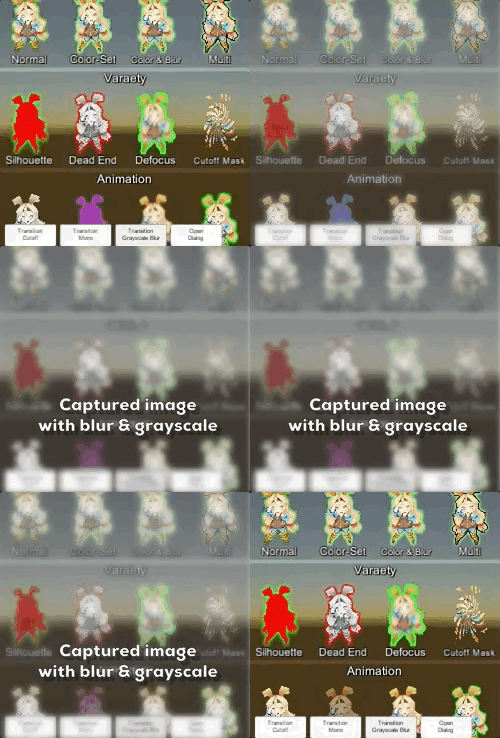
* Capture image with effect, like post effect
|
||||
|
||||
* Dialog with captured image effect
|
||||

|
||||
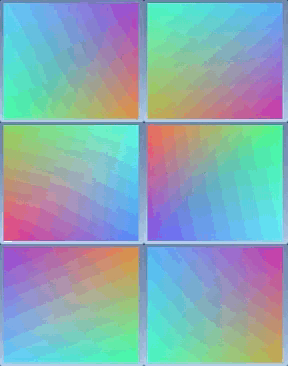
* Change vertex color as gradient, with rotation, offset, color correction
|
||||
|
||||

|
||||
|
||||
|
||||
|
||||
<br><br><br><br>
|
||||
## Demo
|
||||
|
||||
[WebGL Demo](https://developer.cloud.unity3d.com/share/WJTY06hfG7/webgl/)
|
||||
|
||||
* Effect sample
|
||||
* Transition
|
||||
* Dialog window with blur background
|
||||
* Included in unitypackage
|
||||
|
||||
|
||||
|
||||
|
||||
<br><br><br><br>
|
||||
## Usage
|
||||
|
||||
1. Download UIEffect.unitypackage from [Releases](https://github.com/mob-sakai/UIEffect/releases) and install to your project.
|
||||
1. Import the package into your Unity project. Select `Import Package > Custom Package` from the `Assets` menu.
|
||||
1. Add `UIEffect` component to UI element (Image, RawImage, Text, etc...) from `Add Component` in inspector.
|
||||
1. Choose effect type and adjust values in inspector.
|
||||

|
||||
1. Enjoy!
|
||||
|
||||
|
||||
##### Requirement
|
||||
|
||||
* Unity 5.5+ *(included Unity 2017.x)*
|
||||
* No other SDK are required
|
||||
|
||||
|
||||
<br><br><br><br>
|
||||
## Development Note
|
||||
|
||||
#### How does UIEffectCapturedImage work?
|
||||
|
||||

|
||||
|
||||
`UIEffectCapturedImage` is similar to post effect, but uses `CommandBuffer` to give effect only on the rendering result (= captured image) of a specific frame.
|
||||
This effect is non-realtime, light-weight, less-camera, blit only once, but effective.
|
||||
|
||||
* Camera for processing effect is unnecessary.
|
||||
* Process effect only once after `UIEffectCapturedImage.Capture`.
|
||||
* Using reduction buffer, keep used memory size small and keep rendering load are small.
|
||||
* When GameObjects with motion are on the screen, a result texture may be stirred.
|
||||
* You can overlay and display like as: [Screen] | [UIEffectCapturedImage] | [Dialog A] | [UIEffectCapturedImage] | [Dialog B].
|
||||
See also [Demo](#demo).
|
||||
|
||||
|
||||
#### Why is UIEffect lightweight?
|
||||
|
||||
* UIEffect pre-generates material from a combination of effects. This has the following benefits.
|
||||
* Draw call batching If possible, draw calls will decrease.
|
||||
* Since only the required material and shader variants are included in the build, the build size will be smaller.
|
||||
|
||||
|
||||
#### How to control effect parameters for uGUI element WITHOUT MaterialPropertyBlock?
|
||||
|
||||
* In general, you can use [MaterialPropertyBlock](https://docs.unity3d.com/ScriptReference/MaterialPropertyBlock.html) for renderers to control minor changes in the material without different batches.
|
||||
* However, changing the [MaterialPropertyBlock](https://docs.unity3d.com/ScriptReference/MaterialPropertyBlock.html) of the uGUI element from the script will cause different batches and draw calls to increase.
|
||||
* So UIEffect encodes multiple effect parameters to UV1 channel with [IMeshModifier](https://docs.unity3d.com/ScriptReference/UI.IMeshModifier.html).
|
||||
* Pack four 6-bit [0-1] (64 steps) parameters into one float value.
|
||||
* The parameters are low precision, but sufficient.
|
||||
|
||||
| uv1 | 6-bit [0-1] | 6-bit [0-1] | 6-bit [0-1] | 6-bit [0-1] |
|
||||
|-|-|-|-|-|
|
||||
| x(32bit float) | Tone level | *Empty* | Blur level | *Empty* |
|
||||
| y(32bit float) | Red channel | Green channel | Blue channel | Alpha channel |
|
||||
|
||||
|
||||
#### Note: Unity 5.6+
|
||||
|
||||
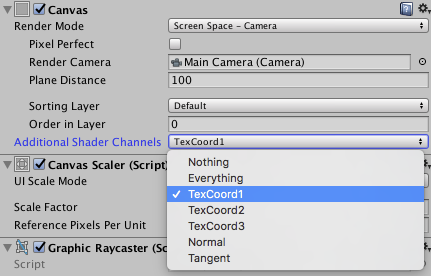
In Unity 5.6+, Canvas supports **Additional Shader Channels**.
|
||||
Please enable `TexCoord1` to use UIEffect.
|
||||
|
||||

|
||||
|
||||
|
||||
#### Note: if you include prefabs / scenes containing UIEffect in AssetBundle.
|
||||
|
||||
Use script define symbol `UIEFFECT_SEPARATE`.
|
||||
Unused shader variants and materials will be excluded from AssetBundles.
|
||||
|
||||
||Combined mode (default)|Separated mode|
|
||||
|-|-|-|
|
||||
|Script define symbol| - |`UIEFFECT_SEPARATE`|
|
||||
|Included in build|Only used variants|Only used variants|
|
||||
|Included in AssetBundle|All variants (Heavy!)|Only used variants|
|
||||
|Look in editor|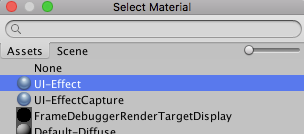|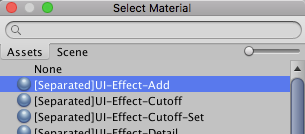|
|
||||
|
||||
|
||||
#### How to improve performance?
|
||||
|
||||
* Use `ShaderVariantCollection` to preload shader.
|
||||
https://docs.unity3d.com/Manual/OptimizingShaderLoadTime.html
|
||||
* Set camera's clear flag to "Solid Color".
|
||||
* Enable multi thread rendering.
|
||||
|
||||
|
||||
|
||||
<br><br><br><br>
|
||||
## Release Notes
|
||||
|
||||
### ver.2.0.0
|
||||
|
||||
* Feature: Switch separate/combine materials by script symbol "UIEFFECT_SEPARATE".
|
||||
* Combined mode (default)
|
||||
* The effect materials are sub-asset, and will be hidden in project view & object picker window.
|
||||
* Unused shader variants and materials will be excluded from build, but they will be **included in AssetBundle.**
|
||||

|
||||
* Separated mode
|
||||
* Use script define symbol `UIEFFECT_SEPARATE`.
|
||||
* The effect materials are main-asset, and will be displayed in project view & object picker window.
|
||||
* In Editor, the effect materials are generated as asset, on demand.
|
||||
* Unused shader variants and materials will be excluded from build and AssetBundle.
|
||||
* We recommend this mode only if you include prefabs / scenes containing UIEffect in AssetBundle.
|
||||

|
||||
* Changed: Default is "Combined mode".
|
||||
* Changed: Change namespace to `Coffee.UIExtensions`.
|
||||
* Changed: Unity 5.3.x & 5.4.x are no longer supported.
|
||||
|
||||
|
||||
### ver.1.6.1
|
||||
|
||||
* Fixed: Cannot access protected member `UnityEngine.UI.BaseMeshEffect.graphic` in Unity5.6+.
|
||||
|
||||
|
||||
### ver.1.6.0
|
||||
|
||||
* Changed: UIEffect inherit BaseMeshEffect.
|
||||
* Fixed: Pixelization is incorrect.
|
||||
* Changed: ShadowMode -> ShadowStyle.
|
||||
* Changed: Blur level is range [0-1].
|
||||
|
||||
|
||||
### ver.1.5.1
|
||||
|
||||
* Fixed: An error occurs when no effect is specified for UICapturedImage. [#36](https://github.com/mob-sakai/UIEffect/issues/36)
|
||||
|
||||
|
||||
### ver.1.5.0
|
||||
|
||||
* Feature: Add ToneMode `Hue Shift`.
|
||||

|
||||
* Feature: Add ShadowMode `Shadow3`.
|
||||

|
||||
* Feature: Add `UIGradient` component to change vertex color as gradient.
|
||||
* Gradient direction
|
||||
* Horizontal
|
||||
* Vertical
|
||||
* Angle
|
||||
* Diagonal
|
||||
* Rotation and offset
|
||||
* Text gradient style
|
||||
* Rect
|
||||
* Fit
|
||||
* Split
|
||||
* Color space
|
||||
* Uninitialized
|
||||
* Gammma
|
||||
* Linear
|
||||
* Ignore aspect ratio
|
||||

|
||||
|
||||
|
||||
### ver.1.4.4
|
||||
|
||||
* Fixed: Error has occur on edit prefab. [#27](https://github.com/mob-sakai/UIEffect/issues/27)
|
||||
|
||||
|
||||
### ver.1.4.3
|
||||
|
||||
* Fixed: Color effect is incorrect. [#19](https://github.com/mob-sakai/UIEffect/issues/19)
|
||||
|
||||
|
||||
### ver.1.4.2
|
||||
|
||||
* Fixed: Error has occur on after deserialize. [#16](https://github.com/mob-sakai/UIEffect/issues/16)
|
||||
|
||||
|
||||
### ver.1.4.1
|
||||
|
||||
* Fixed: Demo link in `readme.md` is broken.
|
||||
|
||||
|
||||
### ver.1.4.0
|
||||
|
||||
* Changed: ToneMode, ColorMode, BlurMode can be changed only in editor.
|
||||
* Changed: Cutoff's level is reversed.
|
||||
* Feature: Exclude unused shader variant from build.
|
||||
* Add: Add many materials for shader variant, but exclude unused materials from build.
|
||||
Build report of demo project is as following.
|
||||
|
||||
| | ver.1.3.0 | ver.1.4.0 |
|
||||
|--|-----------|-----------|
|
||||
| UI-Effect.shader | All 112 variants, 170.7 kb | 21 variants, 31.4 kb |
|
||||
| UI-EffectCapturedImage.shader | All 80 variants, 49.0 kb | 2 variants, 7.3 kb |
|
||||
| Materials in build | Instantiate on play, 0 kb | 23 items, about 6.9 kb |
|
||||
| Total | 219.7 kb | 45.6 kb |
|
||||
|
||||
|
||||
### ver.1.3.0
|
||||
|
||||
* Feature: Capture image with effect, like post effect.
|
||||
* Demo: Add transition blur button & dialog with captured image effect.
|
||||

|
||||
|
||||
|
||||
### ver.1.2.0
|
||||
|
||||
* Fixed : Pixelaration shifts to the lower right.
|
||||
* Fixed : Cutoff alpha is incorrect.
|
||||
* Feature: Supports multiple shadow effect for reduce rendering vertices.
|
||||

|
||||
* Feature: New blur effect mode : `Medium`.
|
||||
* Feature: Fix button to enable TexCoord1 of Canvas.additionalShaderChannels to use UIEffect.
|
||||

|
||||
* Changed : UIEffect.color is obsolete, use UIEffect.effectColor instead.
|
||||
* Changed: Blur range is [0-2].
|
||||
* Refactoring: Shader refactoring.
|
||||
* Demo: Add transition button & multiple shadows.
|
||||
|
||||
|
||||
### ver.1.1.0
|
||||
|
||||
* Feature: Add Pixelaration effect.
|
||||
* Feature: Add Cutoff/Mono effect for patterned alpha images. It can be used for masks and transitions!
|
||||

|
||||
|
||||
|
||||
### ver.1.0.0
|
||||
|
||||
* Feature: Shader supports pre-processer macros (for example UNITY_VERTEX_OUTPUT_STEREO) for Unity 5.3.x, 5.4.x and 5.5.x.
|
||||
* Feature: Supports changing value from animation.
|
||||
* Feature: Supports Tone effect.
|
||||
* grayscale
|
||||
* sepia
|
||||
* nega
|
||||
* Feature: Supports Color effect.
|
||||
* set
|
||||
* add
|
||||
* sub
|
||||
* Feature: Supports Blur effect.
|
||||
* fast
|
||||
* detail
|
||||
* Fix: Color effect will not be properly when it was rotated.
|
||||
* Performance: Shader supports multi-compile for performance.
|
||||
* Performance: Cache same effect materials to reduce draw calls.
|
||||
* Improve: Supports mobile devices.
|
||||
* Improve: Simplify component & inspector.
|
||||
|
||||
|
||||
|
||||
<br><br><br><br>
|
||||
## License
|
||||
|
||||
* MIT
|
||||
* © UTJ/UCL
|
||||
|
||||
|
||||
|
||||
## Author
|
||||
|
||||
[mob-sakai](https://github.com/mob-sakai)
|
||||
|
||||
|
||||
|
||||
## See Also
|
||||
|
||||
* GitHub Page : https://github.com/mob-sakai/UIEffect
|
||||
* Releases : https://github.com/mob-sakai/UIEffect/releases
|
||||
* Issue tracker : https://github.com/mob-sakai/UIEffect/issues
|
||||
* Current Project : https://github.com/mob-sakai/UIEffect/projects/1
|
||||
@@ -0,0 +1,82 @@
|
||||
%YAML 1.1
|
||||
%TAG !u! tag:unity3d.com,2011:
|
||||
--- !u!21 &2100000
|
||||
Material:
|
||||
serializedVersion: 6
|
||||
m_ObjectHideFlags: 0
|
||||
m_PrefabParentObject: {fileID: 0}
|
||||
m_PrefabInternal: {fileID: 0}
|
||||
m_Name: UI-Effect-Dissolve
|
||||
m_Shader: {fileID: 4800000, guid: e1b48dc831eb147e9886c049033213bf, type: 3}
|
||||
m_ShaderKeywords: _EMISSION
|
||||
m_LightmapFlags: 1
|
||||
m_CustomRenderQueue: -1
|
||||
stringTagMap: {}
|
||||
m_SavedProperties:
|
||||
serializedVersion: 2
|
||||
m_TexEnvs:
|
||||
- first:
|
||||
name: _MainTex
|
||||
second:
|
||||
m_Texture: {fileID: 0}
|
||||
m_Scale: {x: 1, y: 1}
|
||||
m_Offset: {x: 0, y: 0}
|
||||
- first:
|
||||
name: _NoiseTex
|
||||
second:
|
||||
m_Texture: {fileID: 2800000, guid: 3e04c247fb2604af186173fce0bc62de, type: 3}
|
||||
m_Scale: {x: 1, y: 1}
|
||||
m_Offset: {x: 0, y: 0}
|
||||
m_Floats:
|
||||
- first:
|
||||
name: _ColorMask
|
||||
second: 15
|
||||
- first:
|
||||
name: _EdgeWidth
|
||||
second: 0.1
|
||||
- first:
|
||||
name: _InnerSoftClip
|
||||
second: 0.468
|
||||
- first:
|
||||
name: _InnerSoftness
|
||||
second: 0.5
|
||||
- first:
|
||||
name: _OuterSoftClip
|
||||
second: 0.776
|
||||
- first:
|
||||
name: _OuterSoftness
|
||||
second: 0.5
|
||||
- first:
|
||||
name: _Stencil
|
||||
second: 0
|
||||
- first:
|
||||
name: _StencilComp
|
||||
second: 8
|
||||
- first:
|
||||
name: _StencilOp
|
||||
second: 0
|
||||
- first:
|
||||
name: _StencilReadMask
|
||||
second: 255
|
||||
- first:
|
||||
name: _StencilWriteMask
|
||||
second: 255
|
||||
- first:
|
||||
name: _UseUIAlphaClip
|
||||
second: 0
|
||||
m_Colors:
|
||||
- first:
|
||||
name: _Color
|
||||
second: {r: 1, g: 1, b: 1, a: 1}
|
||||
- first:
|
||||
name: _EdgeInnerColor
|
||||
second: {r: 1, g: 0, b: 0, a: 1}
|
||||
- first:
|
||||
name: _EdgeOuterColor
|
||||
second: {r: 1, g: 0.7529412, b: 0, a: 1}
|
||||
- first:
|
||||
name: _InnerEdgeColor
|
||||
second: {r: 1, g: 0, b: 0, a: 1}
|
||||
- first:
|
||||
name: _OuterEdgeColor
|
||||
second: {r: 1, g: 0.75, b: 0, a: 1}
|
||||
@@ -0,0 +1,8 @@
|
||||
fileFormatVersion: 2
|
||||
guid: 17b17d6effbe14075a3bbdf1fda1f6e1
|
||||
timeCreated: 1524469054
|
||||
licenseType: Pro
|
||||
NativeFormatImporter:
|
||||
userData:
|
||||
assetBundleName:
|
||||
assetBundleVariant:
|
||||
@@ -0,0 +1,160 @@
|
||||
Shader "UI/Hidden/UI-Effect-Dissolve"
|
||||
{
|
||||
Properties
|
||||
{
|
||||
[PerRendererData] _MainTex ("Main Texture", 2D) = "white" {}
|
||||
_Color ("Tint", Color) = (1,1,1,1)
|
||||
|
||||
_StencilComp ("Stencil Comparison", Float) = 8
|
||||
_Stencil ("Stencil ID", Float) = 0
|
||||
_StencilOp ("Stencil Operation", Float) = 0
|
||||
_StencilWriteMask ("Stencil Write Mask", Float) = 255
|
||||
_StencilReadMask ("Stencil Read Mask", Float) = 255
|
||||
|
||||
_ColorMask ("Color Mask", Float) = 15
|
||||
|
||||
[Toggle(UNITY_UI_ALPHACLIP)] _UseUIAlphaClip ("Use Alpha Clip", Float) = 0
|
||||
|
||||
[Header(Dissolve)]
|
||||
_NoiseTex ("Noise Texture (A)", 2D) = "white" {}
|
||||
_EdgeWidth ("Edge width", Range (0.0001, 1)) = 0.05
|
||||
_OuterEdgeColor ("Outer edge color", Color) = (1.0, 0.75, 0.0, 1.0)
|
||||
_OuterSoftness ("Outer softness", Range (0.0001, 1)) = 0.5
|
||||
_InnerEdgeColor ("Inner edge color", Color) = (1.0, 0.0, 0.0, 1.0)
|
||||
_InnerSoftness ("Inner softness", Range (0.0001, 1)) = 0.5
|
||||
}
|
||||
|
||||
SubShader
|
||||
{
|
||||
Tags
|
||||
{
|
||||
"Queue"="Transparent"
|
||||
"IgnoreProjector"="True"
|
||||
"RenderType"="Transparent"
|
||||
"PreviewType"="Plane"
|
||||
"CanUseSpriteAtlas"="True"
|
||||
}
|
||||
|
||||
Stencil
|
||||
{
|
||||
Ref [_Stencil]
|
||||
Comp [_StencilComp]
|
||||
Pass [_StencilOp]
|
||||
ReadMask [_StencilReadMask]
|
||||
WriteMask [_StencilWriteMask]
|
||||
}
|
||||
|
||||
Cull Off
|
||||
Lighting Off
|
||||
ZWrite Off
|
||||
ZTest [unity_GUIZTestMode]
|
||||
Blend SrcAlpha OneMinusSrcAlpha
|
||||
ColorMask [_ColorMask]
|
||||
|
||||
Pass
|
||||
{
|
||||
Name "Default"
|
||||
|
||||
CGPROGRAM
|
||||
#pragma vertex vert
|
||||
#pragma fragment frag
|
||||
#pragma target 2.0
|
||||
|
||||
#pragma multi_compile __ UNITY_UI_ALPHACLIP
|
||||
|
||||
#include "UnityCG.cginc"
|
||||
#include "UnityUI.cginc"
|
||||
|
||||
struct appdata_t
|
||||
{
|
||||
float4 vertex : POSITION;
|
||||
float4 color : COLOR;
|
||||
float2 texcoord : TEXCOORD0;
|
||||
UNITY_VERTEX_INPUT_INSTANCE_ID
|
||||
|
||||
float2 uv1 : TEXCOORD1;
|
||||
};
|
||||
|
||||
struct v2f
|
||||
{
|
||||
float4 vertex : SV_POSITION;
|
||||
fixed4 color : COLOR;
|
||||
float2 texcoord : TEXCOORD0;
|
||||
float4 worldPosition : TEXCOORD1;
|
||||
UNITY_VERTEX_OUTPUT_STEREO
|
||||
|
||||
half3 effectFactor : TEXCOORD2;
|
||||
};
|
||||
|
||||
fixed4 _Color;
|
||||
fixed4 _TextureSampleAdd;
|
||||
float4 _ClipRect;
|
||||
sampler2D _MainTex;
|
||||
|
||||
sampler2D _NoiseTex;
|
||||
float _EdgeWidth;
|
||||
float3 _OuterEdgeColor;
|
||||
float _OuterSoftness;
|
||||
float3 _InnerEdgeColor;
|
||||
float _InnerSoftness;
|
||||
|
||||
fixed3 UnpackToVec3(float value)
|
||||
{
|
||||
const int PACKER_STEP = 256;
|
||||
const int PRECISION = PACKER_STEP - 1;
|
||||
fixed3 vec;
|
||||
|
||||
vec.x = (value % PACKER_STEP) / PRECISION;
|
||||
value = floor(value / PACKER_STEP);
|
||||
|
||||
vec.y = (value % PACKER_STEP) / PRECISION;
|
||||
value = floor(value / PACKER_STEP);
|
||||
|
||||
vec.z = (value % PACKER_STEP) / PRECISION;
|
||||
return vec;
|
||||
}
|
||||
|
||||
v2f vert(appdata_t IN)
|
||||
{
|
||||
v2f OUT;
|
||||
UNITY_SETUP_INSTANCE_ID(IN);
|
||||
UNITY_INITIALIZE_VERTEX_OUTPUT_STEREO(OUT);
|
||||
OUT.worldPosition = IN.vertex;
|
||||
|
||||
OUT.vertex = UnityObjectToClipPos(IN.vertex);
|
||||
|
||||
OUT.texcoord = IN.texcoord;
|
||||
|
||||
OUT.color = IN.color * _Color;
|
||||
|
||||
//xy: Noize uv
|
||||
//z: Dissolve factor
|
||||
OUT.effectFactor = UnpackToVec3(IN.uv1.x);
|
||||
return OUT;
|
||||
}
|
||||
|
||||
fixed4 frag(v2f IN) : SV_Target
|
||||
{
|
||||
half4 color = (tex2D(_MainTex, IN.texcoord) + _TextureSampleAdd) * IN.color;
|
||||
|
||||
color.a *= UnityGet2DClipping(IN.worldPosition.xy, _ClipRect);
|
||||
|
||||
float cutout = tex2D(_NoiseTex, IN.effectFactor.xy).a;
|
||||
fixed factor = cutout - IN.effectFactor.z;
|
||||
|
||||
#ifdef UNITY_UI_ALPHACLIP
|
||||
clip (min(color.a - 0.01, factor));
|
||||
#endif
|
||||
|
||||
fixed edgeLerp = step(cutout, color.a) * saturate((_EdgeWidth - factor)*16/_InnerSoftness);
|
||||
fixed3 edgeColor = lerp(_OuterEdgeColor, _InnerEdgeColor, (factor)/_EdgeWidth);
|
||||
|
||||
color.rgb =lerp(color.rgb, edgeColor, edgeLerp);
|
||||
color.a *= saturate((factor)*32/_OuterSoftness);
|
||||
|
||||
return color;
|
||||
}
|
||||
ENDCG
|
||||
}
|
||||
}
|
||||
}
|
||||
@@ -0,0 +1,9 @@
|
||||
fileFormatVersion: 2
|
||||
guid: e1b48dc831eb147e9886c049033213bf
|
||||
timeCreated: 1523859834
|
||||
licenseType: Pro
|
||||
ShaderImporter:
|
||||
defaultTextures: []
|
||||
userData:
|
||||
assetBundleName:
|
||||
assetBundleVariant:
|
||||
@@ -0,0 +1,144 @@
|
||||
Shader "UI/Hidden/UI-Effect-Shiny"
|
||||
{
|
||||
Properties
|
||||
{
|
||||
[PerRendererData] _MainTex ("Main Texture", 2D) = "white" {}
|
||||
_Color ("Tint", Color) = (1,1,1,1)
|
||||
|
||||
_StencilComp ("Stencil Comparison", Float) = 8
|
||||
_Stencil ("Stencil ID", Float) = 0
|
||||
_StencilOp ("Stencil Operation", Float) = 0
|
||||
_StencilWriteMask ("Stencil Write Mask", Float) = 255
|
||||
_StencilReadMask ("Stencil Read Mask", Float) = 255
|
||||
|
||||
_ColorMask ("Color Mask", Float) = 15
|
||||
|
||||
[Toggle(UNITY_UI_ALPHACLIP)] _UseUIAlphaClip ("Use Alpha Clip", Float) = 0
|
||||
}
|
||||
|
||||
SubShader
|
||||
{
|
||||
Tags
|
||||
{
|
||||
"Queue"="Transparent"
|
||||
"IgnoreProjector"="True"
|
||||
"RenderType"="Transparent"
|
||||
"PreviewType"="Plane"
|
||||
"CanUseSpriteAtlas"="True"
|
||||
}
|
||||
|
||||
Stencil
|
||||
{
|
||||
Ref [_Stencil]
|
||||
Comp [_StencilComp]
|
||||
Pass [_StencilOp]
|
||||
ReadMask [_StencilReadMask]
|
||||
WriteMask [_StencilWriteMask]
|
||||
}
|
||||
|
||||
Cull Off
|
||||
Lighting Off
|
||||
ZWrite Off
|
||||
ZTest [unity_GUIZTestMode]
|
||||
Blend SrcAlpha OneMinusSrcAlpha
|
||||
ColorMask [_ColorMask]
|
||||
|
||||
Pass
|
||||
{
|
||||
Name "Default"
|
||||
|
||||
CGPROGRAM
|
||||
#pragma vertex vert
|
||||
#pragma fragment frag
|
||||
#pragma target 2.0
|
||||
|
||||
#pragma multi_compile __ UNITY_UI_ALPHACLIP
|
||||
|
||||
#include "UnityCG.cginc"
|
||||
#include "UnityUI.cginc"
|
||||
|
||||
struct appdata_t
|
||||
{
|
||||
float4 vertex : POSITION;
|
||||
float4 color : COLOR;
|
||||
float2 texcoord : TEXCOORD0;
|
||||
UNITY_VERTEX_INPUT_INSTANCE_ID
|
||||
|
||||
float2 uv1 : TEXCOORD1;
|
||||
};
|
||||
|
||||
struct v2f
|
||||
{
|
||||
float4 vertex : SV_POSITION;
|
||||
fixed4 color : COLOR;
|
||||
float2 texcoord : TEXCOORD0;
|
||||
float4 worldPosition : TEXCOORD1;
|
||||
UNITY_VERTEX_OUTPUT_STEREO
|
||||
|
||||
half4 effectFactor : TEXCOORD2;
|
||||
};
|
||||
|
||||
fixed4 _Color;
|
||||
fixed4 _TextureSampleAdd;
|
||||
float4 _ClipRect;
|
||||
sampler2D _MainTex;
|
||||
float4 _MainTex_TexelSize;
|
||||
|
||||
fixed4 UnpackToVec4(float value)
|
||||
{
|
||||
const int PACKER_STEP = 64;
|
||||
const int PRECISION = PACKER_STEP - 1;
|
||||
fixed4 color;
|
||||
|
||||
color.r = (value % PACKER_STEP) / PRECISION;
|
||||
value = floor(value / PACKER_STEP);
|
||||
|
||||
color.g = (value % PACKER_STEP) / PRECISION;
|
||||
value = floor(value / PACKER_STEP);
|
||||
|
||||
color.b = (value % PACKER_STEP) / PRECISION;
|
||||
value = floor(value / PACKER_STEP);
|
||||
|
||||
color.a = (value % PACKER_STEP) / PRECISION;
|
||||
return color;
|
||||
}
|
||||
|
||||
v2f vert(appdata_t IN)
|
||||
{
|
||||
v2f OUT;
|
||||
UNITY_SETUP_INSTANCE_ID(IN);
|
||||
UNITY_INITIALIZE_VERTEX_OUTPUT_STEREO(OUT);
|
||||
OUT.worldPosition = IN.vertex;
|
||||
|
||||
OUT.vertex = UnityObjectToClipPos(IN.vertex);
|
||||
|
||||
OUT.texcoord = IN.texcoord;
|
||||
|
||||
OUT.color = IN.color * _Color;
|
||||
|
||||
OUT.effectFactor = UnpackToVec4(IN.uv1.x);
|
||||
OUT.effectFactor.y = OUT.effectFactor.y * 2 - 0.5;
|
||||
return OUT;
|
||||
}
|
||||
|
||||
fixed4 frag(v2f IN) : SV_Target
|
||||
{
|
||||
half4 color = (tex2D(_MainTex, IN.texcoord) + _TextureSampleAdd) * IN.color;
|
||||
|
||||
color.a *= UnityGet2DClipping(IN.worldPosition.xy, _ClipRect);
|
||||
|
||||
#ifdef UNITY_UI_ALPHACLIP
|
||||
clip (color.a - 0.001);
|
||||
#endif
|
||||
|
||||
fixed lowLevel = IN.effectFactor.y - IN.effectFactor.z;
|
||||
fixed highLevel = IN.effectFactor.y + IN.effectFactor.z;
|
||||
fixed shinePower = smoothstep(IN.effectFactor.z, 0, abs(abs(clamp(IN.effectFactor.x, lowLevel, highLevel) - IN.effectFactor.y)));
|
||||
|
||||
color.rgb += color.a * (shinePower / 2) * IN.effectFactor.w;
|
||||
return color;
|
||||
}
|
||||
ENDCG
|
||||
}
|
||||
}
|
||||
}
|
||||
@@ -0,0 +1,9 @@
|
||||
fileFormatVersion: 2
|
||||
guid: 20ffe76c2439c403aabdd25bd94bf011
|
||||
timeCreated: 1523859834
|
||||
licenseType: Pro
|
||||
ShaderImporter:
|
||||
defaultTextures: []
|
||||
userData:
|
||||
assetBundleName:
|
||||
assetBundleVariant:
|
||||
@@ -85,7 +85,10 @@ Shader "UI/Hidden/UI-Effect"
|
||||
#endif
|
||||
|
||||
#if defined (UI_TONE) || defined (UI_BLUR)
|
||||
half3 effectFactor : TEXCOORD2;
|
||||
half4 effectFactor : TEXCOORD2;
|
||||
#endif
|
||||
#if UI_TONE_HUE || UI_TONE_PIXEL
|
||||
half4 extraFactor : TEXCOORD3;
|
||||
#endif
|
||||
};
|
||||
|
||||
@@ -112,10 +115,10 @@ Shader "UI/Hidden/UI-Effect"
|
||||
#endif
|
||||
|
||||
#if UI_TONE_HUE
|
||||
OUT.effectFactor.y = sin(OUT.effectFactor.x*3.14159265359*2);
|
||||
OUT.effectFactor.x = cos(OUT.effectFactor.x*3.14159265359*2);
|
||||
OUT.extraFactor.x = cos(OUT.effectFactor.x*3.14159265359 * 2);
|
||||
OUT.extraFactor.y = sin(OUT.effectFactor.x*3.14159265359 * 2);
|
||||
#elif UI_TONE_PIXEL
|
||||
OUT.effectFactor.xy = max(2, (1-OUT.effectFactor.x) * _MainTex_TexelSize.zw);
|
||||
OUT.extraFactor.xy = max(2, (1-OUT.effectFactor.x*0.98) * _MainTex_TexelSize.zw);
|
||||
#endif
|
||||
|
||||
#if defined (UI_COLOR)
|
||||
@@ -129,7 +132,7 @@ Shader "UI/Hidden/UI-Effect"
|
||||
fixed4 frag(v2f IN) : SV_Target
|
||||
{
|
||||
#if UI_TONE_PIXEL
|
||||
IN.texcoord = round(IN.texcoord * IN.effectFactor.xy) / IN.effectFactor.xy;
|
||||
IN.texcoord = round(IN.texcoord * IN.extraFactor.xy) / IN.extraFactor.xy;
|
||||
#endif
|
||||
|
||||
#if defined (UI_BLUR)
|
||||
@@ -149,7 +152,7 @@ Shader "UI/Hidden/UI-Effect"
|
||||
color.rgb = IN.color.rgb;
|
||||
color.a = color.a * tex2D(_MainTex, IN.texcoord).a + IN.effectFactor.x * 2 - 1;
|
||||
#elif UI_TONE_HUE
|
||||
color.rgb = shift_hue(color.rgb, IN.effectFactor.x, IN.effectFactor.y);
|
||||
color.rgb = shift_hue(color.rgb, IN.extraFactor.x, IN.extraFactor.y);
|
||||
#elif defined (UI_TONE) & !UI_TONE_CUTOFF
|
||||
color = ApplyToneEffect(color, IN.effectFactor.x);
|
||||
#endif
|
||||
|
||||
@@ -0,0 +1,162 @@
|
||||
using System;
|
||||
using System.Collections.Generic;
|
||||
using UnityEngine;
|
||||
using UnityEngine.UI;
|
||||
|
||||
#if UNITY_EDITOR
|
||||
using System.IO;
|
||||
using System.Linq;
|
||||
using UnityEditor;
|
||||
#endif
|
||||
|
||||
namespace Coffee.UIExtensions
|
||||
{
|
||||
/// <summary>
|
||||
/// UIDissolve.
|
||||
/// </summary>
|
||||
[ExecuteInEditMode]
|
||||
[DisallowMultipleComponent]
|
||||
public class UIDissolve : BaseMeshEffect
|
||||
#if UNITY_EDITOR
|
||||
, ISerializationCallbackReceiver
|
||||
#endif
|
||||
{
|
||||
//################################
|
||||
// Constant or Static Members.
|
||||
//################################
|
||||
public const string shaderName = "UI/Hidden/UI-Effect-Dissolve";
|
||||
|
||||
|
||||
//################################
|
||||
// Serialize Members.
|
||||
//################################
|
||||
[SerializeField] [Range(0, 1)] float m_Location = 0;
|
||||
[SerializeField] Material m_EffectMaterial;
|
||||
|
||||
|
||||
//################################
|
||||
// Public Members.
|
||||
//################################
|
||||
/// <summary>
|
||||
/// Graphic affected by the UIEffect.
|
||||
/// </summary>
|
||||
new public Graphic graphic { get { return base.graphic; } }
|
||||
|
||||
/// <summary>
|
||||
/// Location for effect.
|
||||
/// </summary>
|
||||
public float location { get { return m_Location; } set { m_Location = Mathf.Clamp(value, 0, 1); _SetDirty(); } }
|
||||
|
||||
/// <summary>
|
||||
/// Effect material.
|
||||
/// </summary>
|
||||
public virtual Material effectMaterial { get { return m_EffectMaterial; } }
|
||||
|
||||
/// <summary>
|
||||
/// This function is called when the object becomes enabled and active.
|
||||
/// </summary>
|
||||
protected override void OnEnable()
|
||||
{
|
||||
graphic.material = effectMaterial;
|
||||
base.OnEnable();
|
||||
}
|
||||
|
||||
/// <summary>
|
||||
/// This function is called when the behaviour becomes disabled () or inactive.
|
||||
/// </summary>
|
||||
protected override void OnDisable()
|
||||
{
|
||||
graphic.material = null;
|
||||
base.OnDisable();
|
||||
}
|
||||
|
||||
#if UNITY_EDITOR
|
||||
public void OnBeforeSerialize()
|
||||
{
|
||||
}
|
||||
|
||||
public void OnAfterDeserialize()
|
||||
{
|
||||
var obj = this;
|
||||
EditorApplication.delayCall += () =>
|
||||
{
|
||||
if (Application.isPlaying || !obj || !obj.graphic)
|
||||
return;
|
||||
|
||||
if(!m_EffectMaterial)
|
||||
{
|
||||
m_EffectMaterial = GetMaterial(shaderName);
|
||||
EditorUtility.SetDirty(this);
|
||||
EditorApplication.delayCall +=AssetDatabase.SaveAssets;
|
||||
}
|
||||
if(obj.isActiveAndEnabled && graphic.material != m_EffectMaterial)
|
||||
{
|
||||
graphic.material = m_EffectMaterial;
|
||||
EditorUtility.SetDirty(graphic);
|
||||
EditorApplication.delayCall +=AssetDatabase.SaveAssets;
|
||||
}
|
||||
};
|
||||
}
|
||||
|
||||
public static Material GetMaterial(string shaderName)
|
||||
{
|
||||
string name = Path.GetFileName (shaderName);
|
||||
return AssetDatabase.FindAssets("t:Material " + name)
|
||||
.Select(x => AssetDatabase.GUIDToAssetPath(x))
|
||||
.SelectMany(x => AssetDatabase.LoadAllAssetsAtPath(x))
|
||||
.OfType<Material>()
|
||||
.FirstOrDefault(x => x.name == name);
|
||||
}
|
||||
#endif
|
||||
|
||||
/// <summary>
|
||||
/// Modifies the mesh.
|
||||
/// </summary>
|
||||
public override void ModifyMesh(VertexHelper vh)
|
||||
{
|
||||
|
||||
if (!IsActive())
|
||||
return;
|
||||
|
||||
// rect.
|
||||
Rect rect = graphic.rectTransform.rect;
|
||||
|
||||
// Calculate vertex position.
|
||||
UIVertex vertex = default(UIVertex);
|
||||
for (int i = 0; i < vh.currentVertCount; i++)
|
||||
{
|
||||
vh.PopulateUIVertex(ref vertex, i);
|
||||
|
||||
var x = Mathf.Clamp01 (vertex.position.x / rect.width + 0.5f);
|
||||
var y = Mathf.Clamp01 (vertex.position.y / rect.height + 0.5f);
|
||||
vertex.uv1 = new Vector2 (_PackToFloat (x, y, location), 0);
|
||||
|
||||
vh.SetUIVertex(vertex, i);
|
||||
}
|
||||
}
|
||||
|
||||
//################################
|
||||
// Private Members.
|
||||
//################################
|
||||
/// <summary>
|
||||
/// Mark the UIEffect as dirty.
|
||||
/// </summary>
|
||||
void _SetDirty()
|
||||
{
|
||||
if(graphic)
|
||||
graphic.SetVerticesDirty();
|
||||
}
|
||||
|
||||
/// <summary>
|
||||
/// Pack 3 low-precision [0-1] floats values to a float.
|
||||
/// Each value [0-1] has 256 steps(8 bits).
|
||||
/// </summary>
|
||||
static float _PackToFloat(float x, float y, float z)
|
||||
{
|
||||
const int PRECISION = (1 << 8) - 1;
|
||||
return (Mathf.FloorToInt(z * PRECISION) << 16)
|
||||
+ (Mathf.FloorToInt(y * PRECISION) << 8)
|
||||
+ Mathf.FloorToInt(x * PRECISION);
|
||||
}
|
||||
}
|
||||
}
|
||||
@@ -0,0 +1,12 @@
|
||||
fileFormatVersion: 2
|
||||
guid: ce76b7a490bd74f34a2f2752641aea24
|
||||
timeCreated: 1523859834
|
||||
licenseType: Pro
|
||||
MonoImporter:
|
||||
serializedVersion: 2
|
||||
defaultReferences: []
|
||||
executionOrder: 0
|
||||
icon: {instanceID: 0}
|
||||
userData:
|
||||
assetBundleName:
|
||||
assetBundleVariant:
|
||||
@@ -127,6 +127,9 @@ namespace Coffee.UIExtensions
|
||||
[SerializeField] List<AdditionalShadow> m_AdditionalShadows = new List<AdditionalShadow>();
|
||||
|
||||
|
||||
[SerializeField] bool m_CustomEffect = false;
|
||||
[SerializeField] Vector4 m_CustomFactor = new Vector4();
|
||||
|
||||
//################################
|
||||
// Public Members.
|
||||
//################################
|
||||
@@ -200,6 +203,11 @@ namespace Coffee.UIExtensions
|
||||
/// </summary>
|
||||
public List<AdditionalShadow> additionalShadows { get { return m_AdditionalShadows; } }
|
||||
|
||||
/// <summary>
|
||||
/// Custom effect factor.
|
||||
/// </summary>
|
||||
public Vector4 customFactor { get { return m_CustomFactor; } set { m_CustomFactor = value; _SetDirty(); } }
|
||||
|
||||
/// <summary>
|
||||
/// This function is called when the object becomes enabled and active.
|
||||
/// </summary>
|
||||
@@ -237,7 +245,7 @@ namespace Coffee.UIExtensions
|
||||
{
|
||||
// Pack some effect factors to 1 float.
|
||||
Vector2 factor = new Vector2(
|
||||
_PackToFloat(toneLevel, 0, blur, 0),
|
||||
m_CustomEffect ? _PackToFloat(m_CustomFactor) : _PackToFloat(toneLevel, 0, blur, 0),
|
||||
_PackToFloat(effectColor.r, effectColor.g, effectColor.b, effectColor.a)
|
||||
);
|
||||
|
||||
@@ -284,6 +292,9 @@ namespace Coffee.UIExtensions
|
||||
|
||||
public void OnAfterDeserialize()
|
||||
{
|
||||
if (m_CustomEffect)
|
||||
return;
|
||||
|
||||
var obj = this;
|
||||
EditorApplication.delayCall += () =>
|
||||
{
|
||||
@@ -392,7 +403,7 @@ namespace Coffee.UIExtensions
|
||||
/// Append shadow vertices.
|
||||
/// * It is similar to Shadow component implementation.
|
||||
/// </summary>
|
||||
static void _ApplyShadow(List<UIVertex> verts, ref int start, ref int end, ShadowStyle mode, float toneLevel, float blur, Vector2 effectDistance, Color color, bool useGraphicAlpha)
|
||||
void _ApplyShadow(List<UIVertex> verts, ref int start, ref int end, ShadowStyle mode, float toneLevel, float blur, Vector2 effectDistance, Color color, bool useGraphicAlpha)
|
||||
{
|
||||
if (ShadowStyle.None == mode)
|
||||
return;
|
||||
@@ -437,7 +448,7 @@ namespace Coffee.UIExtensions
|
||||
/// Append shadow vertices.
|
||||
/// * It is similar to Shadow component implementation.
|
||||
/// </summary>
|
||||
static void _ApplyShadowZeroAlloc(List<UIVertex> verts, ref int start, ref int end, float x, float y, Vector2 factor, Color color, bool useGraphicAlpha)
|
||||
void _ApplyShadowZeroAlloc(List<UIVertex> verts, ref int start, ref int end, float x, float y, Vector2 factor, Color color, bool useGraphicAlpha)
|
||||
{
|
||||
// Check list capacity.
|
||||
var neededCapacity = verts.Count + end - start;
|
||||
@@ -456,6 +467,12 @@ namespace Coffee.UIExtensions
|
||||
vt.position.Set(v.x + x, v.y + y, v.z);
|
||||
|
||||
Color vertColor = color;
|
||||
|
||||
if(colorMode != ColorMode.None)
|
||||
{
|
||||
vertColor.r = vertColor.g = vertColor.b = 1;
|
||||
}
|
||||
|
||||
vertColor.a = useGraphicAlpha ? color.a * vt.color.a / 255 : color.a;
|
||||
vt.color = vertColor;
|
||||
|
||||
@@ -490,5 +507,14 @@ namespace Coffee.UIExtensions
|
||||
+ (Mathf.FloorToInt(y * PRECISION) << 6)
|
||||
+ Mathf.FloorToInt(x * PRECISION);
|
||||
}
|
||||
|
||||
/// <summary>
|
||||
/// Pack 4 low-precision [0-1] floats values to a float.
|
||||
/// Each value [0-1] has 64 steps(6 bits).
|
||||
/// </summary>
|
||||
static float _PackToFloat(Vector4 factor)
|
||||
{
|
||||
return _PackToFloat(Mathf.Clamp01(factor.x), Mathf.Clamp01(factor.y), Mathf.Clamp01(factor.z), Mathf.Clamp01(factor.w));
|
||||
}
|
||||
}
|
||||
}
|
||||
|
||||
@@ -53,6 +53,8 @@ namespace Coffee.UIExtensions
|
||||
[SerializeField] DesamplingRate m_ReductionRate;
|
||||
[SerializeField] FilterMode m_FilterMode = FilterMode.Bilinear;
|
||||
[SerializeField] Material m_EffectMaterial;
|
||||
[SerializeField][Range(1, 8)] int m_Iterations = 1;
|
||||
[SerializeField] bool m_KeepCanvasSize = true;
|
||||
|
||||
|
||||
//################################
|
||||
@@ -112,6 +114,16 @@ namespace Coffee.UIExtensions
|
||||
/// Captured texture.
|
||||
/// </summary>
|
||||
public RenderTexture capturedTexture { get { return _rt; } }
|
||||
|
||||
/// <summary>
|
||||
/// Iterations.
|
||||
/// </summary>
|
||||
public int iterations { get { return m_Iterations; } set { m_Iterations = value; } }
|
||||
|
||||
/// <summary>
|
||||
/// Fits graphic size to the root canvas.
|
||||
/// </summary>
|
||||
public bool keepCanvasSize { get { return m_KeepCanvasSize; } set { m_KeepCanvasSize = value; } }
|
||||
|
||||
/// <summary>
|
||||
/// This function is called when the MonoBehaviour will be destroyed.
|
||||
@@ -130,6 +142,22 @@ namespace Coffee.UIExtensions
|
||||
// When not displaying, clear vertex.
|
||||
if (texture == null || effectColor.a < 1 / 255f || canvasRenderer.GetAlpha() < 1 / 255f)
|
||||
vh.Clear();
|
||||
#if UNITY_STANDALONE_WIN
|
||||
else if(_capturedIterations % 2 == 0)
|
||||
{
|
||||
Debug.Log(iterations);
|
||||
base.OnPopulateMesh(vh);
|
||||
int count = vh.currentVertCount;
|
||||
UIVertex vt = UIVertex.simpleVert;
|
||||
Vector2 one = Vector2.one;
|
||||
for (int i = 0; i < count; i++)
|
||||
{
|
||||
vh.PopulateUIVertex(ref vt, i);
|
||||
vt.uv0 = new Vector2(vt.uv0.x, 1-vt.uv0.y);
|
||||
vh.SetUIVertex(vt, i);
|
||||
}
|
||||
}
|
||||
#endif
|
||||
else
|
||||
base.OnPopulateMesh(vh);
|
||||
}
|
||||
@@ -187,8 +215,9 @@ namespace Coffee.UIExtensions
|
||||
// Cache id for RT.
|
||||
if (s_CopyId == 0)
|
||||
{
|
||||
s_CopyId = Shader.PropertyToID("_ScreenCopy");
|
||||
s_EffectId = Shader.PropertyToID("_Effect");
|
||||
s_CopyId = Shader.PropertyToID("_UIEffectCapturedImage_ScreenCopyId");
|
||||
s_EffectId1 = Shader.PropertyToID("_UIEffectCapturedImage_EffectId1");
|
||||
s_EffectId2 = Shader.PropertyToID("_UIEffectCapturedImage_EffectId2");
|
||||
}
|
||||
|
||||
// If size of generated result RT has changed, relese it.
|
||||
@@ -236,22 +265,34 @@ namespace Coffee.UIExtensions
|
||||
{
|
||||
_buffer.Blit(s_CopyId, rtId);
|
||||
_buffer.ReleaseTemporaryRT(s_CopyId);
|
||||
_capturedIterations = 1;
|
||||
}
|
||||
// Blit with reduction buffer.
|
||||
else if (m_DesamplingRate < m_ReductionRate)
|
||||
{
|
||||
GetDesamplingSize(m_ReductionRate, out w, out h);
|
||||
_buffer.GetTemporaryRT(s_EffectId, w, h, 0, m_FilterMode);
|
||||
_buffer.Blit(s_CopyId, s_EffectId, mat);
|
||||
_buffer.ReleaseTemporaryRT(s_CopyId);
|
||||
_buffer.Blit(s_EffectId, rtId);
|
||||
_buffer.ReleaseTemporaryRT(s_EffectId);
|
||||
}
|
||||
// Blit without reduction buffer.
|
||||
// Blit with effect.
|
||||
else
|
||||
{
|
||||
_buffer.Blit(s_CopyId, rtId, mat);
|
||||
GetDesamplingSize(m_ReductionRate, out w, out h);
|
||||
_buffer.GetTemporaryRT(s_EffectId1, w, h, 0, m_FilterMode);
|
||||
_buffer.Blit(s_CopyId, s_EffectId1, mat); // Apply effect (copied screen -> effect1).
|
||||
_buffer.ReleaseTemporaryRT(s_CopyId);
|
||||
|
||||
// Iterate the operation.
|
||||
if(1 < m_Iterations)
|
||||
{
|
||||
_buffer.GetTemporaryRT(s_EffectId2, w, h, 0, m_FilterMode);
|
||||
for (int i = 1; i < m_Iterations; i++)
|
||||
{
|
||||
// Apply effect (effect1 -> effect2, or effect2 -> effect1).
|
||||
_buffer.Blit(i % 2 == 0 ? s_EffectId2 : s_EffectId1, i % 2 == 0 ? s_EffectId1 : s_EffectId2, mat);
|
||||
}
|
||||
}
|
||||
|
||||
_buffer.Blit(m_Iterations % 2 == 0 ? s_EffectId2 : s_EffectId1, rtId);
|
||||
_buffer.ReleaseTemporaryRT(s_EffectId1);
|
||||
if (1 < m_Iterations)
|
||||
{
|
||||
_buffer.ReleaseTemporaryRT(s_EffectId2);
|
||||
}
|
||||
_capturedIterations = m_Iterations;
|
||||
}
|
||||
}
|
||||
|
||||
@@ -259,11 +300,15 @@ namespace Coffee.UIExtensions
|
||||
_camera.AddCommandBuffer(kCameraEvent, _buffer);
|
||||
|
||||
// StartCoroutine by CanvasScaler.
|
||||
#if UNITY_5_4_OR_NEWER
|
||||
canvas.rootCanvas.GetComponent<CanvasScaler>().StartCoroutine(_CoUpdateTextureOnNextFrame());
|
||||
#else
|
||||
canvas.GetComponentInParent<CanvasScaler>().StartCoroutine(_CoUpdateTextureOnNextFrame());
|
||||
#endif
|
||||
var rootCanvas = canvas.rootCanvas;
|
||||
var scaler = rootCanvas.GetComponent<CanvasScaler>();
|
||||
scaler.StartCoroutine(_CoUpdateTextureOnNextFrame());
|
||||
if (m_KeepCanvasSize)
|
||||
{
|
||||
var size = (rootCanvas.transform as RectTransform).rect.size;
|
||||
rectTransform.SetSizeWithCurrentAnchors(RectTransform.Axis.Horizontal, size.x);
|
||||
rectTransform.SetSizeWithCurrentAnchors(RectTransform.Axis.Vertical, size.y);
|
||||
}
|
||||
}
|
||||
|
||||
/// <summary>
|
||||
@@ -284,13 +329,16 @@ namespace Coffee.UIExtensions
|
||||
RenderTexture _rt;
|
||||
RenderTexture _rtToRelease;
|
||||
CommandBuffer _buffer;
|
||||
int _capturedIterations = 1;
|
||||
|
||||
static int s_CopyId;
|
||||
static int s_EffectId;
|
||||
static int s_EffectId1;
|
||||
static int s_EffectId2;
|
||||
|
||||
/// <summary>
|
||||
/// Release genarated objects.
|
||||
/// </summary>
|
||||
/// <param name="releaseRT">If set to <c>true</c> release cached RenderTexture.</param>
|
||||
void _Release(bool releaseRT)
|
||||
{
|
||||
if (releaseRT)
|
||||
|
||||
@@ -0,0 +1,58 @@
|
||||
using System;
|
||||
using System.Collections.Generic;
|
||||
using UnityEngine;
|
||||
using UnityEngine.UI;
|
||||
|
||||
namespace Coffee.UIExtensions
|
||||
{
|
||||
|
||||
[RequireComponent(typeof(Graphic))]
|
||||
[DisallowMultipleComponent]
|
||||
public class UIFlip : BaseMeshEffect
|
||||
{
|
||||
//################################
|
||||
// Serialize Members.
|
||||
//################################
|
||||
[SerializeField] private bool m_Horizontal = false;
|
||||
[SerializeField] private bool m_Veritical = false;
|
||||
|
||||
//################################
|
||||
// Public Members.
|
||||
//################################
|
||||
/// <summary>
|
||||
/// Gets or sets a value indicating whether this <see cref="Coffee.UIExtensions.UIFlip"/> should be flipped horizontally.
|
||||
/// </summary>
|
||||
/// <value><c>true</c> if be flipped horizontally; otherwise, <c>false</c>.</value>
|
||||
public bool horizontal { get { return this.m_Horizontal; } set { this.m_Horizontal = value; } }
|
||||
|
||||
/// <summary>
|
||||
/// Gets or sets a value indicating whether this <see cref="Coffee.UIExtensions.UIFlip"/> should be flipped vertically.
|
||||
/// </summary>
|
||||
/// <value><c>true</c> if be flipped horizontally; otherwise, <c>false</c>.</value>
|
||||
public bool vertical { get { return this.m_Veritical; } set { this.m_Veritical = value; } }
|
||||
|
||||
/// <summary>
|
||||
/// Call used to modify mesh.
|
||||
/// </summary>
|
||||
/// <param name="vh">VertexHelper.</param>
|
||||
public override void ModifyMesh(VertexHelper vh)
|
||||
{
|
||||
RectTransform rt = graphic.rectTransform;
|
||||
UIVertex vt = default(UIVertex);
|
||||
Vector3 pos;
|
||||
Vector2 center = rt.rect.center;
|
||||
for (int i = 0; i < vh.currentVertCount; i++)
|
||||
{
|
||||
vh.PopulateUIVertex(ref vt, i);
|
||||
pos = vt.position;
|
||||
vt.position = new Vector3(
|
||||
m_Horizontal ? -pos.x : pos.x,
|
||||
m_Veritical ? -pos.y : pos.y
|
||||
// m_Horizontal ? (pos.x + (center.x - pos.x) * 2) : pos.x,
|
||||
// m_Veritical ? (pos.y + (center.y - pos.y) * 2) : pos.y
|
||||
);
|
||||
vh.SetUIVertex(vt, i);
|
||||
}
|
||||
}
|
||||
}
|
||||
}
|
||||
@@ -0,0 +1,12 @@
|
||||
fileFormatVersion: 2
|
||||
guid: 9bb4e59514e90489d985e9a17c838085
|
||||
timeCreated: 1525607243
|
||||
licenseType: Pro
|
||||
MonoImporter:
|
||||
serializedVersion: 2
|
||||
defaultReferences: []
|
||||
executionOrder: 0
|
||||
icon: {instanceID: 0}
|
||||
userData:
|
||||
assetBundleName:
|
||||
assetBundleVariant:
|
||||
@@ -0,0 +1,227 @@
|
||||
using System;
|
||||
using System.Collections.Generic;
|
||||
using UnityEngine;
|
||||
using UnityEngine.UI;
|
||||
|
||||
#if UNITY_EDITOR
|
||||
using System.IO;
|
||||
using System.Linq;
|
||||
using UnityEditor;
|
||||
#endif
|
||||
|
||||
namespace Coffee.UIExtensions
|
||||
{
|
||||
/// <summary>
|
||||
/// UIEffect.
|
||||
/// </summary>
|
||||
[ExecuteInEditMode]
|
||||
[DisallowMultipleComponent]
|
||||
public class UIShiny : BaseMeshEffect
|
||||
#if UNITY_EDITOR
|
||||
, ISerializationCallbackReceiver
|
||||
#endif
|
||||
{
|
||||
//################################
|
||||
// Constant or Static Members.
|
||||
//################################
|
||||
public const string shaderName = "UI/Hidden/UI-Effect-Shiny";
|
||||
|
||||
|
||||
//################################
|
||||
// Serialize Members.
|
||||
//################################
|
||||
[SerializeField] [Range(0, 1)] float m_Location = 0;
|
||||
[SerializeField] [Range(0, 1)] float m_Width = 0.25f;
|
||||
[SerializeField] [Range(0, 1)] float m_Alpha = 1f;
|
||||
[SerializeField] [Range(-180, 180)] float m_Rotation;
|
||||
[SerializeField] Material m_EffectMaterial;
|
||||
|
||||
|
||||
//################################
|
||||
// Public Members.
|
||||
//################################
|
||||
/// <summary>
|
||||
/// Graphic affected by the UIEffect.
|
||||
/// </summary>
|
||||
new public Graphic graphic { get { return base.graphic; } }
|
||||
|
||||
/// <summary>
|
||||
/// Location for shiny effect.
|
||||
/// </summary>
|
||||
public float location { get { return m_Location; } set { m_Location = Mathf.Clamp(value, 0, 1); _SetDirty(); } }
|
||||
|
||||
/// <summary>
|
||||
/// Width for shiny effect.
|
||||
/// </summary>
|
||||
public float width { get { return m_Width; } set { m_Width = Mathf.Clamp(value, 0, 2); _SetDirty(); } }
|
||||
|
||||
/// <summary>
|
||||
/// Alpha for shiny effect.
|
||||
/// </summary>
|
||||
public float alpha { get { return m_Alpha; } set { m_Alpha = Mathf.Clamp(value, 0, 1); _SetDirty(); } }
|
||||
|
||||
/// <summary>
|
||||
/// Rotation for shiny effect.
|
||||
/// </summary>
|
||||
public float rotation
|
||||
{
|
||||
get
|
||||
{
|
||||
return m_Rotation;
|
||||
}
|
||||
set { if (!Mathf.Approximately(m_Rotation, value)) { m_Rotation = value; _SetDirty(); } }
|
||||
}
|
||||
|
||||
/// <summary>
|
||||
/// Effect material.
|
||||
/// </summary>
|
||||
public virtual Material effectMaterial { get { return m_EffectMaterial; } }
|
||||
|
||||
/// <summary>
|
||||
/// This function is called when the object becomes enabled and active.
|
||||
/// </summary>
|
||||
protected override void OnEnable()
|
||||
{
|
||||
graphic.material = effectMaterial;
|
||||
base.OnEnable();
|
||||
}
|
||||
|
||||
/// <summary>
|
||||
/// This function is called when the behaviour becomes disabled () or inactive.
|
||||
/// </summary>
|
||||
protected override void OnDisable()
|
||||
{
|
||||
graphic.material = null;
|
||||
base.OnDisable();
|
||||
}
|
||||
|
||||
#if UNITY_EDITOR
|
||||
public void OnBeforeSerialize()
|
||||
{
|
||||
}
|
||||
|
||||
public void OnAfterDeserialize()
|
||||
{
|
||||
var obj = this;
|
||||
EditorApplication.delayCall += () =>
|
||||
{
|
||||
if (Application.isPlaying || !obj)
|
||||
return;
|
||||
|
||||
var mat = GetMaterial(shaderName);
|
||||
if(m_EffectMaterial == mat && graphic.material == mat)
|
||||
return;
|
||||
|
||||
graphic.material = m_EffectMaterial = mat;
|
||||
EditorUtility.SetDirty(this);
|
||||
EditorUtility.SetDirty(graphic);
|
||||
EditorApplication.delayCall +=AssetDatabase.SaveAssets;
|
||||
};
|
||||
}
|
||||
|
||||
public static Material GetMaterial(string shaderName)
|
||||
{
|
||||
string name = Path.GetFileName (shaderName);
|
||||
return AssetDatabase.FindAssets("t:Material " + name)
|
||||
.Select(x => AssetDatabase.GUIDToAssetPath(x))
|
||||
.SelectMany(x => AssetDatabase.LoadAllAssetsAtPath(x))
|
||||
.OfType<Material>()
|
||||
.FirstOrDefault(x => x.name == name);
|
||||
}
|
||||
#endif
|
||||
|
||||
/// <summary>
|
||||
/// Modifies the mesh.
|
||||
/// </summary>
|
||||
public override void ModifyMesh(VertexHelper vh)
|
||||
{
|
||||
|
||||
if (!IsActive())
|
||||
return;
|
||||
|
||||
// rect.
|
||||
Rect rect = graphic.rectTransform.rect;
|
||||
|
||||
// rotation.
|
||||
float rad = rotation * Mathf.Deg2Rad;
|
||||
Vector2 dir = new Vector2(Mathf.Cos(rad), Mathf.Sin(rad));
|
||||
dir.x *= rect.height / rect.width;
|
||||
dir = dir.normalized;
|
||||
|
||||
// Calculate vertex position.
|
||||
UIVertex vertex = default(UIVertex);
|
||||
Vector2 nomalizedPos;
|
||||
Matrix2x3 localMatrix = new Matrix2x3(rect, dir.x, dir.y); // Get local matrix.
|
||||
for (int i = 0; i < vh.currentVertCount; i++)
|
||||
{
|
||||
vh.PopulateUIVertex(ref vertex, i);
|
||||
|
||||
// Normalize vertex position by local matrix.
|
||||
nomalizedPos = localMatrix * vertex.position;
|
||||
|
||||
vertex.uv1 = new Vector2(
|
||||
_PackToFloat(Mathf.Clamp01(nomalizedPos.y), location, width, alpha),
|
||||
0
|
||||
);
|
||||
|
||||
vh.SetUIVertex(vertex, i);
|
||||
}
|
||||
}
|
||||
|
||||
//################################
|
||||
// Private Members.
|
||||
//################################
|
||||
/// <summary>
|
||||
/// Mark the UIEffect as dirty.
|
||||
/// </summary>
|
||||
void _SetDirty()
|
||||
{
|
||||
if(graphic)
|
||||
graphic.SetVerticesDirty();
|
||||
}
|
||||
|
||||
/// <summary>
|
||||
/// Pack 4 low-precision [0-1] floats values to a float.
|
||||
/// Each value [0-1] has 64 steps(6 bits).
|
||||
/// </summary>
|
||||
static float _PackToFloat(float x, float y, float z, float w)
|
||||
{
|
||||
const int PRECISION = (1 << 6) - 1;
|
||||
return (Mathf.FloorToInt(w * PRECISION) << 18)
|
||||
+ (Mathf.FloorToInt(z * PRECISION) << 12)
|
||||
+ (Mathf.FloorToInt(y * PRECISION) << 6)
|
||||
+ Mathf.FloorToInt(x * PRECISION);
|
||||
}
|
||||
|
||||
|
||||
|
||||
/// <summary>
|
||||
/// Matrix2x3.
|
||||
/// </summary>
|
||||
struct Matrix2x3
|
||||
{
|
||||
public float m00, m01, m02, m10, m11, m12;
|
||||
|
||||
public Matrix2x3(Rect rect, float cos, float sin)
|
||||
{
|
||||
const float center = 0.5f;
|
||||
float dx = -rect.xMin / rect.width - center;
|
||||
float dy = -rect.yMin / rect.height - center;
|
||||
m00 = cos / rect.width;
|
||||
m01 = -sin / rect.height;
|
||||
m02 = dx * cos - dy * sin + center;
|
||||
m10 = sin / rect.width;
|
||||
m11 = cos / rect.height;
|
||||
m12 = dx * sin + dy * cos + center;
|
||||
}
|
||||
|
||||
public static Vector2 operator*(Matrix2x3 m, Vector2 v)
|
||||
{
|
||||
return new Vector2(
|
||||
(m.m00 * v.x) + (m.m01 * v.y) + m.m02,
|
||||
(m.m10 * v.x) + (m.m11 * v.y) + m.m12
|
||||
);
|
||||
}
|
||||
}
|
||||
}
|
||||
}
|
||||
@@ -0,0 +1,12 @@
|
||||
fileFormatVersion: 2
|
||||
guid: f19b7e2285c104f6ca47d583f3e5444f
|
||||
timeCreated: 1523859834
|
||||
licenseType: Pro
|
||||
MonoImporter:
|
||||
serializedVersion: 2
|
||||
defaultReferences: []
|
||||
executionOrder: 0
|
||||
icon: {instanceID: 0}
|
||||
userData:
|
||||
assetBundleName:
|
||||
assetBundleVariant:
|
||||
+181
@@ -0,0 +1,181 @@
|
||||
# Changelog
|
||||
|
||||
## [v2.3.2](https://github.com/mob-sakai/UIEffect/tree/v2.3.2) (2018-05-21)
|
||||
|
||||
[Full Changelog](https://github.com/mob-sakai/UIEffect/compare/v2.3.1...v2.3.2)
|
||||
|
||||
**Closed issues:**
|
||||
|
||||
- Fixed: UIEffectCapturedImage: When iteration count is even. the result image is flipped vertically \(other method\) [\#65](https://github.com/mob-sakai/UIEffect/issues/65)
|
||||
|
||||
## [v2.3.1](https://github.com/mob-sakai/UIEffect/tree/v2.3.1) (2018-05-10)
|
||||
|
||||
[Full Changelog](https://github.com/mob-sakai/UIEffect/compare/v2.3.0...v2.3.1)
|
||||
|
||||
**Fixed bugs:**
|
||||
|
||||
- UIEffectCapturedImage: When iteration count is even. the result image is flipped vertically \(on Windows\) [\#62](https://github.com/mob-sakai/UIEffect/issues/62)
|
||||
|
||||
## [v2.3.0](https://github.com/mob-sakai/UIEffect/tree/v2.3.0) (2018-05-08)
|
||||
|
||||
[Full Changelog](https://github.com/mob-sakai/UIEffect/compare/v2.2.0...v2.3.0)
|
||||
|
||||
**Implemented enhancements:**
|
||||
|
||||
- Feature: Flip horizontal/vertical [\#47](https://github.com/mob-sakai/UIEffect/issues/47)
|
||||
- Feature: Dissolve [\#45](https://github.com/mob-sakai/UIEffect/issues/45)
|
||||
- Feature: Shining effect [\#9](https://github.com/mob-sakai/UIEffect/issues/9)
|
||||
|
||||
## [v2.2.0](https://github.com/mob-sakai/UIEffect/tree/v2.2.0) (2018-04-12)
|
||||
|
||||
[Full Changelog](https://github.com/mob-sakai/UIEffect/compare/v2.1.0...v2.2.0)
|
||||
|
||||
**Implemented enhancements:**
|
||||
|
||||
- Feature: Customize shader/material. You can create a custom ui shader and control it with UIEffct. [\#46](https://github.com/mob-sakai/UIEffect/issues/46)
|
||||
- Feature: UIEffectCapturedImage supports keep canvas size. [\#54](https://github.com/mob-sakai/UIEffect/issues/54)
|
||||
- Feature: UIEffectCapturedImage supports `Quality Type` to easy setup. [\#53](https://github.com/mob-sakai/UIEffect/issues/53)
|
||||
|
||||
**Fixed bugs:**
|
||||
|
||||
- Bug: Color effect on shadow is incorrect. [\#55](https://github.com/mob-sakai/UIEffect/issues/55)
|
||||
|
||||
**Closed issues:**
|
||||
|
||||
- Change: Reduce the pixelation effect when tone level = 1. [\#57](https://github.com/mob-sakai/UIEffect/issues/57)
|
||||
|
||||
## [v2.1.0](https://github.com/mob-sakai/UIEffect/tree/v2.1.0) (2018-04-04)
|
||||
|
||||
[Full Changelog](https://github.com/mob-sakai/UIEffect/compare/v2.0.0...v2.1.0)
|
||||
|
||||
**Implemented enhancements:**
|
||||
|
||||
- Feature: UIEffectCapturedImage support iterative operation [\#48](https://github.com/mob-sakai/UIEffect/issues/48)
|
||||
|
||||
## [v2.0.0](https://github.com/mob-sakai/UIEffect/tree/v2.0.0) (2018-01-25)
|
||||
|
||||
[Full Changelog](https://github.com/mob-sakai/UIEffect/compare/v1.6.1...v2.0.0)
|
||||
|
||||
**Breaking changes:**
|
||||
|
||||
- Important: Unity 5.3.x & 5.4.x are no longer supported. [\#40](https://github.com/mob-sakai/UIEffect/issues/40)
|
||||
|
||||
**Implemented enhancements:**
|
||||
|
||||
- Improve: Reduce the materials. Too many effect materials are exist. [\#15](https://github.com/mob-sakai/UIEffect/issues/15)
|
||||
|
||||
**Closed issues:**
|
||||
|
||||
- Change: Change namespace to Coffee.UIExtensions [\#6](https://github.com/mob-sakai/UIEffect/issues/6)
|
||||
|
||||
## [v1.6.1](https://github.com/mob-sakai/UIEffect/tree/v1.6.1) (2018-01-25)
|
||||
|
||||
[Full Changelog](https://github.com/mob-sakai/UIEffect/compare/v1.6.0...v1.6.1)
|
||||
|
||||
**Fixed bugs:**
|
||||
|
||||
- Bug: Cannot access protected member `UnityEngine.UI.BaseMeshEffect.graphic` [\#41](https://github.com/mob-sakai/UIEffect/issues/41)
|
||||
|
||||
## [v1.6.0](https://github.com/mob-sakai/UIEffect/tree/v1.6.0) (2018-01-18)
|
||||
|
||||
[Full Changelog](https://github.com/mob-sakai/UIEffect/compare/v1.5.1...v1.6.0)
|
||||
|
||||
**Fixed bugs:**
|
||||
|
||||
- Bug: Pixelization is incorrect. [\#34](https://github.com/mob-sakai/UIEffect/issues/34)
|
||||
|
||||
**Closed issues:**
|
||||
|
||||
- Change: UIEffect inherit BaseMeshEffect. [\#35](https://github.com/mob-sakai/UIEffect/issues/35)
|
||||
- Change: Blur level range to \[0-1\] [\#32](https://github.com/mob-sakai/UIEffect/issues/32)
|
||||
- Change: ShadowMode -\> ShadowStyle [\#18](https://github.com/mob-sakai/UIEffect/issues/18)
|
||||
|
||||
## [v1.5.1](https://github.com/mob-sakai/UIEffect/tree/v1.5.1) (2018-01-18)
|
||||
|
||||
[Full Changelog](https://github.com/mob-sakai/UIEffect/compare/v1.5.0...v1.5.1)
|
||||
|
||||
**Fixed bugs:**
|
||||
|
||||
- Bug: An error occurs when no effect is specified for UICapturedImage. [\#36](https://github.com/mob-sakai/UIEffect/issues/36)
|
||||
|
||||
## [v1.5.0](https://github.com/mob-sakai/UIEffect/tree/v1.5.0) (2018-01-16)
|
||||
|
||||
[Full Changelog](https://github.com/mob-sakai/UIEffect/compare/v1.4.4...v1.5.0)
|
||||
|
||||
**Implemented enhancements:**
|
||||
|
||||
- Feature: ShadowMode 'Shadow 3' [\#11](https://github.com/mob-sakai/UIEffect/issues/11)
|
||||
- Feature: Hue [\#8](https://github.com/mob-sakai/UIEffect/issues/8)
|
||||
- Feature: Gradient [\#7](https://github.com/mob-sakai/UIEffect/issues/7)
|
||||
|
||||
## [v1.4.4](https://github.com/mob-sakai/UIEffect/tree/v1.4.4) (2018-01-16)
|
||||
|
||||
[Full Changelog](https://github.com/mob-sakai/UIEffect/compare/v1.4.3...v1.4.4)
|
||||
|
||||
**Fixed bugs:**
|
||||
|
||||
- Bug: Error has occur on edit prefab. [\#27](https://github.com/mob-sakai/UIEffect/issues/27)
|
||||
|
||||
## [v1.4.3](https://github.com/mob-sakai/UIEffect/tree/v1.4.3) (2018-01-15)
|
||||
|
||||
[Full Changelog](https://github.com/mob-sakai/UIEffect/compare/v1.4.2...v1.4.3)
|
||||
|
||||
**Fixed bugs:**
|
||||
|
||||
- Bug: Color effect is incorrect. [\#19](https://github.com/mob-sakai/UIEffect/issues/19)
|
||||
|
||||
## [v1.4.2](https://github.com/mob-sakai/UIEffect/tree/v1.4.2) (2018-01-14)
|
||||
|
||||
[Full Changelog](https://github.com/mob-sakai/UIEffect/compare/v1.4.1...v1.4.2)
|
||||
|
||||
**Implemented enhancements:**
|
||||
|
||||
- Feature: ColorMode `Override` [\#12](https://github.com/mob-sakai/UIEffect/issues/12)
|
||||
|
||||
**Fixed bugs:**
|
||||
|
||||
- Bug: Error has occur OnAfterDeserialize in editor. [\#16](https://github.com/mob-sakai/UIEffect/issues/16)
|
||||
|
||||
## [v1.4.1](https://github.com/mob-sakai/UIEffect/tree/v1.4.1) (2018-01-10)
|
||||
|
||||
[Full Changelog](https://github.com/mob-sakai/UIEffect/compare/v1.4.0...v1.4.1)
|
||||
|
||||
## [v1.4.0](https://github.com/mob-sakai/UIEffect/tree/v1.4.0) (2018-01-07)
|
||||
|
||||
[Full Changelog](https://github.com/mob-sakai/UIEffect/compare/v1.3.0...v1.4.0)
|
||||
|
||||
**Implemented enhancements:**
|
||||
|
||||
- Feature: Exclude unused shader variants from build. [\#5](https://github.com/mob-sakai/UIEffect/issues/5)
|
||||
|
||||
## [v1.3.0](https://github.com/mob-sakai/UIEffect/tree/v1.3.0) (2018-01-06)
|
||||
|
||||
[Full Changelog](https://github.com/mob-sakai/UIEffect/compare/v1.2.0...v1.3.0)
|
||||
|
||||
## [v1.2.0](https://github.com/mob-sakai/UIEffect/tree/v1.2.0) (2018-01-05)
|
||||
|
||||
[Full Changelog](https://github.com/mob-sakai/UIEffect/compare/v1.1.0...v1.2.0)
|
||||
|
||||
**Implemented enhancements:**
|
||||
|
||||
- Feature: Fast multiple shadow effect. [\#2](https://github.com/mob-sakai/UIEffect/issues/2)
|
||||
|
||||
**Fixed bugs:**
|
||||
|
||||
- Pixelaration shifts to the lower right. [\#4](https://github.com/mob-sakai/UIEffect/issues/4)
|
||||
|
||||
## [v1.1.0](https://github.com/mob-sakai/UIEffect/tree/v1.1.0) (2017-08-17)
|
||||
|
||||
[Full Changelog](https://github.com/mob-sakai/UIEffect/compare/v1.0.0...v1.1.0)
|
||||
|
||||
**Implemented enhancements:**
|
||||
|
||||
- Feature: Pixelization effect [\#1](https://github.com/mob-sakai/UIEffect/issues/1)
|
||||
|
||||
## [v1.0.0](https://github.com/mob-sakai/UIEffect/tree/v1.0.0) (2017-03-01)
|
||||
|
||||
[Full Changelog](https://github.com/mob-sakai/UIEffect/compare/a9c4ec4e72a055ca5e5c24f6a75c6720f0f6fd7f...v1.0.0)
|
||||
|
||||
|
||||
|
||||
\* *This Changelog was automatically generated by [github_changelog_generator](https://github.com/skywinder/Github-Changelog-Generator)*
|
||||
@@ -0,0 +1,209 @@
|
||||
UIEffect
|
||||
===
|
||||
|
||||
UIEffect is an effect component for uGUI in Unity.
|
||||
Let's decorate your UI with effects!
|
||||
|
||||
[](https://github.com/mob-sakai/UIEffect/releases)
|
||||
[](https://github.com/mob-sakai/UIEffect/releases)
|
||||

|
||||
[](https://github.com/mob-sakai/UIEffect/blob/master/LICENSE.txt)
|
||||
[](https://github.com/mob-sakai/UIEffect/commits/develop)
|
||||
[](https://github.com/mob-sakai/UIEffect/issues)
|
||||
|
||||
|
||||
|
||||
<< [Description](#Description) | [WebGL Demo](#demo) | [Download](https://github.com/mob-sakai/UIEffect/releases) | [Usage](#usage) | [Development Note](#development-note) | [Change log](https://github.com/mob-sakai/UIEffect/blob/develop/CHANGELOG.md) >>
|
||||
|
||||
|
||||
|
||||
<br><br><br><br>
|
||||
## Description
|
||||
|
||||
### New feature in v2.3.0!
|
||||

|
||||
|
||||
### Supports following effects!
|
||||

|
||||
|
||||
* Grayscale
|
||||
* Sepia tone
|
||||
* Nega tone
|
||||
* Pixelation
|
||||
* Hue shift
|
||||
* Cutoff (alpha-based)
|
||||
* Mono (alpha-based)
|
||||
* Color overwrite
|
||||
* Color additive
|
||||
* Color subtract
|
||||
* Blur fast(3x4)
|
||||
* Blur medium(6x4)
|
||||
* Blur detail(6x8)
|
||||
* Shadow with effect
|
||||
* Shadow
|
||||
* Shadow3
|
||||
* Outline
|
||||
* Outline8
|
||||
* Gradient vertex color
|
||||
* Horizontal
|
||||
* Vertical
|
||||
* Angle
|
||||
* Diagonal
|
||||
* Shiny
|
||||
* Dissolve
|
||||
* Flip horizontal/vertical
|
||||
|
||||
|
||||
### Easy to control effect parameters!
|
||||
|
||||
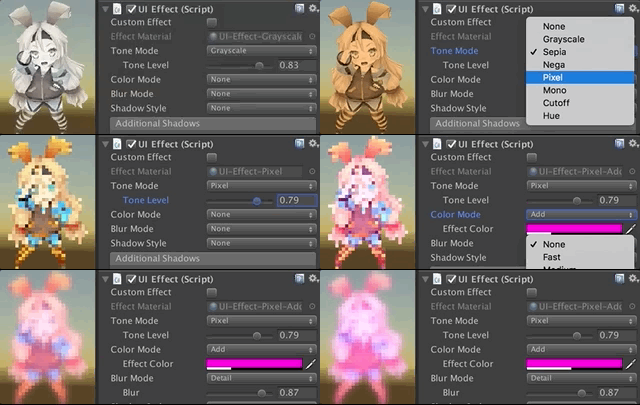
|
||||
|
||||
|
||||
### And, more features!
|
||||
|
||||
* Control the effect parameters without instantiating the material
|
||||
* Control the effect parameters with AnimationClip
|
||||

|
||||
* Use for screen transition
|
||||

|
||||
* Multiple shadow effect to reduce rendering vertices
|
||||

|
||||
* UICapturedEffectImage: The captured image with effect, like post effect
|
||||

|
||||
* UICapturedEffectImage: Dialog window with the captured image effect
|
||||

|
||||
* UIGradient: Change vertex color as gradient, with rotation, offset, color correction
|
||||

|
||||
* UIShiny: Shiny effect WITHOUT Mask component. This will suppress extra draw calls and improve performance.
|
||||
Merged from [ShinyEffectForUGUI](https://github.com/mob-sakai/ShinyEffectForUGUI).
|
||||

|
||||
* UIDissolve: Dissolve effect WITHOUT material instancing. This will suppress extra draw calls and improve performance.
|
||||
Merged from [DissolveEffectForUGUI](https://github.com/mob-sakai/DissolveEffectForUGUI).
|
||||

|
||||
* UIFlip: Flip horizontal/vertical.
|
||||
|
||||
|
||||
|
||||
<br><br><br><br>
|
||||
## Demo
|
||||
|
||||
[WebGL Demo](http://mob-sakai.github.io/UIEffect)
|
||||
|
||||
* Effect sample
|
||||
* Transition
|
||||
* Dialog window with blured background
|
||||
* Included in unitypackage
|
||||
|
||||
|
||||
|
||||
|
||||
<br><br><br><br>
|
||||
## Usage
|
||||
|
||||
1. Download UIEffect.unitypackage from [Releases](https://github.com/mob-sakai/UIEffect/releases).
|
||||
1. Import the package into your Unity project. Select `Import Package > Custom Package` from the `Assets` menu.
|
||||
1. Add `UIEffect` component to UI element (Image, RawImage, Text, etc...) from `Add Component` in inspector.
|
||||
1. Choose effect type and adjust values in inspector.
|
||||

|
||||
1. Enjoy!
|
||||
|
||||
|
||||
##### Requirement
|
||||
|
||||
* Unity 5.5+ *(included Unity 2017.x)*
|
||||
* No other SDK are required
|
||||
|
||||
|
||||
|
||||
|
||||
<br><br><br><br>
|
||||
## Development Note
|
||||
|
||||
#### How does UIEffectCapturedImage work?
|
||||
|
||||

|
||||
|
||||
`UIEffectCapturedImage` is similar to post effect, but uses `CommandBuffer` to give effect only on the rendering result (= captured image) of a specific frame.
|
||||
This effect is non-realtime, light-weight, less-camera, blit only once, but effective.
|
||||
|
||||
* Camera for processing effect is unnecessary.
|
||||
* Process effect only once after `UIEffectCapturedImage.Capture`.
|
||||
* Using reduction buffer, keep used memory size small and keep rendering load are small.
|
||||
* When GameObjects with motion are on the screen, a result texture may be stirred.
|
||||
* You can overlay and display like as: [Screen] | [UIEffectCapturedImage] | [Dialog A] | [UIEffectCapturedImage] | [Dialog B].
|
||||
See also [Demo](#demo).
|
||||
|
||||
|
||||
#### Why is UIEffect lightweight?
|
||||
|
||||
* UIEffect pre-generates material from a combination of effects. This has the following benefits.
|
||||
* Draw call batching If possible, draw calls will decrease.
|
||||
* Since only the required material and shader variants are included in the build, the build size will be smaller.
|
||||
|
||||
|
||||
#### How to control effect parameters for uGUI element WITHOUT MaterialPropertyBlock?
|
||||
|
||||
* In general, you can use [MaterialPropertyBlock](https://docs.unity3d.com/ScriptReference/MaterialPropertyBlock.html) for renderers to control minor changes in the material without different batches.
|
||||
* However, changing the [MaterialPropertyBlock](https://docs.unity3d.com/ScriptReference/MaterialPropertyBlock.html) of the uGUI element from the script will cause different batches and draw calls to increase.
|
||||
* So UIEffect encodes multiple effect parameters to UV1 channel with [IMeshModifier](https://docs.unity3d.com/ScriptReference/UI.IMeshModifier.html).
|
||||
* Pack four 6-bit [0-1] (64 steps) parameters into one float value.
|
||||
* The parameters are low precision, but sufficient.
|
||||
|
||||
| uv1 | 6-bit [0-1] | 6-bit [0-1] | 6-bit [0-1] | 6-bit [0-1] |
|
||||
|-|-|-|-|-|
|
||||
| x(32bit float) | Tone level | *Empty* | Blur level | *Empty* |
|
||||
| y(32bit float) | Red channel | Green channel | Blue channel | Alpha channel |
|
||||
|
||||
|
||||
#### Note: Unity 5.6+
|
||||
|
||||
In Unity 5.6+, Canvas supports **Additional Shader Channels**.
|
||||
Please enable `TexCoord1` to use UIEffect.
|
||||

|
||||

|
||||
|
||||
|
||||
#### Note: if you include prefabs / scenes containing UIEffect in AssetBundle.
|
||||
|
||||
Use script define symbol `UIEFFECT_SEPARATE`.
|
||||
Unused shader variants and materials will be excluded from AssetBundles.
|
||||
|
||||
||Combined mode (default)|Separated mode|
|
||||
|-|-|-|
|
||||
|Script define symbol| - |`UIEFFECT_SEPARATE`|
|
||||
|Included in build|Only used variants|Only used variants|
|
||||
|Included in AssetBundle|All variants (Heavy!)|Only used variants|
|
||||
|Look in editor|||
|
||||
|
||||
|
||||
#### How to improve performance?
|
||||
|
||||
* Use `ShaderVariantCollection` to preload shader.
|
||||
https://docs.unity3d.com/Manual/OptimizingShaderLoadTime.html
|
||||
* Set camera's clear flag to "Solid Color".
|
||||
* Enable multi thread rendering.
|
||||
|
||||
|
||||
|
||||
|
||||
<br><br><br><br>
|
||||
## License
|
||||
|
||||
* MIT
|
||||
* © UTJ/UCL
|
||||
|
||||
|
||||
|
||||
## Author
|
||||
|
||||
[mob-sakai](https://github.com/mob-sakai)
|
||||
|
||||
|
||||
|
||||
## See Also
|
||||
|
||||
* GitHub page : https://github.com/mob-sakai/UIEffect
|
||||
* Releases : https://github.com/mob-sakai/UIEffect/releases
|
||||
* Issue tracker : https://github.com/mob-sakai/UIEffect/issues
|
||||
* Current project : https://github.com/mob-sakai/UIEffect/projects/1
|
||||
* Change log : https://github.com/mob-sakai/UIEffect/blob/master/CHANGELOG.md
|
||||
@@ -1,327 +0,0 @@
|
||||
UIEffect
|
||||
===
|
||||
|
||||
Easy to use effects for uGUI.
|
||||
|
||||

|
||||
|
||||
[WebGL Demo](#demo) | [Download](https://github.com/mob-sakai/UIEffect/releases) | [Usage](#usage) | [Release Notes](#release-notes)
|
||||
|
||||
|
||||
### Supports following effects!
|
||||
|
||||
* Grayscale
|
||||
* Sepia tone
|
||||
* Nega tone
|
||||
* Pixelation
|
||||
* Hue shift
|
||||
* Cutoff (alpha-based)
|
||||
* Mono (alpha-based)
|
||||
* Color override
|
||||
* Color additive
|
||||
* Color subtract
|
||||
* Blur fast(3x4)
|
||||
* Blur medium(6x4)
|
||||
* Blur detail(6x8)
|
||||
* Shadow with effect
|
||||
* Shadow
|
||||
* Shadow3
|
||||
* Outline
|
||||
* Outline8
|
||||
* Gradient vertex color
|
||||
* Horizontal
|
||||
* Vertical
|
||||
* Angle
|
||||
* Diagonal
|
||||
|
||||
|
||||
#### And, more features!
|
||||
|
||||
* Control effect parameter with Animation
|
||||

|
||||
* Use for screen transition
|
||||

|
||||
* Multiple shadow effect to reduce rendering vertices
|
||||

|
||||
* Capture image with effect, like post effect
|
||||

|
||||
* Dialog with captured image effect
|
||||

|
||||
* Change vertex color as gradient, with rotation, offset, color correction
|
||||

|
||||

|
||||
|
||||
|
||||
|
||||
<br><br><br><br>
|
||||
## Demo
|
||||
|
||||
[WebGL Demo](https://developer.cloud.unity3d.com/share/WJTY06hfG7/webgl/)
|
||||
|
||||
* Effect sample
|
||||
* Transition
|
||||
* Dialog window with blur background
|
||||
* Included in unitypackage
|
||||
|
||||
|
||||
|
||||
|
||||
<br><br><br><br>
|
||||
## Usage
|
||||
|
||||
1. Download UIEffect.unitypackage from [Releases](https://github.com/mob-sakai/UIEffect/releases) and install to your project.
|
||||
1. Import the package into your Unity project. Select `Import Package > Custom Package` from the `Assets` menu.
|
||||
1. Add `UIEffect` component to UI element (Image, RawImage, Text, etc...) from `Add Component` in inspector.
|
||||
1. Choose effect type and adjust values in inspector.
|
||||

|
||||
1. Enjoy!
|
||||
|
||||
|
||||
##### Requirement
|
||||
|
||||
* Unity 5.5+ *(included Unity 2017.x)*
|
||||
* No other SDK are required
|
||||
|
||||
|
||||
<br><br><br><br>
|
||||
## Development Note
|
||||
|
||||
#### How does UIEffectCapturedImage work?
|
||||
|
||||

|
||||
|
||||
`UIEffectCapturedImage` is similar to post effect, but uses `CommandBuffer` to give effect only on the rendering result (= captured image) of a specific frame.
|
||||
This effect is non-realtime, light-weight, less-camera, blit only once, but effective.
|
||||
|
||||
* Camera for processing effect is unnecessary.
|
||||
* Process effect only once after `UIEffectCapturedImage.Capture`.
|
||||
* Using reduction buffer, keep used memory size small and keep rendering load are small.
|
||||
* When GameObjects with motion are on the screen, a result texture may be stirred.
|
||||
* You can overlay and display like as: [Screen] | [UIEffectCapturedImage] | [Dialog A] | [UIEffectCapturedImage] | [Dialog B].
|
||||
See also [Demo](#demo).
|
||||
|
||||
|
||||
#### Why is UIEffect lightweight?
|
||||
|
||||
* UIEffect pre-generates material from a combination of effects. This has the following benefits.
|
||||
* Draw call batching If possible, draw calls will decrease.
|
||||
* Since only the required material and shader variants are included in the build, the build size will be smaller.
|
||||
|
||||
|
||||
#### How to control effect parameters for uGUI element WITHOUT MaterialPropertyBlock?
|
||||
|
||||
* In general, you can use [MaterialPropertyBlock](https://docs.unity3d.com/ScriptReference/MaterialPropertyBlock.html) for renderers to control minor changes in the material without different batches.
|
||||
* However, changing the [MaterialPropertyBlock](https://docs.unity3d.com/ScriptReference/MaterialPropertyBlock.html) of the uGUI element from the script will cause different batches and draw calls to increase.
|
||||
* So UIEffect encodes multiple effect parameters to UV1 channel with [IMeshModifier](https://docs.unity3d.com/ScriptReference/UI.IMeshModifier.html).
|
||||
* Pack four 6-bit [0-1] (64 steps) parameters into one float value.
|
||||
* The parameters are low precision, but sufficient.
|
||||
|
||||
| uv1 | 6-bit [0-1] | 6-bit [0-1] | 6-bit [0-1] | 6-bit [0-1] |
|
||||
|-|-|-|-|-|
|
||||
| x(32bit float) | Tone level | *Empty* | Blur level | *Empty* |
|
||||
| y(32bit float) | Red channel | Green channel | Blue channel | Alpha channel |
|
||||
|
||||
|
||||
#### Note: Unity 5.6+
|
||||
|
||||
In Unity 5.6+, Canvas supports **Additional Shader Channels**.
|
||||
Please enable `TexCoord1` to use UIEffect.
|
||||

|
||||

|
||||
|
||||
|
||||
#### Note: if you include prefabs / scenes containing UIEffect in AssetBundle.
|
||||
|
||||
Use script define symbol `UIEFFECT_SEPARATE`.
|
||||
Unused shader variants and materials will be excluded from AssetBundles.
|
||||
|
||||
||Combined mode (default)|Separated mode|
|
||||
|-|-|-|
|
||||
|Script define symbol| - |`UIEFFECT_SEPARATE`|
|
||||
|Included in build|Only used variants|Only used variants|
|
||||
|Included in AssetBundle|All variants (Heavy!)|Only used variants|
|
||||
|Look in editor|||
|
||||
|
||||
|
||||
#### How to improve performance?
|
||||
|
||||
* Use `ShaderVariantCollection` to preload shader.
|
||||
https://docs.unity3d.com/Manual/OptimizingShaderLoadTime.html
|
||||
* Set camera's clear flag to "Solid Color".
|
||||
* Enable multi thread rendering.
|
||||
|
||||
|
||||
|
||||
<br><br><br><br>
|
||||
## Release Notes
|
||||
|
||||
### ver.2.0.0
|
||||
|
||||
* Feature: Switch separate/combine materials by script symbol "UIEFFECT_SEPARATE".
|
||||
* Combined mode (default)
|
||||
* The effect materials are sub-asset, and will be hidden in project view & object picker window.
|
||||
* Unused shader variants and materials will be excluded from build, but they will be **included in AssetBundle.**
|
||||

|
||||
* Separated mode
|
||||
* Use script define symbol `UIEFFECT_SEPARATE`.
|
||||
* The effect materials are main-asset, and will be displayed in project view & object picker window.
|
||||
* In Editor, the effect materials are generated as asset, on demand.
|
||||
* Unused shader variants and materials will be excluded from build and AssetBundle.
|
||||
* We recommend this mode only if you include prefabs / scenes containing UIEffect in AssetBundle.
|
||||

|
||||
* Changed: Default is "Combined mode".
|
||||
* Changed: Change namespace to `Coffee.UIExtensions`.
|
||||
* Changed: Unity 5.3.x & 5.4.x are no longer supported.
|
||||
|
||||
|
||||
### ver.1.6.1
|
||||
|
||||
* Fixed: Cannot access protected member `UnityEngine.UI.BaseMeshEffect.graphic` in Unity5.6+.
|
||||
|
||||
|
||||
### ver.1.6.0
|
||||
|
||||
* Changed: UIEffect inherit BaseMeshEffect.
|
||||
* Fixed: Pixelization is incorrect.
|
||||
* Changed: ShadowMode -> ShadowStyle.
|
||||
* Changed: Blur level is range [0-1].
|
||||
|
||||
|
||||
### ver.1.5.1
|
||||
|
||||
* Fixed: An error occurs when no effect is specified for UICapturedImage. [#36](https://github.com/mob-sakai/UIEffect/issues/36)
|
||||
|
||||
|
||||
### ver.1.5.0
|
||||
|
||||
* Feature: Add ToneMode `Hue Shift`.
|
||||

|
||||
* Feature: Add ShadowMode `Shadow3`.
|
||||

|
||||
* Feature: Add `UIGradient` component to change vertex color as gradient.
|
||||
* Gradient direction
|
||||
* Horizontal
|
||||
* Vertical
|
||||
* Angle
|
||||
* Diagonal
|
||||
* Rotation and offset
|
||||
* Text gradient style
|
||||
* Rect
|
||||
* Fit
|
||||
* Split
|
||||
* Color space
|
||||
* Uninitialized
|
||||
* Gammma
|
||||
* Linear
|
||||
* Ignore aspect ratio
|
||||

|
||||
|
||||
|
||||
### ver.1.4.4
|
||||
|
||||
* Fixed: Error has occur on edit prefab. [#27](https://github.com/mob-sakai/UIEffect/issues/27)
|
||||
|
||||
|
||||
### ver.1.4.3
|
||||
|
||||
* Fixed: Color effect is incorrect. [#19](https://github.com/mob-sakai/UIEffect/issues/19)
|
||||
|
||||
|
||||
### ver.1.4.2
|
||||
|
||||
* Fixed: Error has occur on after deserialize. [#16](https://github.com/mob-sakai/UIEffect/issues/16)
|
||||
|
||||
|
||||
### ver.1.4.1
|
||||
|
||||
* Fixed: Demo link in `readme.md` is broken.
|
||||
|
||||
|
||||
### ver.1.4.0
|
||||
|
||||
* Changed: ToneMode, ColorMode, BlurMode can be changed only in editor.
|
||||
* Changed: Cutoff's level is reversed.
|
||||
* Feature: Exclude unused shader variant from build.
|
||||
* Add: Add many materials for shader variant, but exclude unused materials from build.
|
||||
Build report of demo project is as following.
|
||||
|
||||
| | ver.1.3.0 | ver.1.4.0 |
|
||||
|--|-----------|-----------|
|
||||
| UI-Effect.shader | All 112 variants, 170.7 kb | 21 variants, 31.4 kb |
|
||||
| UI-EffectCapturedImage.shader | All 80 variants, 49.0 kb | 2 variants, 7.3 kb |
|
||||
| Materials in build | Instantiate on play, 0 kb | 23 items, about 6.9 kb |
|
||||
| Total | 219.7 kb | 45.6 kb |
|
||||
|
||||
|
||||
### ver.1.3.0
|
||||
|
||||
* Feature: Capture image with effect, like post effect.
|
||||
* Demo: Add transition blur button & dialog with captured image effect.
|
||||

|
||||
|
||||
|
||||
### ver.1.2.0
|
||||
|
||||
* Fixed : Pixelaration shifts to the lower right.
|
||||
* Fixed : Cutoff alpha is incorrect.
|
||||
* Feature: Supports multiple shadow effect for reduce rendering vertices.
|
||||

|
||||
* Feature: New blur effect mode : `Medium`.
|
||||
* Feature: Fix button to enable TexCoord1 of Canvas.additionalShaderChannels to use UIEffect.
|
||||

|
||||
* Changed : UIEffect.color is obsolete, use UIEffect.effectColor instead.
|
||||
* Changed: Blur range is [0-2].
|
||||
* Refactoring: Shader refactoring.
|
||||
* Demo: Add transition button & multiple shadows.
|
||||
|
||||
|
||||
### ver.1.1.0
|
||||
|
||||
* Feature: Add Pixelaration effect.
|
||||
* Feature: Add Cutoff/Mono effect for patterned alpha images. It can be used for masks and transitions!
|
||||

|
||||
|
||||
|
||||
### ver.1.0.0
|
||||
|
||||
* Feature: Shader supports pre-processer macros (for example UNITY_VERTEX_OUTPUT_STEREO) for Unity 5.3.x, 5.4.x and 5.5.x.
|
||||
* Feature: Supports changing value from animation.
|
||||
* Feature: Supports Tone effect.
|
||||
* grayscale
|
||||
* sepia
|
||||
* nega
|
||||
* Feature: Supports Color effect.
|
||||
* set
|
||||
* add
|
||||
* sub
|
||||
* Feature: Supports Blur effect.
|
||||
* fast
|
||||
* detail
|
||||
* Fix: Color effect will not be properly when it was rotated.
|
||||
* Performance: Shader supports multi-compile for performance.
|
||||
* Performance: Cache same effect materials to reduce draw calls.
|
||||
* Improve: Supports mobile devices.
|
||||
* Improve: Simplify component & inspector.
|
||||
|
||||
|
||||
|
||||
<br><br><br><br>
|
||||
## License
|
||||
|
||||
* MIT
|
||||
* © UTJ/UCL
|
||||
|
||||
|
||||
|
||||
## Author
|
||||
|
||||
[mob-sakai](https://github.com/mob-sakai)
|
||||
|
||||
|
||||
|
||||
## See Also
|
||||
|
||||
* GitHub Page : https://github.com/mob-sakai/UIEffect
|
||||
* Releases : https://github.com/mob-sakai/UIEffect/releases
|
||||
* Issue tracker : https://github.com/mob-sakai/UIEffect/issues
|
||||
* Current Project : https://github.com/mob-sakai/UIEffect/projects/1
|
||||
Binary file not shown.
@@ -0,0 +1,11 @@
|
||||
{
|
||||
"name": "UIEffect",
|
||||
"version": "2.3.2",
|
||||
"repository": {
|
||||
"type": "git",
|
||||
"url": "git+https://github.com/mob-sakai/UIEffect.git"
|
||||
},
|
||||
"src": "Assets/UIEffect",
|
||||
"unity": "/Applications/Unity/Hub/Editor/5.5.0p4/Unity.app/Contents/MacOS/Unity",
|
||||
"license": "MIT"
|
||||
}
|
||||
Executable
+67
@@ -0,0 +1,67 @@
|
||||
#!/bin/bash -e
|
||||
|
||||
# NOTE: Set an environment variable `CHANGELOG_GITHUB_TOKEN` by running the following command at the prompt, or by adding it to your shell profile (e.g., ~/.bash_profile or ~/.zshrc):
|
||||
# export CHANGELOG_GITHUB_TOKEN="«your-40-digit-github-token»"
|
||||
|
||||
# Release the project with the following steps:
|
||||
# 1. Update the release version in package.json.
|
||||
# 2. Update "CHANGELOG.md" using "github_changelog_generator-1.15.0.pre.rc".
|
||||
# 3. Commit package.json and CHANGELOG.md.
|
||||
# 4. Merge into master branch.
|
||||
# 5. Export unitypackage.
|
||||
# 6. Release using "gh-release-3.2.0". (Upload unitypackage)
|
||||
|
||||
|
||||
# input release version
|
||||
PACKAGE_NAME=`node -pe 'require("./package.json").name'`
|
||||
echo Github Release: $PACKAGE_NAME
|
||||
read -p "[? release version (for example: 1.0.0): " RELEASE_VERSION
|
||||
[ -z "$RELEASE_VERSION" ] && exit
|
||||
|
||||
|
||||
# update version in package.json
|
||||
git checkout -B release develop
|
||||
sed -i -e "s/\"version\": \(.*\)/\"version\": \"${RELEASE_VERSION}\",/g" package.json
|
||||
|
||||
|
||||
# generate change log
|
||||
TAG=v$RELEASE_VERSION
|
||||
git tag $TAG
|
||||
git push --tags
|
||||
github_changelog_generator
|
||||
git tag -d $TAG
|
||||
git push --delete origin $TAG
|
||||
|
||||
|
||||
git diff -- CHANGELOG.md
|
||||
read -p "[? continue? (y/N):" yn
|
||||
case "$yn" in [yY]*) ;; *) exit ;; esac
|
||||
|
||||
|
||||
# export unitypackage
|
||||
UNITY_EDITOR=`node -pe 'require("./package.json").unity'`
|
||||
PACKAGE_SRC=`node -pe 'require("./package.json").src'`
|
||||
"$UNITY_EDITOR" -quit -batchmode -projectPath "`pwd`" -exportpackage "$PACKAGE_SRC" "$PACKAGE_NAME.unitypackage"
|
||||
|
||||
|
||||
# commit files
|
||||
git add CHANGELOG.md -f
|
||||
git add package.json -f
|
||||
git commit -m "update change log"
|
||||
|
||||
|
||||
# merge and push
|
||||
git checkout master
|
||||
git merge --no-ff release -m "release $TAG"
|
||||
git branch -D release
|
||||
git push origin master
|
||||
git checkout develop
|
||||
git merge --ff master
|
||||
git push origin develop
|
||||
|
||||
|
||||
# upload unitypackage and release on Github
|
||||
gh-release --draft --assets "$PACKAGE_NAME.unitypackage"
|
||||
|
||||
|
||||
echo "\n\n$PACKAGE_NAME v$RELEASE_VERSION has been successfully released!\n"
|
||||
Reference in New Issue
Block a user