|
|
|
@@ -0,0 +1,288 @@
|
|
|
|
|
UIEffect
|
|
|
|
|
===
|
|
|
|
|
|
|
|
|
|
Easy to use effects for uGUI.
|
|
|
|
|
|
|
|
|
|

|
|
|
|
|
|
|
|
|
|
[WebGL Demo](#demo) | [Download](https://github.com/mob-sakai/UIEffect/releases) | [Usage](#usage) | [Release Notes](#release-notes)
|
|
|
|
|
|
|
|
|
|
|
|
|
|
|
### Supports following effects!
|
|
|
|
|
|
|
|
|
|
* Grayscale
|
|
|
|
|
* Sepia tone
|
|
|
|
|
* Nega tone
|
|
|
|
|
* Pixelation
|
|
|
|
|
* Hue shift
|
|
|
|
|
* Cutoff (alpha-based)
|
|
|
|
|
* Mono (alpha-based)
|
|
|
|
|
* Color override
|
|
|
|
|
* Color additive
|
|
|
|
|
* Color subtract
|
|
|
|
|
* Blur fast(3x4)
|
|
|
|
|
* Blur medium(6x4)
|
|
|
|
|
* Blur detail(6x8)
|
|
|
|
|
* Shadow with effect
|
|
|
|
|
* Shadow
|
|
|
|
|
* Shadow3
|
|
|
|
|
* Outline
|
|
|
|
|
* Outline8
|
|
|
|
|
* Gradient vertex color
|
|
|
|
|
* Horizontal
|
|
|
|
|
* Vertical
|
|
|
|
|
* Angle
|
|
|
|
|
* Diagonal
|
|
|
|
|
|
|
|
|
|
|
|
|
|
|
#### And, more features!
|
|
|
|
|
|
|
|
|
|
* Control effect parameter with Animation
|
|
|
|
|

|
|
|
|
|
* Use for screen transition
|
|
|
|
|

|
|
|
|
|
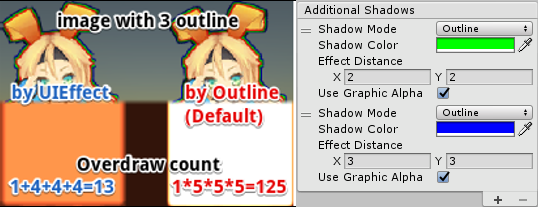
* Multiple shadow effect to reduce rendering vertices
|
|
|
|
|
|
|
|
|
|
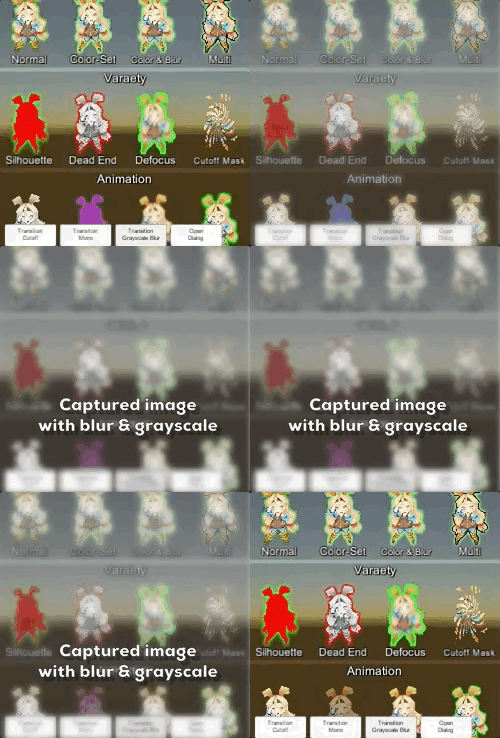
* Capture image with effect, like post effect
|
|
|
|
|
|
|
|
|
|
* Dialog with captured image effect
|
|
|
|
|

|
|
|
|
|
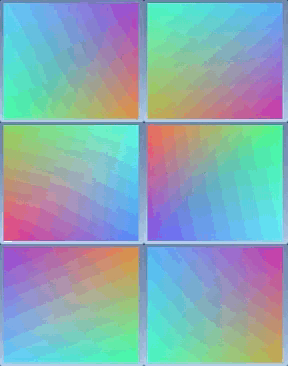
* Change vertex color as gradient, with rotation, offset, color correction
|
|
|
|
|
|
|
|
|
|

|
|
|
|
|
|
|
|
|
|
|
|
|
|
|
|
|
|
|
|
<br><br><br><br>
|
|
|
|
|
## Demo
|
|
|
|
|
|
|
|
|
|
[WebGL Demo](https://developer.cloud.unity3d.com/share/WJTY06hfG7/webgl/)
|
|
|
|
|
|
|
|
|
|
* Effect sample
|
|
|
|
|
* Transition
|
|
|
|
|
* Dialog window with blur background
|
|
|
|
|
* Included in unitypackage
|
|
|
|
|
|
|
|
|
|
|
|
|
|
|
|
|
|
|
|
|
|
|
|
|
<br><br><br><br>
|
|
|
|
|
## Usage
|
|
|
|
|
|
|
|
|
|
1. Download UIEffect.unitypackage from [Releases](https://github.com/mob-sakai/UIEffect/releases) and install to your project.
|
|
|
|
|
1. Import the package into your Unity project. Select `Import Package > Custom Package` from the `Assets` menu.
|
|
|
|
|
1. Add `UIEffect` component to UI element (Image, RawImage, Text, etc...) from `Add Component` in inspector.
|
|
|
|
|
1. Choose effect type and adjust values in inspector.
|
|
|
|
|

|
|
|
|
|
1. Enjoy!
|
|
|
|
|
|
|
|
|
|
|
|
|
|
|
##### Requirement
|
|
|
|
|
|
|
|
|
|
* Unity 5.3+ *(included Unity 2017.x)*
|
|
|
|
|
* No other SDK are required
|
|
|
|
|
|
|
|
|
|
|
|
|
|
|
<br><br><br><br>
|
|
|
|
|
## Development Note
|
|
|
|
|
|
|
|
|
|
#### How does UIEffectCapturedImage work?
|
|
|
|
|
|
|
|
|
|

|
|
|
|
|
|
|
|
|
|
`UIEffectCapturedImage` is similar to post effect, but uses `CommandBuffer` to give effect only on the rendering result (= captured image) of a specific frame.
|
|
|
|
|
This effect is non-realtime, light-weight, less-camera, blit only once, but effective.
|
|
|
|
|
|
|
|
|
|
* Camera for processing effect is unnecessary.
|
|
|
|
|
* Process effect only once after `UIEffectCapturedImage.Capture`.
|
|
|
|
|
* Using reduction buffer, keep used memory size small and keep rendering load are small.
|
|
|
|
|
* When GameObjects with motion are on the screen, a result texture may be stirred.
|
|
|
|
|
* You can overlay and display like as: [Screen] | [UIEffectCapturedImage] | [Dialog A] | [UIEffectCapturedImage] | [Dialog B].
|
|
|
|
|
See also [Demo](#demo).
|
|
|
|
|
|
|
|
|
|
|
|
|
|
|
#### Why is UIEffect lightweight?
|
|
|
|
|
|
|
|
|
|
* UIEffect pre-generates material from a combination of effects. This has the following benefits.
|
|
|
|
|
* Draw call batching If possible, draw calls will decrease.
|
|
|
|
|
* Since only the required material and shader variants are included in the build, the build size will be smaller.
|
|
|
|
|
|
|
|
|
|
|
|
|
|
|
#### How to control effect parameters for uGUI element WITHOUT MaterialPropertyBlock?
|
|
|
|
|
|
|
|
|
|
* In general, you can use [MaterialPropertyBlock](https://docs.unity3d.com/ScriptReference/MaterialPropertyBlock.html) for renderers to control minor changes in the material without different batches.
|
|
|
|
|
* However, changing the [MaterialPropertyBlock](https://docs.unity3d.com/ScriptReference/MaterialPropertyBlock.html) of the uGUI element from the script will cause different batches and draw calls to increase.
|
|
|
|
|
* So UIEffect encodes multiple effect parameters to UV1 channel with [IMeshModifier](https://docs.unity3d.com/ScriptReference/UI.IMeshModifier.html).
|
|
|
|
|
* Pack four 6-bit [0-1] (64 steps) parameters into one float value.
|
|
|
|
|
* The parameters are low precision, but sufficient.
|
|
|
|
|
|
|
|
|
|
| uv1 | 6-bit [0-1] | 6-bit [0-1] | 6-bit [0-1] | 6-bit [0-1] |
|
|
|
|
|
|-|-|-|-|-|
|
|
|
|
|
| x(32bit float) | Tone level | *Empty* | Blur level | *Empty* |
|
|
|
|
|
| y(32bit float) | Red channel | Green channel | Blue channel | Alpha channel |
|
|
|
|
|
|
|
|
|
|
|
|
|
|
|
#### Note: Unity 5.6+
|
|
|
|
|
|
|
|
|
|
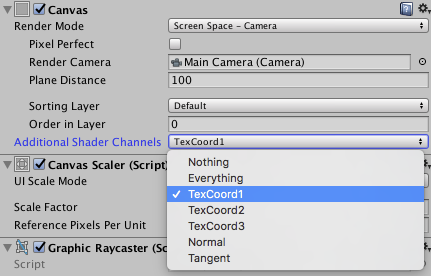
In Unity 5.6+, Canvas supports **Additional Shader Channels**.
|
|
|
|
|
Please enable `TexCoord1` to use UIEffect.
|
|
|
|
|
|
|
|
|
|

|
|
|
|
|
|
|
|
|
|
|
|
|
|
|
|
|
|
|
|
|
|
|
|
|
<br><br><br><br>
|
|
|
|
|
## Release Notes
|
|
|
|
|
|
|
|
|
|
### ver.1.6.1
|
|
|
|
|
|
|
|
|
|
* Fixed: Cannot access protected member `UnityEngine.UI.BaseMeshEffect.graphic` in Unity5.6+.
|
|
|
|
|
|
|
|
|
|
|
|
|
|
|
### ver.1.6.0
|
|
|
|
|
|
|
|
|
|
* Changed: UIEffect inherit BaseMeshEffect.
|
|
|
|
|
* Fixed: Pixelization is incorrect.
|
|
|
|
|
* Changed: ShadowMode -> ShadowStyle.
|
|
|
|
|
* Changed: Blur level is range [0-1].
|
|
|
|
|
|
|
|
|
|
|
|
|
|
|
### ver.1.5.1
|
|
|
|
|
|
|
|
|
|
* Fixed: An error occurs when no effect is specified for UICapturedImage. [#36](https://github.com/mob-sakai/UIEffect/issues/36)
|
|
|
|
|
|
|
|
|
|
|
|
|
|
|
### ver.1.5.0
|
|
|
|
|
|
|
|
|
|
* Feature: Add ToneMode `Hue Shift`.
|
|
|
|
|

|
|
|
|
|
* Feature: Add ShadowMode `Shadow3`.
|
|
|
|
|

|
|
|
|
|
* Feature: Add `UIGradient` component to change vertex color as gradient.
|
|
|
|
|
* Gradient direction
|
|
|
|
|
* Horizontal
|
|
|
|
|
* Vertical
|
|
|
|
|
* Angle
|
|
|
|
|
* Diagonal
|
|
|
|
|
* Rotation and offset
|
|
|
|
|
* Text gradient style
|
|
|
|
|
* Rect
|
|
|
|
|
* Fit
|
|
|
|
|
* Split
|
|
|
|
|
* Color space
|
|
|
|
|
* Uninitialized
|
|
|
|
|
* Gammma
|
|
|
|
|
* Linear
|
|
|
|
|
* Ignore aspect ratio
|
|
|
|
|

|
|
|
|
|
|
|
|
|
|
|
|
|
|
|
### ver.1.4.4
|
|
|
|
|
|
|
|
|
|
* Fixed: Error has occur on edit prefab. [#27](https://github.com/mob-sakai/UIEffect/issues/27)
|
|
|
|
|
|
|
|
|
|
|
|
|
|
|
### ver.1.4.3
|
|
|
|
|
|
|
|
|
|
* Fixed: Color effect is incorrect. [#19](https://github.com/mob-sakai/UIEffect/issues/19)
|
|
|
|
|
|
|
|
|
|
|
|
|
|
|
### ver.1.4.2
|
|
|
|
|
|
|
|
|
|
* Fixed: Error has occur on after deserialize. [#16](https://github.com/mob-sakai/UIEffect/issues/16)
|
|
|
|
|
|
|
|
|
|
|
|
|
|
|
### ver.1.4.1
|
|
|
|
|
|
|
|
|
|
* Fixed: Demo link in `readme.md` is broken.
|
|
|
|
|
|
|
|
|
|
|
|
|
|
|
### ver.1.4.0
|
|
|
|
|
|
|
|
|
|
* Changed: ToneMode, ColorMode, BlurMode can be changed only in editor.
|
|
|
|
|
* Changed: Cutoff's level is reversed.
|
|
|
|
|
* Feature: Exclude unused shader variant from build.
|
|
|
|
|
* Add: Add many materials for shader variant, but exclude unused materials from build.
|
|
|
|
|
Build report of demo project is as following.
|
|
|
|
|
|
|
|
|
|
| | ver.1.3.0 | ver.1.4.0 |
|
|
|
|
|
|--|-----------|-----------|
|
|
|
|
|
| UI-Effect.shader | All 112 variants, 170.7 kb | 21 variants, 31.4 kb |
|
|
|
|
|
| UI-EffectCapturedImage.shader | All 80 variants, 49.0 kb | 2 variants, 7.3 kb |
|
|
|
|
|
| Materials in build | Instantiate on play, 0 kb | 23 items, about 6.9 kb |
|
|
|
|
|
| Total | 219.7 kb | 45.6 kb |
|
|
|
|
|
|
|
|
|
|
|
|
|
|
|
### ver.1.3.0
|
|
|
|
|
|
|
|
|
|
* Feature: Capture image with effect, like post effect.
|
|
|
|
|
* Demo: Add transition blur button & dialog with captured image effect.
|
|
|
|
|

|
|
|
|
|
|
|
|
|
|
|
|
|
|
|
### ver.1.2.0
|
|
|
|
|
|
|
|
|
|
* Fixed : Pixelaration shifts to the lower right.
|
|
|
|
|
* Fixed : Cutoff alpha is incorrect.
|
|
|
|
|
* Feature: Supports multiple shadow effect for reduce rendering vertices.
|
|
|
|
|

|
|
|
|
|
* Feature: New blur effect mode : `Medium`.
|
|
|
|
|
* Feature: Fix button to enable TexCoord1 of Canvas.additionalShaderChannels to use UIEffect.
|
|
|
|
|

|
|
|
|
|
* Changed : UIEffect.color is obsolete, use UIEffect.effectColor instead.
|
|
|
|
|
* Changed: Blur range is [0-2].
|
|
|
|
|
* Refactoring: Shader refactoring.
|
|
|
|
|
* Demo: Add transition button & multiple shadows.
|
|
|
|
|
|
|
|
|
|
|
|
|
|
|
### ver.1.1.0
|
|
|
|
|
|
|
|
|
|
* Feature: Add Pixelaration effect.
|
|
|
|
|
* Feature: Add Cutoff/Mono effect for patterned alpha images. It can be used for masks and transitions!
|
|
|
|
|

|
|
|
|
|
|
|
|
|
|
|
|
|
|
|
### ver.1.0.0
|
|
|
|
|
|
|
|
|
|
* Feature: Shader supports pre-processer macros (for example UNITY_VERTEX_OUTPUT_STEREO) for Unity 5.3.x, 5.4.x and 5.5.x.
|
|
|
|
|
* Feature: Supports changing value from animation.
|
|
|
|
|
* Feature: Supports Tone effect.
|
|
|
|
|
* grayscale
|
|
|
|
|
* sepia
|
|
|
|
|
* nega
|
|
|
|
|
* Feature: Supports Color effect.
|
|
|
|
|
* set
|
|
|
|
|
* add
|
|
|
|
|
* sub
|
|
|
|
|
* Feature: Supports Blur effect.
|
|
|
|
|
* fast
|
|
|
|
|
* detail
|
|
|
|
|
* Fix: Color effect will not be properly when it was rotated.
|
|
|
|
|
* Performance: Shader supports multi-compile for performance.
|
|
|
|
|
* Performance: Cache same effect materials to reduce draw calls.
|
|
|
|
|
* Improve: Supports mobile devices.
|
|
|
|
|
* Improve: Simplify component & inspector.
|
|
|
|
|
|
|
|
|
|
|
|
|
|
|
|
|
|
|
|
<br><br><br><br>
|
|
|
|
|
## License
|
|
|
|
|
|
|
|
|
|
* MIT
|
|
|
|
|
* © UTJ/UCL
|
|
|
|
|
|
|
|
|
|
|
|
|
|
|
|
|
|
|
|
## Author
|
|
|
|
|
|
|
|
|
|
[mob-sakai](https://github.com/mob-sakai)
|
|
|
|
|
|
|
|
|
|
|
|
|
|
|
|
|
|
|
|
## See Also
|
|
|
|
|
|
|
|
|
|
* GitHub Page : https://github.com/mob-sakai/UIEffect
|
|
|
|
|
* Releases : https://github.com/mob-sakai/UIEffect/releases
|
|
|
|
|
* Issue tracker : https://github.com/mob-sakai/UIEffect/issues
|
|
|
|
|
* Current Project : https://github.com/mob-sakai/UIEffect/projects/1
|
 Takashi Sakai