mirror of
https://github.com/mob-sakai/UIEffect.git
synced 2026-11-20 09:52:38 +08:00
Compare commits
6 Commits
| Author | SHA1 | Date | |
|---|---|---|---|
 Takashi Sakai |
ab5f988cf1 | ||
|
Takashi Sakai
|
5ab1e0f300 | ||
|
Takashi Sakai
|
79f8e34c3c | ||
|
Takashi Sakai
|
3217c7f015 | ||
|
Takashi Sakai
|
72eb81de95 | ||
|
Takashi Sakai
|
314313a45d |
File diff suppressed because it is too large
Load Diff
@@ -136,7 +136,7 @@ namespace UnityEditor.UI
|
||||
{
|
||||
spAdditionalShadows.InsertArrayElementAtIndex(ro.count);
|
||||
var element = spAdditionalShadows.GetArrayElementAtIndex(ro.count - 1);
|
||||
element.FindPropertyRelative("shadowMode").intValue = (int)UIEffect.ShadowMode.Shadow;
|
||||
element.FindPropertyRelative("shadowMode").intValue = (int)UIEffect.ShadowStyle.Shadow;
|
||||
element.FindPropertyRelative("shadowColor").colorValue = Color.black;
|
||||
element.FindPropertyRelative("effectDistance").vector2Value = new Vector2(1f, -1f);
|
||||
element.FindPropertyRelative("useGraphicAlpha").boolValue = true;
|
||||
@@ -146,7 +146,7 @@ namespace UnityEditor.UI
|
||||
float ElementHeightCallback(int index)
|
||||
{
|
||||
var element = spAdditionalShadows.GetArrayElementAtIndex(index);
|
||||
if (element.FindPropertyRelative("shadowMode").intValue == (int)UIEffect.ShadowMode.None)
|
||||
if (element.FindPropertyRelative("shadowMode").intValue == (int)UIEffect.ShadowStyle.None)
|
||||
return 16;
|
||||
|
||||
return (spBlurMode.intValue == (int)UIEffect.BlurMode.None ? 66 : 84) + (EditorGUIUtility.wideMode ? 0 : 18);
|
||||
@@ -163,7 +163,7 @@ namespace UnityEditor.UI
|
||||
r.height = EditorGUIUtility.singleLineHeight;
|
||||
var spMode = sp.FindPropertyRelative("shadowMode");
|
||||
EditorGUI.PropertyField(r, spMode);
|
||||
if (spMode.intValue == (int)UIEffect.ShadowMode.None)
|
||||
if (spMode.intValue == (int)UIEffect.ShadowStyle.None)
|
||||
return;
|
||||
|
||||
r.y += r.height;
|
||||
@@ -191,11 +191,11 @@ namespace UnityEditor.UI
|
||||
//================
|
||||
// Shadow setting.
|
||||
//================
|
||||
var spShadowMode = serializedObject.FindProperty("m_ShadowMode");
|
||||
var spShadowMode = serializedObject.FindProperty("m_ShadowStyle");
|
||||
EditorGUILayout.PropertyField(spShadowMode);
|
||||
|
||||
// When shadow is enable, show parameters.
|
||||
if (spShadowMode.intValue != (int)UIEffect.ShadowMode.None)
|
||||
if (spShadowMode.intValue != (int)UIEffect.ShadowStyle.None)
|
||||
{
|
||||
EditorGUI.indentLevel++;
|
||||
EditorGUILayout.PropertyField(serializedObject.FindProperty("m_EffectDistance"));
|
||||
|
||||
+84
-80
@@ -1,9 +1,14 @@
|
||||
UIEffect
|
||||
===
|
||||
|
||||
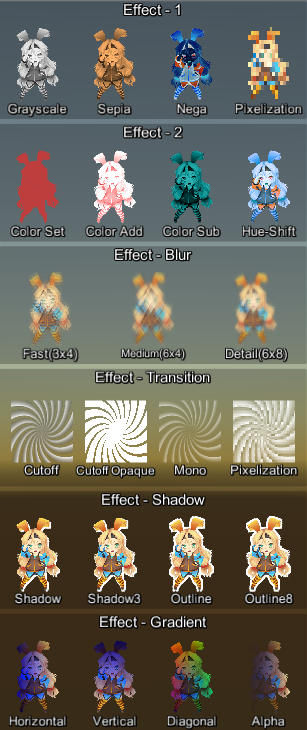
|
||||
Easy to use effects for uGUI.
|
||||
|
||||
Easy to use effects for uGUI. Supports following effects.
|
||||

|
||||
|
||||
[WebGL Demo](#demo) | [Download](https://github.com/mob-sakai/UIEffect/releases) | [Usage](#usage) | [Release Notes](#release-notes)
|
||||
|
||||
|
||||
### Supports following effects!
|
||||
|
||||
* Grayscale
|
||||
* Sepia tone
|
||||
@@ -48,81 +53,7 @@ Easy to use effects for uGUI. Supports following effects.
|
||||
|
||||
|
||||
|
||||
|
||||
## Requirement
|
||||
|
||||
* Unity 5.3+ *(included Unity 2017.x)*
|
||||
* No other SDK are required
|
||||
|
||||
|
||||
|
||||
|
||||
## Usage
|
||||
|
||||
1. Download UIEffect.unitypackage from [Releases](https://github.com/mob-sakai/UIEffect/releases) and install to your project.
|
||||
1. Import the package into your Unity project. Select `Import Package > Custom Package` from the `Assets` menu.
|
||||
1. Add `UIEffect` component to UI element (Image, RawImage, Text, etc...) from `Add Component` in inspector.
|
||||
1. Choose effect type and adjust values in inspector.
|
||||

|
||||
1. Enjoy!
|
||||
|
||||
|
||||
|
||||
## Development Note
|
||||
|
||||
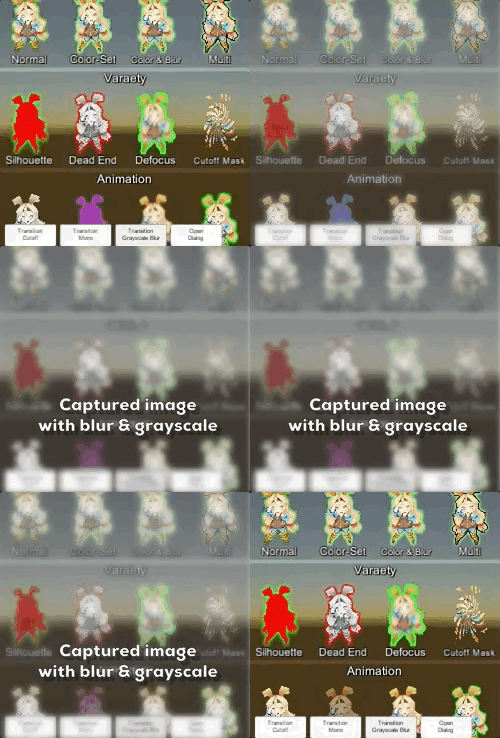
### How does UIEffectCapturedImage work?
|
||||
|
||||
|
||||
|
||||
`UIEffectCapturedImage` is similar to post effect, but uses `CommandBuffer` to give effect only on the rendering result (= captured image) of a specific frame.
|
||||
This effect is non-realtime, light-weight, less-camera, blit only once, but effective.
|
||||
|
||||
* Camera for processing effect is unnecessary.
|
||||
* Process effect only once after `UIEffectCapturedImage.Capture`.
|
||||
* Using reduction buffer, keep used memory size small and keep rendering load are small.
|
||||
* When GameObjects with motion are on the screen, a result texture may be stirred.
|
||||
* You can overlay and display like as: [Screen] | [UIEffectCapturedImage] | [Dialog A] | [UIEffectCapturedImage] | [Dialog B].
|
||||
See also [WebGL Demo](https://developer.cloud.unity3d.com/share/WyQetw3p-X/webgl/).
|
||||
|
||||
|
||||
|
||||
|
||||
## Why is UIEffect lightweight?
|
||||
|
||||
* UIEffect pre-generates material from a combination of effects. This has the following benefits.
|
||||
* Draw call batching If possible, draw calls will decrease.
|
||||
* Since only the required material and shader variants are included in the build, the build size will be smaller.
|
||||
|
||||
|
||||
|
||||
|
||||
## How to control effect parameters for uGUI element WITHOUT MaterialPropertyBlock?
|
||||
|
||||
* In general, you can use [MaterialPropertyBlock](https://docs.unity3d.com/ScriptReference/MaterialPropertyBlock.html) for renderers to control minor changes in the material without different batches.
|
||||
* However, changing the [MaterialPropertyBlock](https://docs.unity3d.com/ScriptReference/MaterialPropertyBlock.html) of the uGUI element from the script will cause different batches and draw calls to increase.
|
||||
* So UIEffect encodes multiple effect parameters to UV1 channel with [IMeshModifier](https://docs.unity3d.com/ScriptReference/UI.IMeshModifier.html).
|
||||
* Up to four [0-1] parameters are packed in one float.
|
||||
* 6 bit has 64 steps and 12 bit has 4096 steps.
|
||||
* Effect parameters are low precision, but sufficient.
|
||||
|
||||
| uv1 | - | - | - | - |
|
||||
|-|-|-|-|-|
|
||||
| x(32bit float) | Tone[0-1] (6bit) | Empty (6bit) | Blur[0-1] (12bit) | - |
|
||||
| y(32bit float) | Red[0-1] (6bit) | Green[0-1] (6bit) | Blue[0-1] (6bit) | Alpha[0-1] (6bit) |
|
||||
|
||||
|
||||
|
||||
|
||||
## Note: Unity 5.6+
|
||||
|
||||
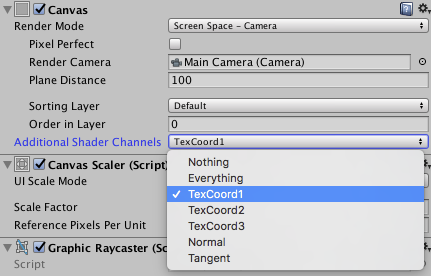
In Unity 5.6+, Canvas supports **Additional Shader Channels**.
|
||||
Please enable `TexCoord1` to use UIEffect.
|
||||
|
||||

|
||||
|
||||
|
||||
|
||||
|
||||
<br><br><br><br>
|
||||
## Demo
|
||||
|
||||
[WebGL Demo](https://developer.cloud.unity3d.com/share/WJTY06hfG7/webgl/)
|
||||
@@ -135,8 +66,83 @@ Please enable `TexCoord1` to use UIEffect.
|
||||
|
||||
|
||||
|
||||
<br><br><br><br>
|
||||
## Usage
|
||||
|
||||
1. Download UIEffect.unitypackage from [Releases](https://github.com/mob-sakai/UIEffect/releases) and install to your project.
|
||||
1. Import the package into your Unity project. Select `Import Package > Custom Package` from the `Assets` menu.
|
||||
1. Add `UIEffect` component to UI element (Image, RawImage, Text, etc...) from `Add Component` in inspector.
|
||||
1. Choose effect type and adjust values in inspector.
|
||||

|
||||
1. Enjoy!
|
||||
|
||||
|
||||
##### Requirement
|
||||
|
||||
* Unity 5.3+ *(included Unity 2017.x)*
|
||||
* No other SDK are required
|
||||
|
||||
|
||||
<br><br><br><br>
|
||||
## Development Note
|
||||
|
||||
#### How does UIEffectCapturedImage work?
|
||||
|
||||

|
||||
|
||||
`UIEffectCapturedImage` is similar to post effect, but uses `CommandBuffer` to give effect only on the rendering result (= captured image) of a specific frame.
|
||||
This effect is non-realtime, light-weight, less-camera, blit only once, but effective.
|
||||
|
||||
* Camera for processing effect is unnecessary.
|
||||
* Process effect only once after `UIEffectCapturedImage.Capture`.
|
||||
* Using reduction buffer, keep used memory size small and keep rendering load are small.
|
||||
* When GameObjects with motion are on the screen, a result texture may be stirred.
|
||||
* You can overlay and display like as: [Screen] | [UIEffectCapturedImage] | [Dialog A] | [UIEffectCapturedImage] | [Dialog B].
|
||||
See also [Demo](#demo).
|
||||
|
||||
|
||||
#### Why is UIEffect lightweight?
|
||||
|
||||
* UIEffect pre-generates material from a combination of effects. This has the following benefits.
|
||||
* Draw call batching If possible, draw calls will decrease.
|
||||
* Since only the required material and shader variants are included in the build, the build size will be smaller.
|
||||
|
||||
|
||||
#### How to control effect parameters for uGUI element WITHOUT MaterialPropertyBlock?
|
||||
|
||||
* In general, you can use [MaterialPropertyBlock](https://docs.unity3d.com/ScriptReference/MaterialPropertyBlock.html) for renderers to control minor changes in the material without different batches.
|
||||
* However, changing the [MaterialPropertyBlock](https://docs.unity3d.com/ScriptReference/MaterialPropertyBlock.html) of the uGUI element from the script will cause different batches and draw calls to increase.
|
||||
* So UIEffect encodes multiple effect parameters to UV1 channel with [IMeshModifier](https://docs.unity3d.com/ScriptReference/UI.IMeshModifier.html).
|
||||
* Pack four 6-bit [0-1] (64 steps) parameters into one float value.
|
||||
* The parameters are low precision, but sufficient.
|
||||
|
||||
| uv1 | 6-bit [0-1] | 6-bit [0-1] | 6-bit [0-1] | 6-bit [0-1] |
|
||||
|-|-|-|-|-|
|
||||
| x(32bit float) | Tone level | *Empty* | Blur level | *Empty* |
|
||||
| y(32bit float) | Red channel | Green channel | Blue channel | Alpha channel |
|
||||
|
||||
|
||||
#### Note: Unity 5.6+
|
||||
|
||||
In Unity 5.6+, Canvas supports **Additional Shader Channels**.
|
||||
Please enable `TexCoord1` to use UIEffect.
|
||||

|
||||

|
||||
|
||||
|
||||
|
||||
|
||||
<br><br><br><br>
|
||||
## Release Notes
|
||||
|
||||
### ver.1.6.0
|
||||
|
||||
* Changed: UIEffect inherit BaseMeshEffect.
|
||||
* Fixed: Pixelization is incorrect.
|
||||
* Changed: ShadowMode -> ShadowStyle.
|
||||
* Changed: Blur level is range [0-1].
|
||||
|
||||
|
||||
### ver.1.5.1
|
||||
|
||||
* Fixed: An error occurs when no effect is specified for UICapturedImage. [#36](https://github.com/mob-sakai/UIEffect/issues/36)
|
||||
@@ -255,7 +261,7 @@ Build report of demo project is as following.
|
||||
|
||||
|
||||
|
||||
|
||||
<br><br><br><br>
|
||||
## License
|
||||
|
||||
* MIT
|
||||
@@ -263,14 +269,12 @@ Build report of demo project is as following.
|
||||
|
||||
|
||||
|
||||
|
||||
## Author
|
||||
|
||||
[mob-sakai](https://github.com/mob-sakai)
|
||||
|
||||
|
||||
|
||||
|
||||
## See Also
|
||||
|
||||
* GitHub Page : https://github.com/mob-sakai/UIEffect
|
||||
|
||||
@@ -40,44 +40,24 @@ fixed4 UnpackToVec4(float value)
|
||||
return color;
|
||||
}
|
||||
|
||||
// Unpack float to low-precision [0-1] half3.
|
||||
// The z value is a little high precision.
|
||||
half3 UnpackToVec3(float value)
|
||||
{
|
||||
const int PRECISION = PACKER_STEP - 1;
|
||||
const int PACKER_STEP_HIGH = PACKER_STEP * PACKER_STEP;
|
||||
const int PRECISION_HIGH = PACKER_STEP_HIGH - 1;
|
||||
half3 color;
|
||||
|
||||
color.x = (value % PACKER_STEP) / PRECISION;
|
||||
value = floor(value / PACKER_STEP);
|
||||
|
||||
color.y = (value % PACKER_STEP) / PRECISION;
|
||||
value = floor(value / PACKER_STEP);
|
||||
|
||||
color.z = (value % PACKER_STEP_HIGH) / (PRECISION_HIGH - 1);
|
||||
|
||||
return color;
|
||||
}
|
||||
|
||||
//################################
|
||||
// Blur effect
|
||||
//################################
|
||||
// Calculate blur effect.
|
||||
// Sample texture by blured uv, with bias.
|
||||
fixed4 Blur(sampler2D tex, half2 uv, half addUv, half bias)
|
||||
fixed4 Blur(sampler2D tex, half2 uv, half2 addUv, half bias)
|
||||
{
|
||||
return
|
||||
(
|
||||
tex2D(tex, uv + half2(addUv, addUv))
|
||||
+ tex2D(tex, uv + half2(-addUv, addUv))
|
||||
+ tex2D(tex, uv + half2(addUv, -addUv))
|
||||
+ tex2D(tex, uv + half2(-addUv, -addUv))
|
||||
tex2D(tex, uv + half2(addUv.x, addUv.y))
|
||||
+ tex2D(tex, uv + half2(-addUv.x, addUv.y))
|
||||
+ tex2D(tex, uv + half2(addUv.x, -addUv.y))
|
||||
+ tex2D(tex, uv + half2(-addUv.x, -addUv.y))
|
||||
#if UI_BLUR_DETAIL
|
||||
+ tex2D(tex, uv + half2(addUv, 0))
|
||||
+ tex2D(tex, uv + half2(-addUv, 0))
|
||||
+ tex2D(tex, uv + half2(0, addUv))
|
||||
+ tex2D(tex, uv + half2(0, -addUv))
|
||||
+ tex2D(tex, uv + half2(addUv.x, 0))
|
||||
+ tex2D(tex, uv + half2(-addUv.x, 0))
|
||||
+ tex2D(tex, uv + half2(0, addUv.y))
|
||||
+ tex2D(tex, uv + half2(0, -addUv.y))
|
||||
)
|
||||
* bias / 2;
|
||||
#else
|
||||
@@ -90,7 +70,7 @@ fixed4 Blur(sampler2D tex, half2 uv, half addUv, half bias)
|
||||
// * Fast: Sample texture with 3x4 blurring.
|
||||
// * Medium: Sample texture with 6x4 blurring.
|
||||
// * Detail: Sample texture with 6x8 blurring.
|
||||
fixed4 Tex2DBlurring(sampler2D tex, half2 uv, half blur)
|
||||
fixed4 Tex2DBlurring(sampler2D tex, half2 uv, half2 blur)
|
||||
{
|
||||
half4 color = tex2D(tex, uv);
|
||||
|
||||
|
||||
@@ -104,7 +104,9 @@ Shader "UI/Hidden/UI-Effect"
|
||||
fixed4 _Color;
|
||||
fixed4 _TextureSampleAdd;
|
||||
float4 _ClipRect;
|
||||
|
||||
sampler2D _MainTex;
|
||||
float4 _MainTex_TexelSize;
|
||||
|
||||
v2f vert(appdata_t IN)
|
||||
{
|
||||
v2f OUT;
|
||||
@@ -129,13 +131,14 @@ Shader "UI/Hidden/UI-Effect"
|
||||
|
||||
// vvvv [For UIEffect] vvvv : Calculate effect parameter.
|
||||
#if defined (UI_TONE) || defined (UI_BLUR)
|
||||
OUT.effectFactor = UnpackToVec3(IN.uv1.x);
|
||||
OUT.effectFactor = UnpackToVec4(IN.uv1.x);
|
||||
#endif
|
||||
|
||||
#if UI_TONE_HUE
|
||||
OUT.effectFactor.y = sin(OUT.effectFactor.x*3.14159265359*2);
|
||||
OUT.effectFactor.x = cos(OUT.effectFactor.x*3.14159265359*2);
|
||||
#endif
|
||||
|
||||
OUT.effectFactor.z = OUT.effectFactor.z / 4;
|
||||
#elif UI_TONE_PIXEL && UNITY_VERSION >= 540
|
||||
OUT.effectFactor.xy = max(2, (1-OUT.effectFactor.x) * _MainTex_TexelSize.zw);
|
||||
#endif
|
||||
|
||||
#if defined (UI_COLOR)
|
||||
@@ -146,17 +149,18 @@ Shader "UI/Hidden/UI-Effect"
|
||||
return OUT;
|
||||
}
|
||||
|
||||
sampler2D _MainTex;
|
||||
|
||||
fixed4 frag(v2f IN) : SV_Target
|
||||
{
|
||||
#if UI_TONE_PIXEL
|
||||
#if UI_TONE_PIXEL && UNITY_VERSION >= 540
|
||||
IN.texcoord = round(IN.texcoord * IN.effectFactor.xy) / IN.effectFactor.xy;
|
||||
#elif UI_TONE_PIXEL
|
||||
float pixelRate = max(1,(1-IN.effectFactor.x) * 256);
|
||||
IN.texcoord = round(IN.texcoord * pixelRate) / pixelRate;
|
||||
#endif
|
||||
|
||||
#if defined (UI_BLUR)
|
||||
half4 color = (Tex2DBlurring(_MainTex, IN.texcoord, IN.effectFactor.z) + _TextureSampleAdd) * IN.color;
|
||||
half4 color = (Tex2DBlurring(_MainTex, IN.texcoord, IN.effectFactor.z * _MainTex_TexelSize.xy * 2) + _TextureSampleAdd) * IN.color;
|
||||
#else
|
||||
half4 color = (tex2D(_MainTex, IN.texcoord) + _TextureSampleAdd) * IN.color;
|
||||
#endif
|
||||
|
||||
@@ -30,47 +30,84 @@ Shader "UI/Hidden/UI-EffectCapture"
|
||||
#pragma shader_feature __ UI_COLOR_ADD UI_COLOR_SUB UI_COLOR_SET
|
||||
#pragma shader_feature __ UI_BLUR_FAST UI_BLUR_MEDIUM UI_BLUR_DETAIL
|
||||
#include "UI-Effect.cginc"
|
||||
// ^^^^ [For UIEffect] ^^^^
|
||||
|
||||
v2f_img vert(appdata_img v)
|
||||
// ^^^^ [For UIEffect] ^^^^
|
||||
struct v2f
|
||||
{
|
||||
v2f_img o;
|
||||
o.pos = mul(UNITY_MATRIX_MVP, v.vertex);
|
||||
|
||||
#if UNITY_UV_STARTS_AT_TOP
|
||||
o.uv = half2(v.texcoord.x, 1 - v.texcoord.y);
|
||||
#else
|
||||
o.uv = v.texcoord;
|
||||
float4 vertex : SV_POSITION;
|
||||
float2 texcoord : TEXCOORD0;
|
||||
|
||||
// vvvv [For UIEffect] vvvv
|
||||
#if defined (UI_COLOR) // Add color effect factor.
|
||||
fixed4 colorFactor : COLOR1;
|
||||
#endif
|
||||
|
||||
return o;
|
||||
}
|
||||
|
||||
#if defined (UI_TONE) || defined (UI_BLUR) // Add other effect factor.
|
||||
half4 effectFactor : TEXCOORD2;
|
||||
#endif
|
||||
// ^^^^ [For UIEffect] ^^^^
|
||||
};
|
||||
|
||||
sampler2D _MainTex;
|
||||
half3 _EffectFactor;
|
||||
float4 _MainTex_TexelSize;
|
||||
half4 _EffectFactor;
|
||||
fixed4 _ColorFactor;
|
||||
|
||||
fixed4 frag(v2f_img IN) : SV_Target
|
||||
v2f vert(appdata_img v)
|
||||
{
|
||||
#if UI_TONE_PIXEL
|
||||
float pixelRate = max(1,(1 - _EffectFactor.x) * 256);
|
||||
IN.uv = round(IN.uv * pixelRate) / pixelRate;
|
||||
#endif
|
||||
|
||||
#if defined (UI_BLUR)
|
||||
half4 color = Tex2DBlurring(_MainTex, IN.uv, _EffectFactor.z);
|
||||
v2f OUT;
|
||||
OUT.vertex = mul(UNITY_MATRIX_MVP, v.vertex);
|
||||
|
||||
#if UNITY_UV_STARTS_AT_TOP
|
||||
OUT.texcoord = half2(v.texcoord.x, 1 - v.texcoord.y);
|
||||
#else
|
||||
half4 color = tex2D(_MainTex, IN.uv);
|
||||
OUT.texcoord = v.texcoord;
|
||||
#endif
|
||||
|
||||
// vvvv [For UIEffect] vvvv : Calculate effect parameter.
|
||||
#if defined (UI_TONE) || defined (UI_BLUR)
|
||||
OUT.effectFactor = _EffectFactor;
|
||||
#endif
|
||||
|
||||
#if UI_TONE_HUE
|
||||
color.rgb = shift_hue(color.rgb, _EffectFactor.x, _EffectFactor.y);
|
||||
#elif defined (UI_TONE)
|
||||
color = ApplyToneEffect(color, _EffectFactor.x); // Tone effect.
|
||||
OUT.effectFactor.y = sin(OUT.effectFactor.x*3.14159265359*2);
|
||||
OUT.effectFactor.x = cos(OUT.effectFactor.x*3.14159265359*2);
|
||||
#elif UI_TONE_PIXEL && UNITY_VERSION >= 540
|
||||
OUT.effectFactor.xy = max(2, (1-OUT.effectFactor.x) * _MainTex_TexelSize.zw);
|
||||
#endif
|
||||
|
||||
#if defined (UI_COLOR)
|
||||
color = ApplyColorEffect(color, _ColorFactor); // Color effect.
|
||||
OUT.colorFactor = _ColorFactor;
|
||||
#endif
|
||||
// ^^^^ [For UIEffect] ^^^^
|
||||
|
||||
return OUT;
|
||||
}
|
||||
|
||||
|
||||
fixed4 frag(v2f IN) : SV_Target
|
||||
{
|
||||
#if UI_TONE_PIXEL && UNITY_VERSION >= 540
|
||||
IN.texcoord = round(IN.texcoord * IN.effectFactor.xy) / IN.effectFactor.xy;
|
||||
#elif UI_TONE_PIXEL
|
||||
float pixelRate = max(1,(1-IN.effectFactor.x) * 256);
|
||||
IN.texcoord = round(IN.texcoord * pixelRate) / pixelRate;
|
||||
#endif
|
||||
|
||||
#if defined (UI_BLUR)
|
||||
half4 color = Tex2DBlurring(_MainTex, IN.texcoord, IN.effectFactor.z * _MainTex_TexelSize.xy * 2);
|
||||
#else
|
||||
half4 color = tex2D(_MainTex, IN.texcoord);
|
||||
#endif
|
||||
|
||||
#if UI_TONE_HUE
|
||||
color.rgb = shift_hue(color.rgb, IN.effectFactor.x, IN.effectFactor.y);
|
||||
#elif defined (UI_TONE)
|
||||
color = ApplyToneEffect(color, IN.effectFactor.x); // Tone effect.
|
||||
#endif
|
||||
|
||||
#if defined (UI_COLOR)
|
||||
color = ApplyColorEffect(color, IN.colorFactor); // Color effect.
|
||||
#endif
|
||||
|
||||
color.a = 1;
|
||||
|
||||
+47
-74
@@ -16,7 +16,7 @@ namespace UnityEngine.UI
|
||||
[ExecuteInEditMode]
|
||||
[RequireComponent(typeof(Graphic))]
|
||||
[DisallowMultipleComponent]
|
||||
public class UIEffect : MonoBehaviour, IMeshModifier
|
||||
public class UIEffect : BaseMeshEffect
|
||||
#if UNITY_EDITOR
|
||||
, ISerializationCallbackReceiver
|
||||
#endif
|
||||
@@ -30,13 +30,13 @@ namespace UnityEngine.UI
|
||||
/// <summary>
|
||||
/// How far is the blurring shadow from the graphic.
|
||||
/// </summary>
|
||||
[Range(0, 2)]
|
||||
[Range(0, 1)]
|
||||
public float shadowBlur = 0.25f;
|
||||
|
||||
/// <summary>
|
||||
/// Shadow effect mode.
|
||||
/// </summary>
|
||||
public ShadowMode shadowMode = ShadowMode.Shadow;
|
||||
public ShadowStyle shadowMode = ShadowStyle.Shadow;
|
||||
|
||||
/// <summary>
|
||||
/// Color for the shadow effect.
|
||||
@@ -88,7 +88,25 @@ namespace UnityEngine.UI
|
||||
/// <summary>
|
||||
/// Shadow effect mode.
|
||||
/// </summary>
|
||||
[Obsolete("ShadowMode has been deprecated. Use ShadowStyle instead (UnityUpgradable) -> ShadowStyle", true)]
|
||||
public enum ShadowMode
|
||||
{
|
||||
[Obsolete("ShadowMode.None has been deprecated. Use ShadowStyle.None instead (UnityUpgradable) -> ShadowStyle.None", true)]
|
||||
None = 0,
|
||||
[Obsolete("ShadowMode.Shadow has been deprecated. Use ShadowStyle.Shadow instead (UnityUpgradable) -> ShadowStyle.Shadow", true)]
|
||||
Shadow,
|
||||
[Obsolete("ShadowMode.Outline has been deprecated. Use ShadowStyle.Outline instead (UnityUpgradable) -> ShadowStyle.Outline", true)]
|
||||
Outline,
|
||||
[Obsolete("ShadowMode.Outline8 has been deprecated. Use ShadowStyle.Outline8 instead (UnityUpgradable) -> ShadowStyle.Outline8", true)]
|
||||
Outline8,
|
||||
[Obsolete("ShadowMode.Shadow3 has been deprecated. Use ShadowStyle.Shadow3 instead (UnityUpgradable) -> ShadowStyle.Shadow3", true)]
|
||||
Shadow3,
|
||||
}
|
||||
|
||||
/// <summary>
|
||||
/// Shadow effect style.
|
||||
/// </summary>
|
||||
public enum ShadowStyle
|
||||
{
|
||||
None = 0,
|
||||
Shadow,
|
||||
@@ -129,21 +147,24 @@ namespace UnityEngine.UI
|
||||
/// </summary>
|
||||
public float blur { get { return m_Blur; } set { m_Blur = Mathf.Clamp(value, 0, 2); SetDirty(); } }
|
||||
|
||||
[SerializeField][Range(0, 2)] float m_Blur = 0.25f;
|
||||
[SerializeField][Range(0, 1)] float m_Blur = 0.25f;
|
||||
|
||||
/// <summary>
|
||||
/// How far is the blurring shadow from the graphic.
|
||||
/// </summary>
|
||||
public float shadowBlur { get { return m_ShadowBlur; } set { m_ShadowBlur = Mathf.Clamp(value, 0, 2); SetDirty(); } }
|
||||
|
||||
[SerializeField][Range(0, 2)] float m_ShadowBlur = 0.25f;
|
||||
[SerializeField][Range(0, 1)] float m_ShadowBlur = 0.25f;
|
||||
|
||||
/// <summary>
|
||||
/// Shadow effect mode.
|
||||
/// </summary>
|
||||
public ShadowMode shadowMode { get { return m_ShadowMode; } set { m_ShadowMode = value; SetDirty(); } }
|
||||
public ShadowStyle shadowStyle { get { return m_ShadowStyle; } set { m_ShadowStyle = value; SetDirty(); } }
|
||||
|
||||
[SerializeField] ShadowMode m_ShadowMode;
|
||||
[Obsolete("UIEffect.shadowMode is obsolete, use UIEffect.shadowStyle instead. (UnityUpgradable) -> shadowStyle")]
|
||||
public ShadowStyle shadowMode { get { return m_ShadowStyle; } set { m_ShadowStyle = value; SetDirty(); } }
|
||||
|
||||
[SerializeField][FormerlySerializedAs("m_ShadowMode")] ShadowStyle m_ShadowStyle;
|
||||
|
||||
/// <summary>
|
||||
/// Tone effect mode.
|
||||
@@ -207,12 +228,6 @@ namespace UnityEngine.UI
|
||||
|
||||
[SerializeField] Material m_EffectMaterial;
|
||||
|
||||
/// <summary>
|
||||
/// Graphic affected by the UIEffect.
|
||||
/// </summary>
|
||||
public Graphic graphic { get { if (m_Graphic == null) m_Graphic = GetComponent<Graphic>(); return m_Graphic; } }
|
||||
|
||||
Graphic m_Graphic;
|
||||
|
||||
/// <summary>
|
||||
/// Additional Shadows.
|
||||
@@ -228,32 +243,25 @@ namespace UnityEngine.UI
|
||||
/// <summary>
|
||||
/// This function is called when the object becomes enabled and active.
|
||||
/// </summary>
|
||||
protected virtual void OnEnable()
|
||||
protected override void OnEnable()
|
||||
{
|
||||
SetDirty(true);
|
||||
graphic.material = effectMaterial;
|
||||
base.OnEnable();
|
||||
}
|
||||
|
||||
/// <summary>
|
||||
/// This function is called when the behaviour becomes disabled () or inactive.
|
||||
/// </summary>
|
||||
protected virtual void OnDisable()
|
||||
protected override void OnDisable()
|
||||
{
|
||||
graphic.material = null;
|
||||
SetDirty();
|
||||
}
|
||||
|
||||
/// <summary>
|
||||
/// Callback for when properties have been changed by animation.
|
||||
/// </summary>
|
||||
protected virtual void OnDidApplyAnimationProperties()
|
||||
{
|
||||
SetDirty(true);
|
||||
base.OnDisable();
|
||||
}
|
||||
|
||||
/// <summary>
|
||||
/// Modifies the mesh.
|
||||
/// </summary>
|
||||
public virtual void ModifyMesh(VertexHelper vh)
|
||||
public override void ModifyMesh(VertexHelper vh)
|
||||
{
|
||||
if (!isActiveAndEnabled)
|
||||
{
|
||||
@@ -269,8 +277,8 @@ namespace UnityEngine.UI
|
||||
{
|
||||
// Pack some effect factors to 1 float.
|
||||
Vector2 factor = new Vector2(
|
||||
PackToFloat(toneLevel, 0, blur / graphic.mainTexture.width * 4),
|
||||
PackToFloat(effectColor.r, effectColor.g, effectColor.b, effectColor.a)
|
||||
PackToFloat(toneLevel, 0, blur, 0),
|
||||
PackToFloat(effectColor.r, effectColor.g, effectColor.b, effectColor.a)
|
||||
);
|
||||
|
||||
for (int i = 0; i < s_Verts.Count; i++)
|
||||
@@ -295,11 +303,11 @@ namespace UnityEngine.UI
|
||||
for (int i = additionalShadows.Count - 1; 0 <= i; i--)
|
||||
{
|
||||
AdditionalShadow shadow = additionalShadows[i];
|
||||
ApplyShadow(s_Verts, ref start, ref end, shadow.shadowMode, toneLevel, shadow.shadowBlur / graphic.mainTexture.width * 4, shadow.effectDistance, shadow.shadowColor, shadow.useGraphicAlpha);
|
||||
ApplyShadow(s_Verts, ref start, ref end, shadow.shadowMode, toneLevel, shadow.shadowBlur, shadow.effectDistance, shadow.shadowColor, shadow.useGraphicAlpha);
|
||||
}
|
||||
|
||||
// Shadow.
|
||||
ApplyShadow(s_Verts, ref start, ref end, shadowMode, toneLevel, shadowBlur / graphic.mainTexture.width * 4, effectDistance, shadowColor, useGraphicAlpha);
|
||||
ApplyShadow(s_Verts, ref start, ref end, shadowStyle, toneLevel, shadowBlur, effectDistance, shadowColor, useGraphicAlpha);
|
||||
}
|
||||
|
||||
vh.Clear();
|
||||
@@ -308,22 +316,7 @@ namespace UnityEngine.UI
|
||||
s_Verts.Clear();
|
||||
}
|
||||
|
||||
/// <summary>
|
||||
/// Modifies the mesh.
|
||||
/// </summary>
|
||||
[System.Obsolete("use IMeshModifier.ModifyMesh (VertexHelper verts) instead")]
|
||||
public void ModifyMesh(Mesh mesh)
|
||||
{
|
||||
}
|
||||
|
||||
#if UNITY_EDITOR
|
||||
/// <summary>
|
||||
/// This function is called when the script is loaded or a value is changed in the inspector (Called in the editor only).
|
||||
/// </summary>
|
||||
protected virtual void OnValidate()
|
||||
{
|
||||
SetDirty(true);
|
||||
}
|
||||
|
||||
public void OnBeforeSerialize()
|
||||
{
|
||||
@@ -371,13 +364,13 @@ namespace UnityEngine.UI
|
||||
/// Append shadow vertices.
|
||||
/// * It is similar to Shadow component implementation.
|
||||
/// </summary>
|
||||
static void ApplyShadow(List<UIVertex> verts, ref int start, ref int end, ShadowMode mode, float toneLevel, float blur, Vector2 effectDistance, Color color, bool useGraphicAlpha)
|
||||
static void ApplyShadow(List<UIVertex> verts, ref int start, ref int end, ShadowStyle mode, float toneLevel, float blur, Vector2 effectDistance, Color color, bool useGraphicAlpha)
|
||||
{
|
||||
if (ShadowMode.None == mode)
|
||||
if (ShadowStyle.None == mode)
|
||||
return;
|
||||
|
||||
var factor = new Vector2(
|
||||
PackToFloat(toneLevel, 0, blur),
|
||||
PackToFloat(toneLevel, 0, blur, 0),
|
||||
PackToFloat(color.r, color.g, color.b, 1)
|
||||
);
|
||||
|
||||
@@ -385,14 +378,14 @@ namespace UnityEngine.UI
|
||||
ApplyShadowZeroAlloc(s_Verts, ref start, ref end, effectDistance.x, effectDistance.y, factor, color, useGraphicAlpha);
|
||||
|
||||
// Append Shadow3.
|
||||
if (ShadowMode.Shadow3 == mode)
|
||||
if (ShadowStyle.Shadow3 == mode)
|
||||
{
|
||||
ApplyShadowZeroAlloc(s_Verts, ref start, ref end, effectDistance.x, 0, factor, color, useGraphicAlpha);
|
||||
ApplyShadowZeroAlloc(s_Verts, ref start, ref end, 0, effectDistance.y, factor, color, useGraphicAlpha);
|
||||
}
|
||||
|
||||
// Append Outline.
|
||||
else if (ShadowMode.Outline == mode)
|
||||
else if (ShadowStyle.Outline == mode)
|
||||
{
|
||||
ApplyShadowZeroAlloc(s_Verts, ref start, ref end, effectDistance.x, -effectDistance.y, factor, color, useGraphicAlpha);
|
||||
ApplyShadowZeroAlloc(s_Verts, ref start, ref end, -effectDistance.x, effectDistance.y, factor, color, useGraphicAlpha);
|
||||
@@ -400,7 +393,7 @@ namespace UnityEngine.UI
|
||||
}
|
||||
|
||||
// Append Outline8.
|
||||
else if (ShadowMode.Outline8 == mode)
|
||||
else if (ShadowStyle.Outline8 == mode)
|
||||
{
|
||||
ApplyShadowZeroAlloc(s_Verts, ref start, ref end, effectDistance.x, -effectDistance.y, factor, color, useGraphicAlpha);
|
||||
ApplyShadowZeroAlloc(s_Verts, ref start, ref end, -effectDistance.x, effectDistance.y, factor, color, useGraphicAlpha);
|
||||
@@ -451,15 +444,10 @@ namespace UnityEngine.UI
|
||||
/// <summary>
|
||||
/// Mark the UIEffect as dirty.
|
||||
/// </summary>
|
||||
/// <param name="isMaterialDirty">If set to true material dirty.</param>
|
||||
void SetDirty(bool isMaterialDirty = false)
|
||||
void SetDirty()
|
||||
{
|
||||
// Update material if needed.
|
||||
if (isMaterialDirty)
|
||||
{
|
||||
graphic.material = effectMaterial;
|
||||
}
|
||||
graphic.SetVerticesDirty();
|
||||
if(graphic)
|
||||
graphic.SetVerticesDirty();
|
||||
}
|
||||
|
||||
/// <summary>
|
||||
@@ -474,20 +462,5 @@ namespace UnityEngine.UI
|
||||
+ (Mathf.FloorToInt(y * PRECISION) << 6)
|
||||
+ Mathf.FloorToInt(x * PRECISION);
|
||||
}
|
||||
|
||||
/// <summary>
|
||||
/// Pack 3 low-precision [0-1] floats values to a float.
|
||||
/// The x and y values [0-1] have 64 steps(6 bits).
|
||||
/// The z value [0-1] is a little high precision(12 bits).
|
||||
/// </summary>
|
||||
static float PackToFloat(float x, float y, float z)
|
||||
{
|
||||
const int PRECISION = (1 << 6) - 1;
|
||||
const int PRECISION_HIGH = (1 << 12) - 1;
|
||||
|
||||
return (Mathf.FloorToInt(z * PRECISION_HIGH) << 12)
|
||||
+ (Mathf.FloorToInt(y * PRECISION) << 6)
|
||||
+ Mathf.FloorToInt(x * PRECISION);
|
||||
}
|
||||
}
|
||||
}
|
||||
|
||||
@@ -46,7 +46,7 @@ namespace UnityEngine.UI
|
||||
public float blur { get { return m_Blur; } set { m_Blur = Mathf.Clamp(value, 0, 4); } }
|
||||
|
||||
[SerializeField]
|
||||
[Range(0, 2)]
|
||||
[Range(0, 1)]
|
||||
float m_Blur = 0;
|
||||
|
||||
/// <summary>
|
||||
@@ -180,15 +180,11 @@ namespace UnityEngine.UI
|
||||
mat ? mat.name : "noeffect";
|
||||
|
||||
// Copy to temporary RT.
|
||||
_buffer.GetTemporaryRT(s_CopyId, -1, -1, 0, FilterMode.Bilinear);
|
||||
_buffer.GetTemporaryRT(s_CopyId, -1, -1, 0, m_FilterMode);
|
||||
_buffer.Blit(BuiltinRenderTextureType.CurrentActive, s_CopyId);
|
||||
|
||||
// Set properties.
|
||||
if(toneMode == UIEffect.ToneMode.Hue)
|
||||
_buffer.SetGlobalVector("_EffectFactor", new Vector4(Mathf.Cos(toneLevel* Mathf.PI * 2), Mathf.Sin(toneLevel * Mathf.PI * 2), blur / w));
|
||||
else
|
||||
_buffer.SetGlobalVector("_EffectFactor", new Vector4(toneLevel, 0, blur / w));
|
||||
|
||||
_buffer.SetGlobalVector("_EffectFactor", new Vector4(toneLevel, 0, blur, 0));
|
||||
_buffer.SetGlobalVector("_ColorFactor", new Vector4(effectColor.r, effectColor.g, effectColor.b, effectColor.a));
|
||||
|
||||
// Blit without effect.
|
||||
@@ -201,7 +197,7 @@ namespace UnityEngine.UI
|
||||
else if (m_DesamplingRate < m_ReductionRate)
|
||||
{
|
||||
GetDesamplingSize(m_ReductionRate, out w, out h);
|
||||
_buffer.GetTemporaryRT(s_EffectId, w, h, 0, FilterMode.Bilinear);
|
||||
_buffer.GetTemporaryRT(s_EffectId, w, h, 0, m_FilterMode);
|
||||
_buffer.Blit(s_CopyId, s_EffectId, mat);
|
||||
_buffer.ReleaseTemporaryRT(s_CopyId);
|
||||
_buffer.Blit(s_EffectId, rtId);
|
||||
|
||||
Binary file not shown.
Reference in New Issue
Block a user