mirror of
https://github.com/mob-sakai/UIEffect.git
synced 2026-11-20 09:52:38 +08:00
Compare commits
7 Commits
| Author | SHA1 | Date | |
|---|---|---|---|
 Takashi Sakai |
674c1e858b | ||
|
Takashi Sakai
|
67c35affec | ||
|
Takashi Sakai
|
7fe0b44e56 | ||
|
Takashi Sakai
|
0c2a515abc | ||
|
Takashi Sakai
|
2c7df2a749 | ||
|
Takashi Sakai
|
cc02d8945b | ||
|
Takashi Sakai
|
866cf34048 |
@@ -3,6 +3,8 @@ UIEffect
|
||||
|
||||
|
||||
|
||||
[WebGL Demo](https://developer.cloud.unity3d.com/share/WyQetw3p-X/webgl/)
|
||||
|
||||
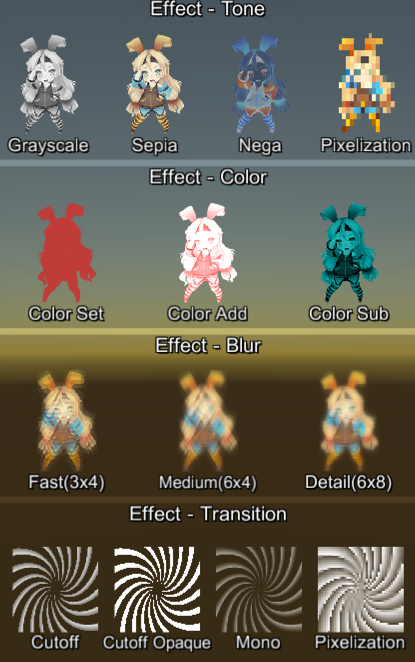
Easy to use effects for uGUI. Supports following effects.
|
||||
|
||||
* Grayscale tone
|
||||
@@ -29,7 +31,7 @@ Easy to use effects for uGUI. Supports following effects.
|
||||
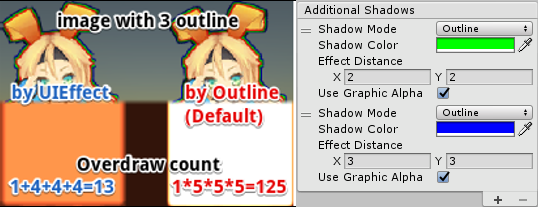
|
||||
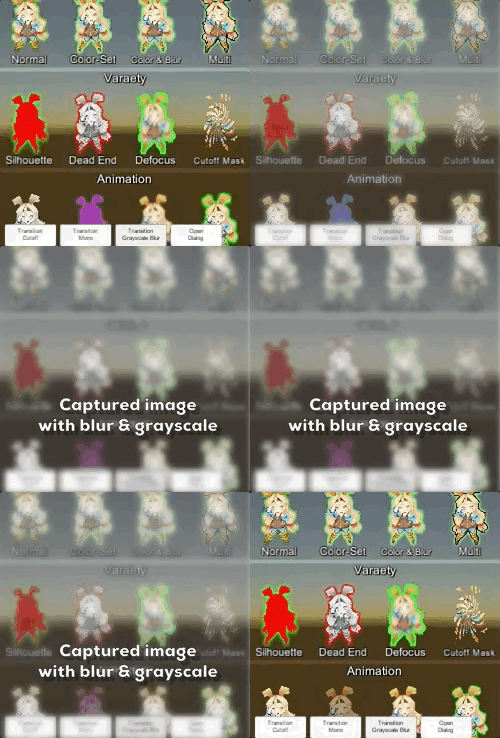
* Capture image with effect, like post effect
|
||||
|
||||
* Dialog with captured image effect.
|
||||
* Dialog with captured image effect
|
||||

|
||||
|
||||
|
||||
@@ -66,7 +68,8 @@ This effect is non-realtime, light-weight, less-camera, blit only once, but effe
|
||||
* Process effect only once after `UIEffectCapturedImage.Capture`.
|
||||
* Using reduction buffer, keep used memory size small and keep rendering load are small.
|
||||
* When GameObjects with motion are on the screen, a result texture may be stirred.
|
||||
* You can overlay and display like as: [Screen] | [UIEffectCapturedImage] | [Dialog A] | [UIEffectCapturedImage] | [Dialog B]. See also demo.
|
||||
* You can overlay and display like as: [Screen] | [UIEffectCapturedImage] | [Dialog A] | [UIEffectCapturedImage] | [Dialog B].
|
||||
See also [WebGL Demo](https://developer.cloud.unity3d.com/share/WyQetw3p-X/webgl/).
|
||||
|
||||
|
||||
|
||||
@@ -83,7 +86,7 @@ Please enable `TexCoord1` to use UIEffect.
|
||||
|
||||
## Demo
|
||||
|
||||
[WebGL Demo](https://developer.cloud.unity3d.com/share/b18LwIciWX/webgl/)
|
||||
[WebGL Demo](https://developer.cloud.unity3d.com/share/WyQetw3p-X/webgl/)
|
||||
|
||||
* Effect sample
|
||||
* Transition
|
||||
@@ -95,6 +98,18 @@ Please enable `TexCoord1` to use UIEffect.
|
||||
|
||||
## Release Notes
|
||||
|
||||
### ver.1.4.3
|
||||
|
||||
* Fixed: Color effect is incorrect. [#19](https://github.com/mob-sakai/UIEffect/issues/19)
|
||||
|
||||
### ver.1.4.2
|
||||
|
||||
* Fixed: Error has occur on after deserialize. [#16](https://github.com/mob-sakai/UIEffect/issues/16)
|
||||
|
||||
### ver.1.4.1
|
||||
|
||||
* Fixed: Demo link in `readme.md` is broken.
|
||||
|
||||
### ver.1.4.0
|
||||
|
||||
* Changed: ToneMode, ColorMode, BlurMode can be changed only in editor.
|
||||
|
||||
@@ -171,7 +171,7 @@ Shader "UI/Hidden/UI-Effect"
|
||||
#endif
|
||||
|
||||
#if defined (UI_COLOR)
|
||||
color = ApplyColorEffect(color, IN.colorFactor); // Color effect.
|
||||
color = ApplyColorEffect(color, IN.colorFactor) * IN.color; // Color effect.
|
||||
#endif
|
||||
|
||||
return color;
|
||||
|
||||
@@ -329,8 +329,12 @@ namespace UnityEngine.UI
|
||||
|
||||
public void OnAfterDeserialize()
|
||||
{
|
||||
var obj = this;
|
||||
EditorApplication.delayCall += () =>
|
||||
{
|
||||
if (!obj)
|
||||
return;
|
||||
|
||||
var old = m_EffectMaterial;
|
||||
m_EffectMaterial = GetMaterial(Shader.Find(shaderName), toneMode, colorMode, blurMode);
|
||||
if (old != m_EffectMaterial)
|
||||
|
||||
Binary file not shown.
Reference in New Issue
Block a user